Visual Paradigm Desktop VP Online

Use Case Modeling: Action-Oriented & Agile (Best for project teams or internal documentation)

Introduction: The Strategic Vision

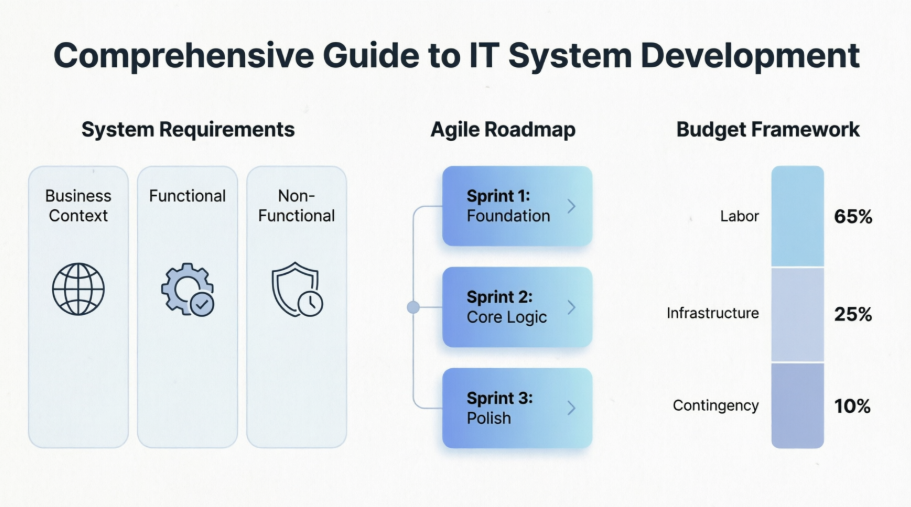
In an increasingly data-driven environment, the ability to manage, process, and act upon information with precision is a cornerstone of organizational success. This project aims to design and implement a robust target IT system tailored to streamline. By leveraging modern software architecture and an iterative, Agile-driven development lifecycle, we intend to provide a solution that is not only highly functional and secure but also adaptable to future shifts in the business landscape.
Action-Oriented & Agile (Best for project teams or internal documentation)
This proposal outlines the functional requirements, developmental roadmap, and financial framework necessary to transform this vision into a high-impact, operational reality.

How To create an effective requirement description

To create an effective requirement description for an IT system, you must balance business needs with technical constraints. A high-quality requirements document—often referred to as a Software Requirements Specification (SRS)—serves as the roadmap for developers, stakeholders, and quality assurance teams.

Core Components of an IT System Requirement

To ensure clarity and completeness, structure your requirements description using the following framework:

1. Business Context & Objectives

Briefly define the "why." What problem is this system solving, and what is the desired outcome?

  • Goal: A high-level statement of purpose (e.g., "Automate invoice processing to reduce human error by 40%").

  • Target Audience: Who will use the system?

2. Functional Requirements

These define what the system must do. Use the "User-Action-Outcome" format to ensure these are testable.

  • User Roles: Define permissions (e.g., Admin, Registered User, Guest).

  • Key Capabilities:

    • Input Handling: What data does the system collect?

    • Processing Logic: How does the system transform that data?

    • Output/Reporting: What reports or data does the system generate?

3. Non-Functional Requirements (Quality Attributes)

These define how the system performs. They are critical for the architecture of the system:

  • Performance: Response times, throughput, or capacity (e.g., "The system must handle 500 concurrent users").

  • Security: Authentication, encryption, and data compliance (e.g., GDPR, HIPAA).

  • Scalability: Ability to grow as business volume increases.

  • Reliability/Availability: Expected uptime (e.g., "99.9% availability").

4. Constraints & Dependencies

List the limitations the development team must work within:

  • Technology Stack: Mandatory languages, frameworks, or databases.

  • Integration: APIs or legacy systems the new software must communicate with.

  • Budget/Timeline: Firm milestones or financial guardrails.

Example Template

If you are drafting this for a project, you can use this structure:

Project Title: [System Name]

1. Purpose: To build a centralized portal for [Department] to manage [Data Type].

2. Primary User Stories:

  • As a User, I want to log in using SSO so that I can access the dashboard securely.

  • As an Admin, I want to generate monthly usage reports so that I can track performance metrics.

3. Technical Constraints:

  • The system must be hosted on a cloud infrastructure (AWS).

  • The database must support real-time synchronization.

4. Success Metrics:

  • Decrease in manual data entry time by [X]%.

  • System must maintain a sub-second response time for 95% of queries.

Tips for Success

  • Be Specific: Avoid vague language like "fast," "user-friendly," or "efficient." Instead, use metrics (e.g., "The page must load in under 2 seconds").

  • Prioritize: Categorize requirements using the MoSCoW method (Must have, Should have, Could have, Won't have).

  • Verify: Ensure every requirement is testable so that your QA team knows exactly when a requirement has been met.

To better tailor this to your specific project, would you like to provide the nature of the system you are developing, or would you like me to draft a more detailed template for a specific industry?

The Example Use Case Diagram

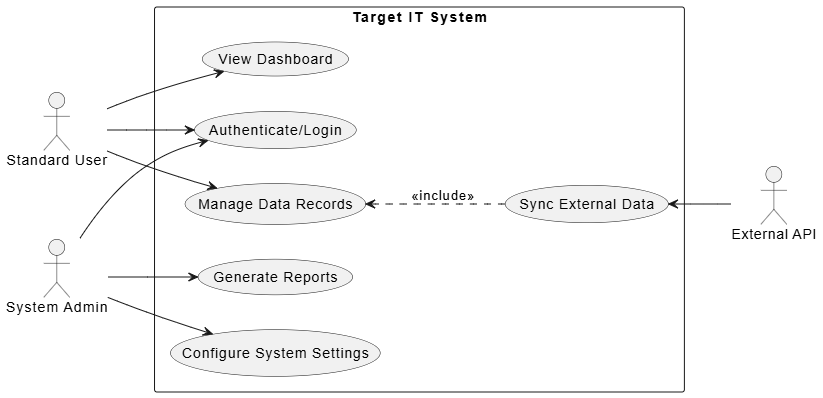
To visualize the requirements for an IT system, a Use Case Diagram is an excellent tool for defining the scope and interactions between actors (users/external systems) and the system itself.

Below is the PlantUML code to generate a Use Case Diagram based on the standard architecture for a secure, administrative-driven IT system.
@startuml
left to right direction
skinparam packageStyle rectangle

actor "Standard User" as User
actor "System Admin" as Admin
actor "External API" as API

rectangle "Target IT System" {
usecase "Authenticate/Login" as UC1
usecase "View Dashboard" as UC2
usecase "Manage Data Records" as UC3
usecase "Generate Reports" as UC4
usecase "Configure System Settings" as UC5
usecase "Sync External Data" as UC6
}

User --> UC1
User --> UC2
User --> UC3

Admin --> UC1
Admin --> UC4
Admin --> UC5

UC3 <.. UC6 : <<include>>
UC6 <-- API

@enduml


Diagram Breakdown:

  • Actors: Represented by the stick figures (User, Admin, API).

  • Use Cases: Represented by the ovals, which define the specific functional requirements of the system.

  • Relationships:

    • Association (Lines): Shows which actor triggers which process.

    • Include (Dotted line with arrow): Indicates that the "Manage Data Records" use case inherently requires the "Sync External Data" process to function correctly.

This diagram provides a clear bird's-eye view of your system's functionality and helps identify gaps in your requirements gathering process.

Agile Development Roadmap

To transform the use case diagram into an actionable development plan, we will organize the work into three distinct Sprints. This plan assumes a standard Agile methodology (e.g., Scrum) where each sprint is approximately 2 weeks long, focusing on delivering a "Potentially Shippable Increment."

Sprint Focus Area Key Use Cases Goal
Sprint 1 Foundation & Security Authenticate, View Dashboard Establish base infrastructure and secure access.
Sprint 2 Core Functionality Manage Data Records, Sync API Build the primary business logic and integration.
Sprint 3 Administration & Polish Generate Reports, Config Settings Enable oversight and final refinement.

Detailed Sprint Backlog

Sprint 1: Infrastructure & User Access

  • Goal: Setup environment and ensure secure user entry.
  • Tasks:
    • Set up CI/CD pipeline and cloud environment.
    • Develop Authenticate/Login flow (including password hashing and session management).
    • Create the View Dashboard interface (UI scaffolding).
    • Acceptance Criteria: User can successfully register/login and land on a secure dashboard.

Sprint 2: Core Business Logic

  • Goal: Enable the main data operations and external communication.
  • Tasks:
    • Develop Manage Data Records (CRUD operations: Create, Read, Update, Delete).
    • Implement Sync External Data (API integration logic).
    • Establish database schema for record persistence.
    • Acceptance Criteria: Data records can be fetched from the API and modified within the application.

Sprint 3: Reporting & Administration

  • Goal: Provide management capabilities and system configuration.
  • Tasks:
    • Develop Generate Reports (export functionality: CSV/PDF).
    • Create Configure System Settings panel for Admins.
    • Perform End-to-End (E2E) testing of all system paths.
    • Acceptance Criteria: Admins can configure system parameters and run reports based on the data managed in Sprint 2.

Implementation Strategy for the Team

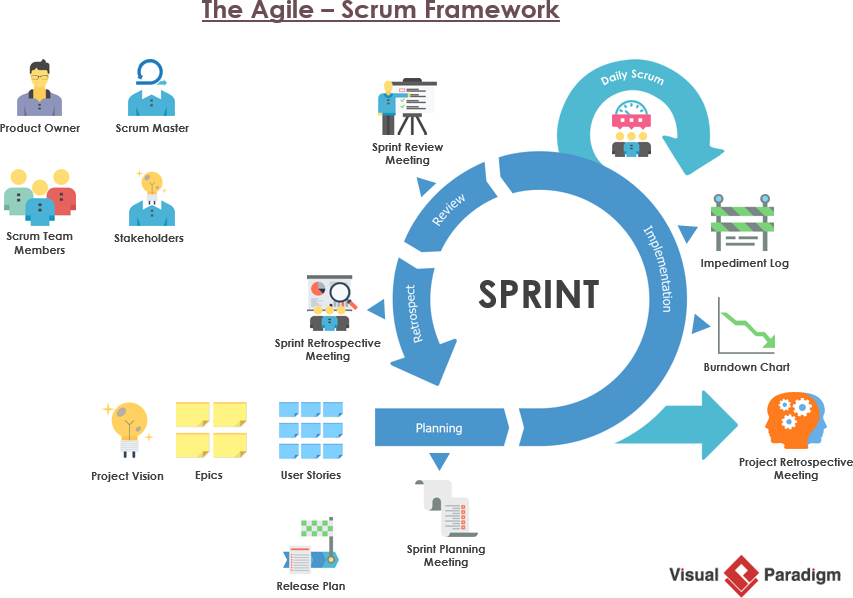
What is Agile? What is Scrum?

1. Velocity and Prioritization

We will use the MoSCoW method within our backlog to ensure that even if the timeline slips, the "Must-haves" (Login, Data Management) are completed first.

  • Must Have: Authenticate, Manage Data, Sync API.
  • Should Have: Dashboard, Generate Reports.
  • Could Have: Custom Admin Settings.

2. Daily Scrum Routine

  • Daily Stand-up: Focus on progress toward the Sprint Goal.
  • Refinement: Continuous grooming of user stories to ensure technical requirements (non-functional) are considered alongside features.
  • Review & Retrospective: At the end of each sprint, demo the working software to stakeholders and reflect on team velocity.

3. Technical Debt Management

We will reserve 10% of every sprint for refactoring and technical debt resolution. This ensures that as we build new features, we don't accumulate "spaghetti code" that slows us down in later sprints.

Would you like me to break down a specific sprint into individual user stories with acceptance criteria, or should we focus on defining the technical stack required to achieve these sprints?

Budget Estimation Framework

Creating a budget estimation for an Agile IT project requires balancing precision with the flexibility inherent in iterative development. Since the scope in Agile can evolve, your budget should be treated as a living document that provides both a firm baseline and a necessary buffer for uncertainty.

For an IT system, we use a Bottom-Up Estimation approach. This involves breaking the project into the sprints defined in your development plan, then assigning costs to the resources required for each.

Cost Categories

Category Description Examples
Labor (Direct) Salaries/hourly rates for the team. Developers, QA, Scrum Master, UI/UX Designer.
Infrastructure Recurring costs to run the system. Cloud hosting (AWS/Azure), API subscriptions.
Tools & Licenses One-time or subscription software costs. IDE licenses, project management (Jira), security tools.
Contingency "Buffer" for unexpected risks. Typically 15–25% of the total estimate.

Sample Budget Estimation Template

This is a simplified example based on a 3-Sprint (6-week) project structure.

Item Estimated Effort/Unit Rate Total Cost
Project Manager 6 weeks (part-time) $X/week $...
Developers (x2) 12 weeks total $Y/hour $...
QA Engineer 6 weeks $Z/hour $...
Cloud Infrastructure 3 months (est.) $monthly $...
Contingency Buffer ~20% of subtotal N/A $...
GRAND TOTAL $00,000

Key Strategies for Agile Budgeting

Use "Story Points" to Estimate Effort

Instead of guessing hours for every task, use relative sizing (Story Points) to estimate the complexity of your features. Once your team determines their velocity (how many points they complete per sprint), you can more accurately forecast the number of sprints needed, which translates directly to labor costs.

Adopt a "Rolling Wave" Approach

Don't attempt to budget the entire project in extreme detail on day one.

  • Refine: After each sprint, review the actual burn rate and compare it against the original estimate.
  • Adjust: Update the remaining budget forecast based on the team's actual velocity and any changes in requirements from stakeholders.

Manage Contingency Wisely

The Contingency Buffer is your financial safety net. It is not for "nice-to-have" features that were forgotten; it is specifically for:

  • Technical debt or unexpected architectural blockers.
  • Integration issues with third-party APIs.
  • Necessary revisions based on stakeholder feedback during Sprint Reviews.

Define "Stop-Loss" Thresholds

Establish clear financial checkpoints. If a sprint exceeds its allocated budget by more than 15%, the project leadership must conduct a Variance Analysis to determine if the issue is a one-time anomaly or a systemic issue requiring a scope reduction (e.g., dropping lower-priority "Could Have" features).


Checklist for Success

  • Define the MVP (Minimum Viable Product): Ensure the budget covers the absolute requirements first.
  • Identify Indirect Costs: Don't forget training, administrative overhead, and legal/compliance fees.
  • Formalize the SOW (Statement of Work): Clearly document what is "in scope" to prevent budget-draining scope creep.
  • Transparency: Provide stakeholders with a monthly budget burn report, not just a final number.

Tooling

  • s via prompt workflows during planning sessions, establishing instantaneous alignment before the first line of code is written.

🤝 Real-Time Team Collaboration

To prevent working in communication silos, Visual Paradigm Cloud provides team-wide coordination:

  • Concurrent Editing: Multiple engineers, product owners, and scrum masters can co-create and critique complex systems simultaneously in a single workspace.
  • Version Control: Teams can track, compare, and revert any design modification, ensuring clear revision history as software architectures pivot during sprints.

Agile Development: Generative AI Transforms UML Modeling and Workflow Automation

In the fast-paced world of Agile development, maintaining alignment between dynamic code, user stories, and architectural design is a constant challenge. Traditionally, structured UML design has been viewed as a bottleneck—time-consuming, rigid, and disconnected from the rapid iterations of modern sprints. However, Visual Paradigm is bridging this gap by embedding generative AI throughout its collaborative modeling workflow. This transformation turns static, manual documentation into a dynamic, interactive partner, ensuring that design and development remain perfectly synchronized across every iteration.

AI-Driven UML Generation: Collapsing Design Time

Traditionally, manual layout, alignment, and symbol creation slowed down agile sprints. Visual Paradigm removes this friction through advanced text-to-model automation:
  • Natural Language to Diagrams: Developers can input brief process descriptions or technical requirements to instantly generate editable UML Class, Sequence, Component, or Activity diagrams.
  • Textual Requirements to Visuals: The AI-Assisted Use Case Tool parses text specifications to dynamically build compliant workflows, automatically identifying actors, conditions, and process forks.
  • Semantic Updates: Unlike basic whiteboards, the AI modifies live meta-models. Instructing the chatbot to change a branch automatically updates all connected data structures across the entire repository.

Enhancing Agile Workflows and Backlogs

Visual Paradigm Online and its desktop solutions streamline sprint mechanics and requirements gathering to keep teams moving efficiently:
  • Sprint and Story Automation: The platform uses AI to turn a single project idea into granular user stories, complete with technical acceptance criteria and initial story point suggestions.
  • Jira and Backlog Integration: Broad feature concepts are visually mapped into User Story Maps, which seamlessly sync back as structured Jira backlogs for developers.
  • Ceremony Accelerators: Dedicated canvases for Scrum, LeSS, and Nexus framework management help teams plan retrospectives and sprint demos, with AI summarizing team feedback to surface bottleneck insights.

Code Engineering & Bi-Directional Alignment

An agile project requires a single source of truth between documentation and production code:
  • Round-Trip Engineering: Agile developers can model a class architecture visually and auto-generate code templates, or reverse-engineer existing repositories back into clean, living UML models.
  • Rapid Prototyping: Software architects can draft system structures, such as microservices, via prompt workflows during planning sessions, establishing instantaneous alignment before the first line of code is written.

Real-Time Team Collaboration

To prevent working in communication silos, Visual Paradigm Cloud provides seamless team-wide coordination:
  • Concurrent Editing: Multiple engineers, product owners, and scrum masters can co-create and critique complex systems simultaneously in a single workspace.
  • Version Control: Teams can track, compare, and revert any design modification, ensuring a clear revision history as software architectures pivot during sprints.

Conclusion

As software development continues to accelerate, the tools we use must evolve from passive documentation platforms into active, intelligent collaborators. By integrating generative AI into every facet of UML modeling and Agile workflow management, Visual Paradigm empowers teams to eliminate manual busywork, maintain architectural integrity, and deliver high-quality software faster than ever. This AI-driven approach not only preserves the rigor of traditional engineering but also embraces the flexibility required for modern, agile success.

References

  1. UML in the Age of AI: How Visual Paradigm’s Ecosystem Is Reviving Visual Modeling for Agile, Enterprise, and Future-Ready Development (2025): Explores how Visual Paradigm integrates AI to revive visual modeling for agile and enterprise development.
  2. The Agile Blueprint: How Generative AI Reconciles Sketching and Blueprinting in Modern Software Modeling: Discusses how generative AI bridges the gap between quick sketching and detailed blueprinting in software modeling.
  3. Visual Paradigm Desktop AI Activity Diagram Generation: Announces the enhancement of Visual Paradigm Desktop with full support for generating UML activity diagrams using AI.
  4. AI-Powered Use Case Modeling Studio: Introduces the AI-powered use case modeling studio for streamlined UML use case creation.
  5. AI Use Case to Activity Diagram Generator: Details the tool that automatically converts use case descriptions into activity diagrams using AI.
  6. Visual Paradigm AI Features Demonstration: A YouTube video demonstrating the AI capabilities within the Visual Paradigm ecosystem.
  7. Agile Tool | Visual Paradigm: Overview of Visual Paradigm's comprehensive agile tool solution for managing sprints and backlogs.
  8. Agile Workflow | Visual Paradigm AI: Highlights how Visual Paradigm AI accelerates agile workflows, from user stories to sprint planning.
  9. Features | Visual Paradigm: A complete list of features offered by Visual Paradigm, including round-trip engineering and code generation.
  10. AI Component Diagram Generator Update: Details the latest updates to the AI component diagram generator for rapid system architecture prototyping.
  11. Visual Paradigm: The official homepage of Visual Paradigm, a leading provider of UML, SysML, BPMN, and Agile modeling tools.

Turn every software project into a successful one.

We use cookies to offer you a better experience. By visiting our website, you agree to the use of cookies as described in our Cookie Policy.

OK