Introduction to Business Process Model and Notation (BPMN)
Business Process Model and Notation (BPMN) 2.0 is the global standard for modeling business processes. It provides a visual language that bridges the gap between business stakeholders and technical teams. With Visual Paradigm's AI diagram generator, creating these standards-compliant models has become faster and more accessible than ever.
This guide teaches you BPMN fundamentals through three real-world examples generated by Visual Paradigm's AI, helping you understand both the notation and how to leverage Visual Paradigm for rapid, intelligent process modeling.
Key BPMN 2.0 Concepts
Before diving into the examples, let's understand the core elements supported by Visual Paradigm:
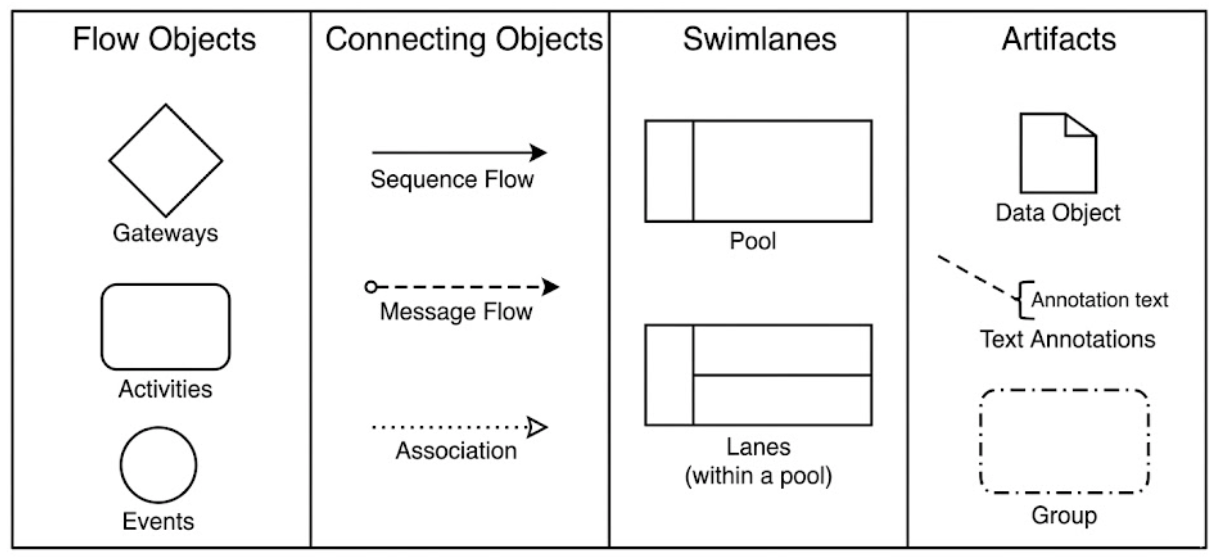
Flow Objects
- Events (Circles): Something that happens (start, intermediate, end)
- Activities (Rounded Rectangles): Work that is performed
- Gateways (Diamonds): Decision points that control flow divergence/convergence
Connecting Objects
- Sequence Flows (Solid arrows): Show the order of activities
- Message Flows (Dashed arrows): Show messages between participants
- Associations (Dotted lines): Link artifacts to flow objects
Swimlanes
- Pools: Represent major participants (organizations, systems)
- Lanes: Subdivisions within pools (departments, roles)
Artifacts
- Data objects, groups, and annotations that provide additional information
💡 Visual Paradigm Tip: All BPMN 2.0 elements are available in the palette, with AI assistance helping you place them correctly based on your natural language description.
Example 1: Employee Onboarding Process
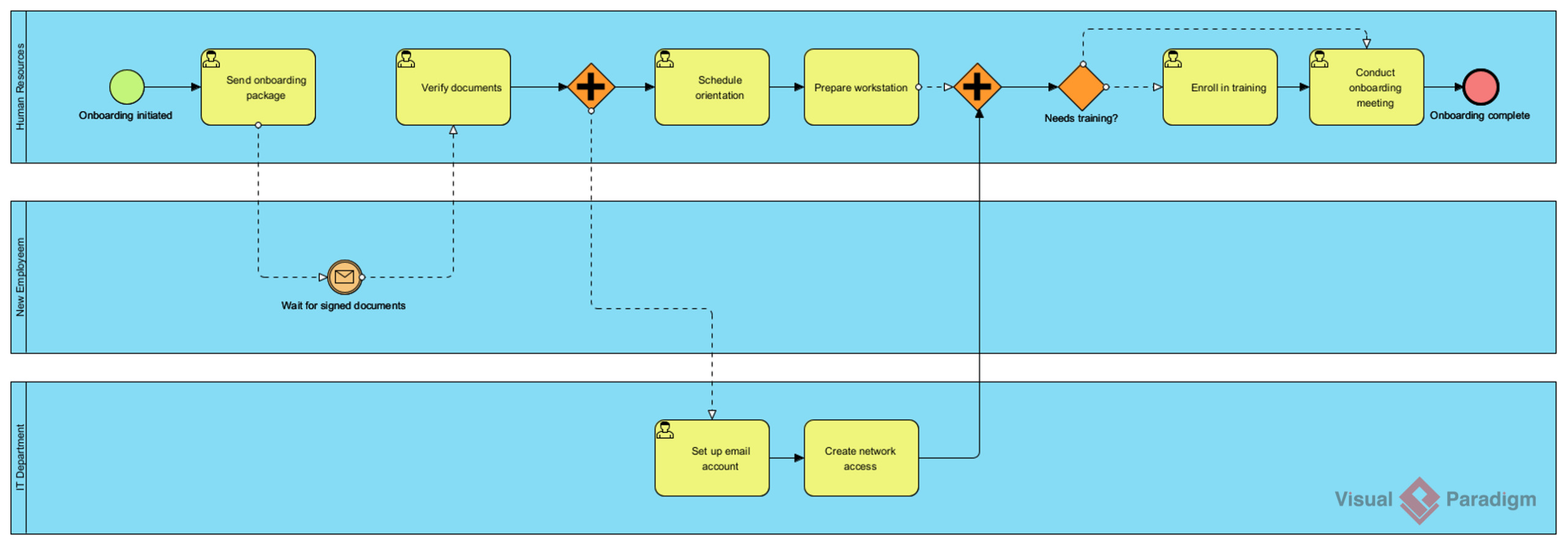
Prompt Used in Visual Paradigm: "An employee onboarding process in a mid-sized company."
Process Overview
This diagram, generated by Visual Paradigm's AI, illustrates how a mid-sized company brings new employees into the organization, from job offer acceptance to full integration.
Key BPMN Elements Demonstrated:
1. Start Event (Thin Circle)
- The process begins with "New Employee Hired"
- Represents the trigger that initiates the entire onboarding workflow
2. Tasks (Rounded Rectangles)
- HR Documentation: Completing employment contracts, tax forms, benefits enrollment
- IT Setup: Creating email accounts, system access, equipment provisioning
- Orientation Session: Introducing company culture, policies, and team members
- Department Training: Role-specific training and mentorship assignment
3. Exclusive Gateway (Diamond with X)
- Decision point: "Background Check Clear?"
- Yes path: Continue with onboarding
- No path: Terminate hiring process
- Visual Paradigm automatically suggests appropriate gateway types based on your process logic
4. Parallel Gateway (Diamond with +)
- Shows activities that can happen simultaneously:
- IT setup can occur while HR completes documentation
- This optimizes the process by reducing total onboarding time
5. End Event (Thick Circle)
- "Employee Fully Onboarded"
- Marks the successful completion of the process
Business Value
This process typically takes 2-4 weeks. By modeling it in Visual Paradigm, organizations can:
- Identify bottlenecks (e.g., background check delays)
- Ensure compliance with HR regulations
- Standardize the experience across all new hires
- Reduce time-to-productivity for new employees
✨ Visual Paradigm Advantage: After AI generation, use Visual Paradigm's drag-and-drop editor to refine task descriptions, add custom properties, or link to documentation—all while maintaining BPMN 2.0 compliance.
Example 2: Customer Support Ticket Resolution Process
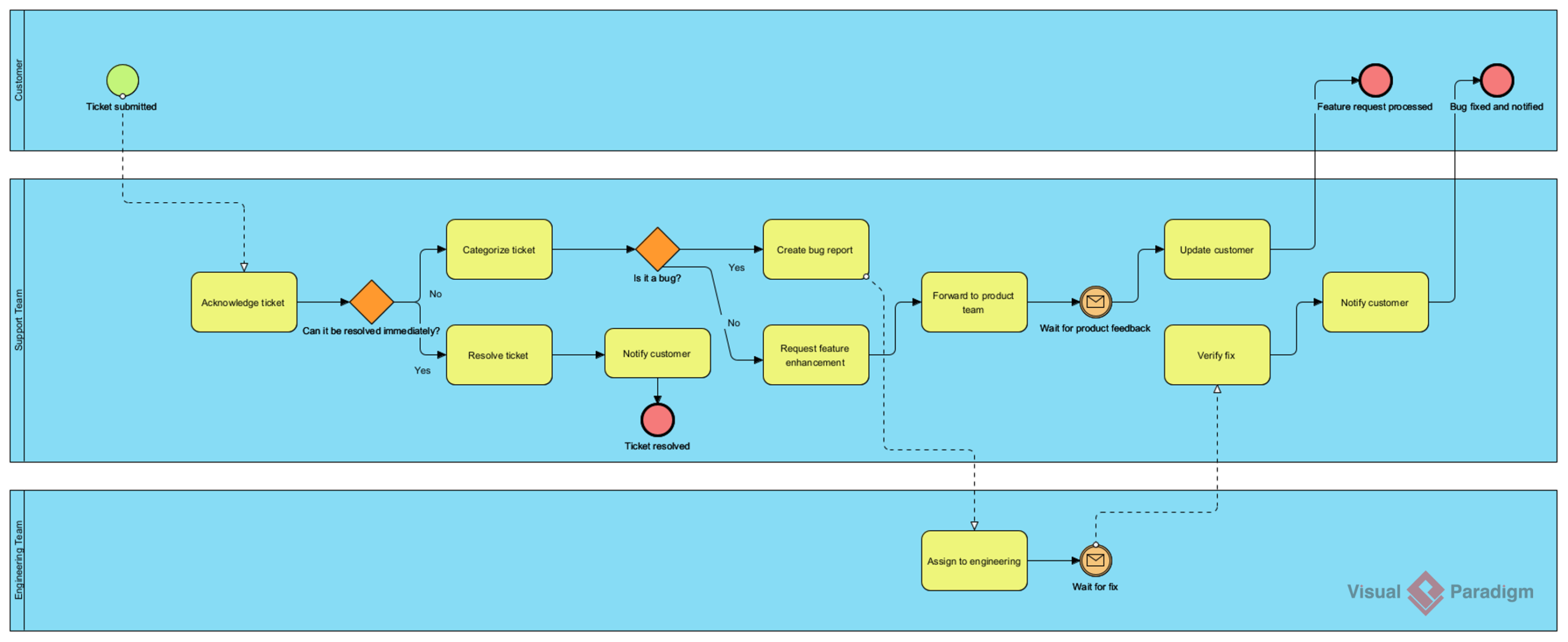
Prompt Used in Visual Paradigm: "A customer support ticket resolution process for a SaaS company."
Process Overview
This Visual Paradigm AI-generated diagram shows how a Software-as-a-Service (SaaS) company handles customer support requests from initial submission to final resolution.
Key BPMN Elements Demonstrated:
1. Message Start Event (Envelope Icon)
- "Customer Submits Ticket"
- Indicates the process is triggered by an external message (customer action)
- Visual Paradigm distinguishes message events visually for clear stakeholder communication
2. Swimlanes/Pools
- Customer Lane: Actions performed by the customer
- Support Team Lane: Actions performed by support staff
- System Lane: Automated processes
- Visual Paradigm's lane management makes role clarity effortless
3. Intermediate Events
- Timer Event (Clock Icon): "SLA Deadline Approaching"
- Triggers escalation if ticket isn't resolved within agreed time
- Critical for maintaining service level agreements
4. Inclusive Gateway (Diamond with Circle)
- "Issue Complexity Assessment"
- Routes tickets based on multiple criteria:
- Simple issues → Level 1 Support
- Technical issues → Level 2/3 Support
- Billing issues → Finance Team
5. Sub-Process (Rounded Rectangle with +)
- "Escalation Procedure"
- A collapsed sub-process containing detailed steps
- Visual Paradigm lets you drill down into sub-processes with a double-click
6. Message Flows (Dashed Lines)
- Show communication between customer and support team
- "Send Resolution" and "Request Clarification"
- Visual Paradigm enforces correct usage: message flows only connect pools
7. End Events
- Multiple end states:
- "Ticket Resolved" (successful completion)
- "Ticket Escalated to Management" (exception handling)
Business Value
For SaaS companies using Visual Paradigm, this process delivers:
- Customer Retention: Fast resolution improves satisfaction
- Resource Optimization: Proper routing ensures experts handle complex issues
- Compliance: SLA tracking ensures contractual obligations are met
- Continuous Improvement: Export process metrics directly from Visual Paradigm for analysis
✨ Visual Paradigm Advantage: Use the built-in simulation feature to test your support process—measure cycle times, identify bottlenecks, and validate SLA compliance before implementation.
Example 3: Loan Application and Approval Process
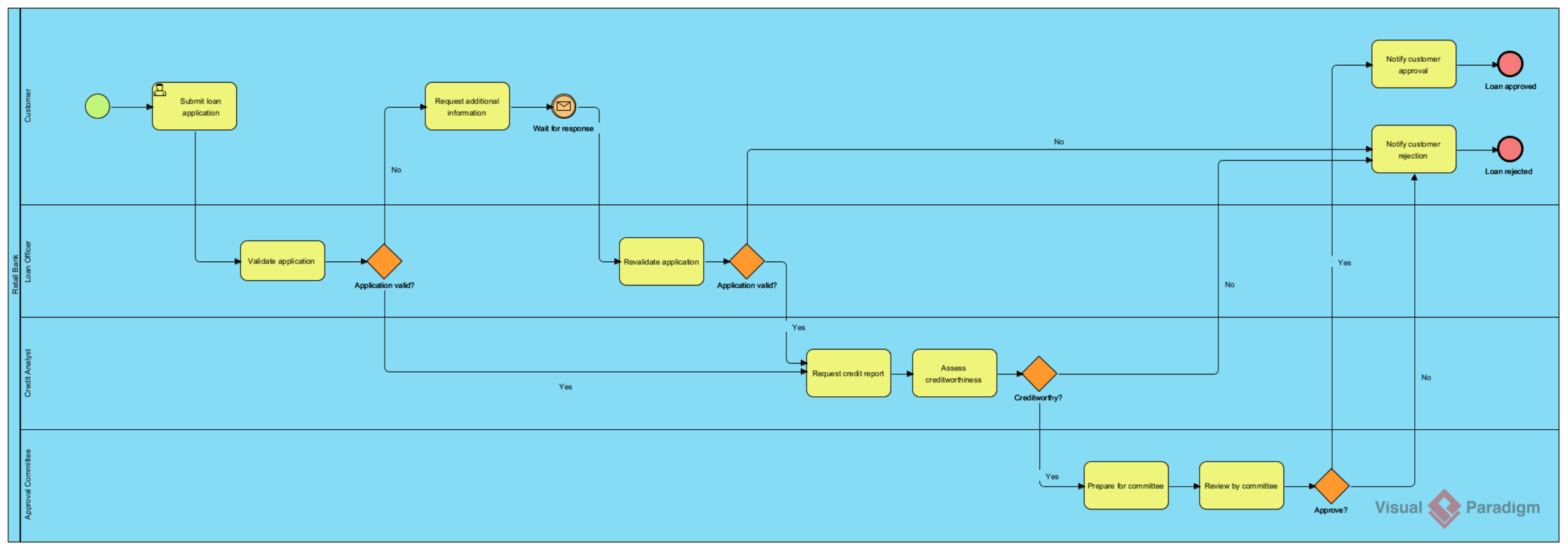
Prompt Used in Visual Paradigm: "A loan application and approval process in a retail bank."
Process Overview
This Visual Paradigm AI-generated diagram demonstrates how a retail bank processes loan applications, from initial submission through credit assessment to final approval or rejection.
Key BPMN Elements Demonstrated:
1. Multiple Start Events
- "Application Submitted Online"
- "Application Submitted In-Branch"
- Visual Paradigm supports multi-channel process modeling with clear convergence points
2. Data Objects (Document Icons)
- "Loan Application Form"
- "Credit Report"
- "Income Verification"
- "Approval Letter"
- Visual Paradigm links data objects to tasks for impact analysis
3. Complex Gateway Decisions
- Credit Score Check:
- Score > 750 → Fast-track approval
- Score 650-750 → Standard review
- Score < 650 → Manual underwriting or rejection
- Debt-to-Income Ratio:
- Additional decision point assessing financial capacity
4. Parallel Processing
- Credit check and income verification happen simultaneously
- Reduces overall processing time from days to hours
5. Intermediate Timer Events
- "Awaiting Customer Response" (3-day timeout)
- If customer doesn't provide requested documents within timeframe, application is suspended
6. Manual vs. Automated Tasks
- Automated: Credit score calculation, initial eligibility check
- Manual: Underwriter review, final approval for large loans
- Visual Paradigm lets you tag tasks with execution type for automation planning
7. Compensation Handling
- If loan is approved but customer declines, the process triggers:
- Withdrawal of credit hold
- Notification to all systems
- Archival of application
8. End Events with Outcomes
- "Loan Approved and Disbursed"
- "Application Rejected"
- "Application Withdrawn"
Business Value
For retail banks using Visual Paradigm, this process delivers:
- Risk Management: Thorough assessment prevents bad loans
- Regulatory Compliance: Full audit trail with version history
- Customer Experience: Fast approval paths for qualified applicants
- Operational Efficiency: Visual Paradigm's process mining integration identifies automation opportunities
✨ Visual Paradigm Advantage: Generate documentation automatically—Visual Paradigm exports process descriptions, RACI matrices, and implementation guides directly from your BPMN model.
Advanced BPMN Patterns in Visual Paradigm
1. Exception Handling
All three Visual Paradigm examples demonstrate robust exception modeling:
- Failed background checks (onboarding)
- SLA breaches (support tickets)
- Insufficient credit score (loans)
Visual Paradigm Best Practice: Use the "Error Event" palette to attach exception flows directly to tasks, keeping your main diagram clean.
2. Parallel vs. Sequential Processing
- Parallel (AND Gateway): Independent tasks that can happen simultaneously
- Sequential (no gateway): Tasks that must happen in order
Visual Paradigm Tip: The AI generator suggests parallel opportunities; you can accept or adjust with a single click.
3. Decision Complexity
Visual Paradigm supports:
- Simple Binary: Yes/No decisions
- Multi-way: Range-based routing (credit score tiers)
- Rule-based: Complex business logic with expression editors
Visual Paradigm Feature: Attach business rules directly to gateways using the built-in decision table editor.
4. Stakeholder Communication
Swimlanes in Visual Paradigm make responsibilities crystal clear:
- Color-code lanes by department
- Add role descriptions as lane annotations
- Export role-specific views for targeted reviews
Mastering AI Diagram Generation in Visual Paradigm
How Visual Paradigm's AI Generator Works
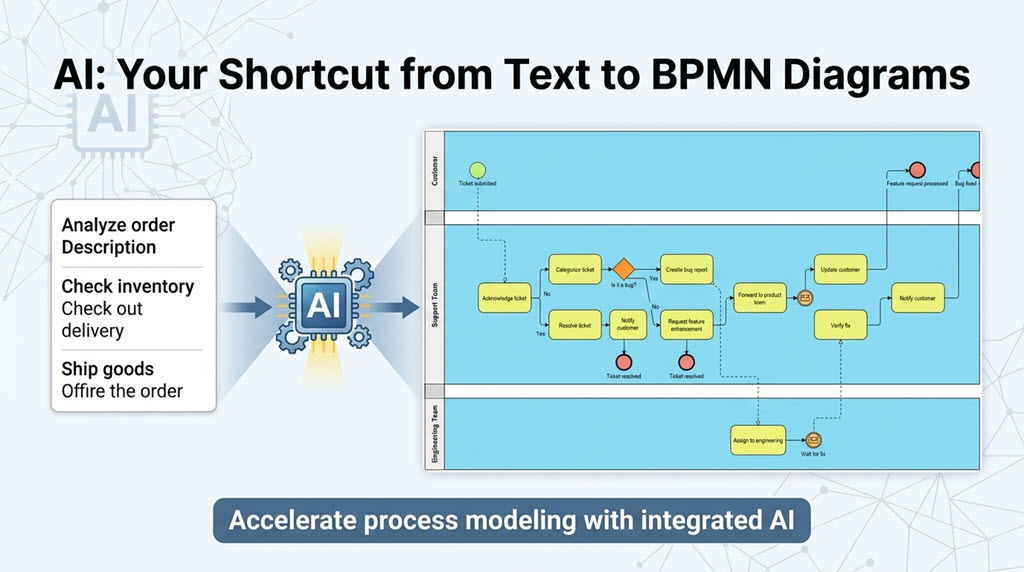
1. Natural Language Input
Describe your process in plain English directly in Visual Paradigm:
"A customer support ticket resolution process for a SaaS company."
2. AI Interpretation Engine
Visual Paradigm's AI:
- Identifies key actors and suggests appropriate swimlanes
- Recognizes major activities and maps them to BPMN tasks
- Understands decision points and recommends gateway types
- Applies BPMN 2.0 best practices automatically
3. Instant Diagram Generation
Visual Paradigm creates a standards-compliant BPMN 2.0 diagram with:
- Proper symbol usage and positioning
- Valid sequence and message flows
- Logical gateway placement
- Suggested lane assignments
4. Human Refinement in Visual Paradigm
Then, use Visual Paradigm's professional editor to:
- Adjust details specific to your organization
- Add business rules, data objects, and annotations
- Fine-tune gateway conditions using the expression builder
- Validate with stakeholders using presentation mode
Advantages of Visual Paradigm's AI-Assisted Modeling
Speed: What took hours now takes minutes
- Initial draft in 30-60 seconds
- Focus shifts from drawing to analyzing
Consistency: Visual Paradigm enforces BPMN 2.0 standards
- Proper symbol usage validated in real-time
- Sequence flow rules enforced automatically
- Gateway type suggestions based on context
Completeness: Visual Paradigm's AI suggests elements you might forget
- Exception paths and error events
- Timer events for SLAs
- Data objects for audit trails
Accessibility: Non-experts can create professional diagrams in Visual Paradigm
- Business analysts without BPMN certification
- Subject matter experts describing their processes
- Rapid prototyping for workshops
Best Practices for Visual Paradigm AI Prompts
To get the best results from Visual Paradigm's AI diagram generator:
1. Be Specific About Context
❌ "A loan process"
✅ "A personal loan application and approval process in a retail bank for amounts up to $50,000"
2. Mention Key Actors
❌ "An onboarding process"
✅ "An employee onboarding process involving HR, IT, hiring manager, and the new employee"
3. Specify Decision Criteria
❌ "A support process with escalations"
✅ "A support process that escalates tickets unresolved after 24 hours or marked as high priority"
4. Note Special Requirements
- Compliance needs (SOX, GDPR, HIPAA)
- Integration points (external systems)
- Service level agreements (time limits)
💡 Pro Tip: Save your refined prompts in Visual Paradigm's template library for reuse across similar processes.
From AI Draft to Production-Ready Model in Visual Paradigm
Step 1: Validate Logic
- Use Visual Paradigm's process simulation to walk through each path
- Check for dead ends or infinite loops with the validator
- Verify all decision conditions using the rule editor
Step 2: Add Detail
- Include data inputs/outputs using Visual Paradigm's data association tools
- Specify systems and applications with the technology palette
- Add performance metrics using custom properties
Step 3: Refine Notation
- Collapse complex sub-processes with one click
- Add annotations for business rules using the note tool
- Include error handling with Visual Paradigm's compensation event palette
Step 4: Socialize and Iterate
- Share via Visual Paradigm's cloud workspace for stakeholder review
- Conduct process walkthroughs using presentation mode
- Update based on feedback with full version history
Comparing the Three Visual Paradigm Examples: What We Learn
Complexity Spectrum
Simple → Complex
- Employee Onboarding: Linear with few decisions
- Mostly sequential with some parallel tasks
- Clear start and end
- Limited exceptions
- Support Ticket Resolution: Moderate complexity
- Multiple decision points
- Timer-based escalations
- Message exchanges with external parties
- Loan Approval: High complexity
- Multiple start events
- Complex decision logic
- Parallel assessments
- Regulatory requirements
- Financial risk considerations
Common Patterns Across All Visual Paradigm Examples
- Start with a Trigger: External event initiates the process
- Validate Early: Check eligibility/qualifications upfront
- Parallel Where Possible: Don't serialize independent tasks
- Decision Gateways: Route based on business rules
- Exception Handling: Model what happens when things go wrong
- Clear End States: Define success and failure outcomes
Industry-Specific Considerations in Visual Paradigm
HR (Onboarding)
- Compliance with labor laws: Use Visual Paradigm's compliance tagging
- Employee experience focus: Add customer journey annotations
- Coordination across departments: Leverage cross-lane analytics
Technology (Support)
- Speed and SLA adherence: Configure timer events with Visual Paradigm's time expressions
- Customer satisfaction metrics: Attach KPI properties to end events
- Knowledge management integration: Link tasks to external documentation
Financial Services (Loans)
- Risk assessment: Use Visual Paradigm's risk annotation palette
- Regulatory compliance: Enable audit trail in project settings
- Audit trail requirements: Export full change history
- Financial calculations: Integrate with decision tables
Practical Exercise: Build Your Own BPMN Diagram in Visual Paradigm
Scenario: Online Order Fulfillment Process
Using what you've learned in Visual Paradigm, try modeling this process:
Context: E-commerce company fulfilling customer orders
Requirements:
- Customer places order online
- System checks inventory
- If in stock: proceed to payment
- If out of stock: notify customer and offer backorder
- Payment processing (approve/decline)
- If approved: warehouse picks and packs
- Shipping carrier collects package
- Customer receives order
- If payment declined: notify customer to update payment method
Try This in Visual Paradigm:
- Open the AI Diagram Generator in Visual Paradigm
- Enter your prompt (see sample below)
- Review the generated diagram
- Add these elements using Visual Paradigm's editor:
- Timer event for payment timeout (15 minutes)
- Escalation if order not shipped within 48 hours
- Return process for damaged items
Sample Visual Paradigm AI Prompt:
"Create a BPMN diagram for an online order fulfillment process for an e-commerce company. Include: customer order placement, inventory check with in-stock and out-of-stock paths, payment processing with approval and decline outcomes, warehouse picking and packing for approved orders, shipping handoff to carrier, and customer delivery. Add a 15-minute payment timeout and a 48-hour shipping SLA escalation."
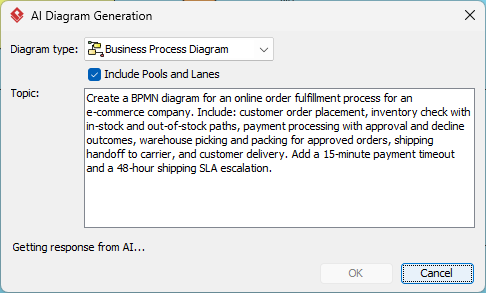
And here is the BPD generated by AI, using Visual Paradigm.
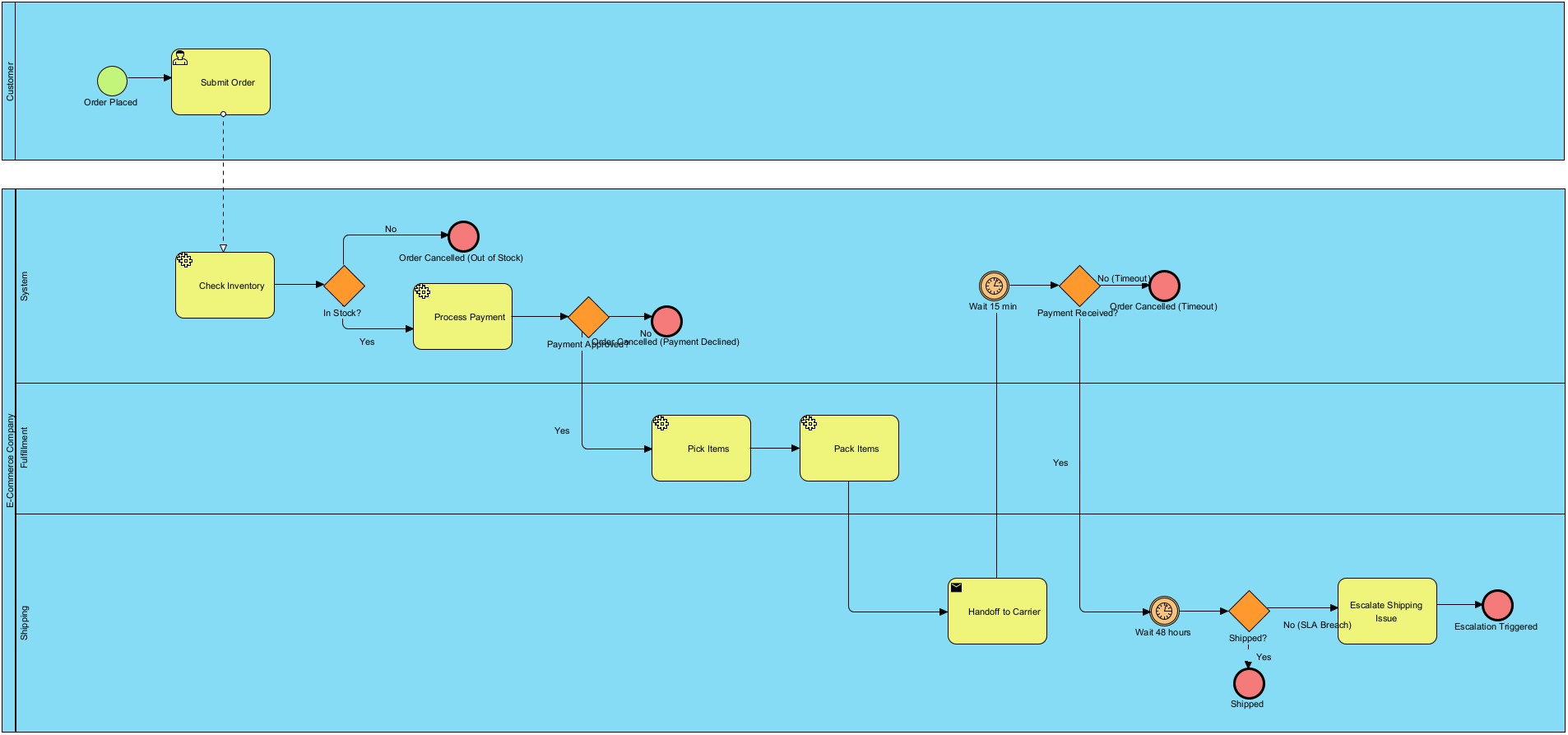
✨ Visual Paradigm Tip: After generation, use the "Auto-Layout" feature to instantly optimize diagram spacing and readability.
Visual Paradigm Resources for BPMN Excellence
Visual Paradigm Features for BPMN 2.0
AI-Powered:
- Natural language to BPMN conversion
- Intelligent gateway and event suggestions
- Context-aware swimlane recommendations
Professional Modeling:
- Full BPMN 2.0 specification support
- Drag-and-drop editor with snap-to-grid
- Real-time validation and error checking
Collaboration:
- Cloud workspace for team modeling
- Commenting and review workflows
- Role-based access control
Analysis & Execution:
- Process simulation for what-if analysis
- Export to executable formats (BPEL, Camunda)
- Integration with Visual Paradigm's process mining
Learning Resources from Visual Paradigm
Documentation:
Templates:
- Pre-built BPMN templates for common industries
- AI prompt library for rapid process modeling
- Compliance frameworks (ISO, SOX, GDPR)
Community & Support:
- Visual Paradigm Community Forum
- Live webinars on BPMN best practices
- Dedicated support for enterprise customers
Certification Path:
- Visual Paradigm Certified BPMN Professional program
- Hands-on workshops with AI modeling techniques
Conclusion: The Future of Process Modeling with Visual Paradigm
The combination of BPMN 2.0 standards and Visual Paradigm's AI-powered diagram generation represents a significant shift in how organizations document and improve their processes:
Democratization: Business users can now create professional process models in Visual Paradigm without extensive training in BPMN notation.
Speed: What used to take days of workshops and diagramming sessions can now be prototyped in minutes with Visual Paradigm's AI.
Focus on Value: Teams spend less time drawing boxes and arrows, and more time on:
- Process analysis and optimization within Visual Paradigm
- Stakeholder alignment using Visual Paradigm's presentation tools
- Implementation planning with Visual Paradigm's export capabilities
- Performance measurement using Visual Paradigm's analytics
Continuous Improvement: AI-generated diagrams in Visual Paradigm serve as living documents that evolve with the business, making it easier to maintain accurate process documentation with full version control.
Key Takeaways
- BPMN 2.0 is the universal language for business process modeling, and Visual Paradigm makes it accessible to everyone.
- Visual Paradigm's AI diagram generator accelerates initial modeling, while its professional editor ensures human expertise guides validation and refinement.
- The three examples demonstrate core patterns applicable across industries: validation, parallel processing, decision routing, and exception handling—all achievable in Visual Paradigm.
- Start simple, then add complexity in Visual Paradigm: Begin with the happy path, then layer in exceptions, timers, and edge cases using the intuitive palette.
- Processes are living entities: Model them in Visual Paradigm, measure them with its analytics, and continuously improve them with AI-assisted iteration.
By mastering BPMN fundamentals and leveraging Visual Paradigm's AI-powered platform, you can transform how your organization documents, analyzes, and optimizes its business processes—turning process modeling from a bureaucratic exercise into a strategic advantage.
Ready to create your own AI-generated BPMN diagrams in Visual Paradigm? Start with a simple process description in the AI generator and iterate from there. Remember: the best process model is the one that drives understanding, alignment, and improvement—and Visual Paradigm makes that journey faster, smarter, and more collaborative.
🔗 Get Started: Visit Visual Paradigm's AI Diagram Generation page to explore features, watch tutorials, and start modeling today.
Reference
- BPMN Notation Overview: Complete reference for business process modeling elements, symbols, and workflow notation
- Visual Paradigm Platform: Comprehensive visual modeling and collaboration platform for enterprise architecture
- UML Tool Features: Advanced unified modeling language capabilities, diagram support, and code engineering features
- BPMN and UML Integration: Bridging business processes with software design through integrated modeling approaches
- UML Modeling Process: Best practices for software development workflows using unified modeling language
- BPMN Diagram Tools: Business process modeling features, notation support, and workflow optimization tools
- BPMN Tutorial Video: Visual guide to business process modeling techniques, notation, and process optimization
- Business Process Modeling: Enterprise workflow design, optimization solutions, and process transformation strategies
- Documenting BPMN Tasks: Guide for creating auditable business procedures, working documentation, and process governance
- BPMN Part II: Swimlanes Tutorial: Advanced BPMN tutorial covering swimlane notation, role assignment, and process partitioning
- BPMN Part III: Flow and Connecting Objects: Guide to BPMN flow objects, connectors, gateways, and process orchestration techniques
- As-Is and To-Be Business Process Development: Methodology for analyzing current processes and designing future-state business workflows


