
For developers, data engineers, and API integrators, JSON is the universal language of data exchange. But as APIs grow more complex, so do the JSON payloads. Trying to mentally parse deeply nested objects, arrays of objects, and mixed data types from raw text can be tedious and error-prone.
Traditionally, if you wanted to visualize a JSON structure, you had to manually draw a diagram or convert the JSON into an intermediate syntax like PlantUML or Mermaid.
VPasCode changes the game.
With its latest update, Visual Paradigm's VPasCode can now directly visualize raw JSON into intuitive, interactive node-link diagrams. There is no conversion, no extra syntax to learn, and no manual mapping required. You simply paste your JSON, and the tool instantly translates the hierarchy into a visual graph.
Whether you are debugging a massive API response, documenting a database schema, or trying to understand a third-party integration, this feature allows you to see the "shape" of your data at a glance. In this guide, we will break down how VPasCode maps JSON to visual elements, explore key concepts, and provide practical examples to help you master JSON visualization.
VPasCode has a powerful feature that automatically converts raw JSON code into a visual graph (node-link diagram). This allows developers to instantly understand the structure, hierarchy, and relationships within complex data without reading lines of code.
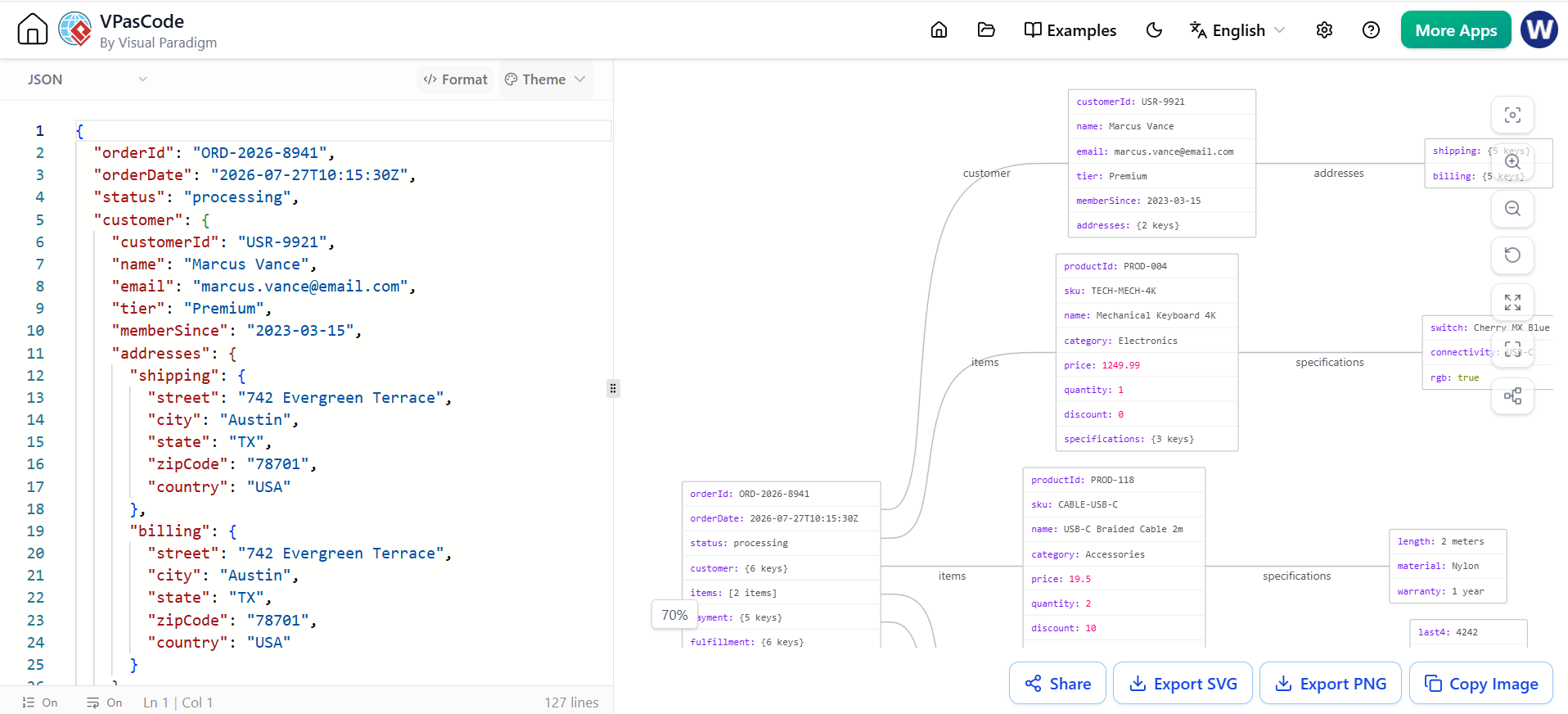
The tool translates JSON syntax into visual elements using specific rules:
The main JSON object { ... } becomes the central or starting node on the left.
orderId: ORD-2026-8941).{} or Array [], the node box shows a summary (e.g., customer: {3 keys} or items: [2 items]) and draws a line to a new node.When a JSON value is an Object (curly braces {}), VPasCode creates a new box (node) for it.
"customer" connects the root node to the customer details node.When a JSON value is an Array (square brackets []), VPasCode creates a separate node for every item in that list.
"items" array has 2 objects. The graph shows two distinct boxes connected to the root, both labeled "items".Let's look at how your specific JSON translates to the image on the right.
This box represents the top level of your JSON.
orderId and orderDate.customer: {3 keys}, items: [2 items], fulfillment: {3 keys}."customer": { ... }customerId, name, and tier."items": [ { ... }, { ... } ]PROD-004 (TECH-MECH-4K).PROD-118 (CABLE-USB-C)."fulfillment": { ... "history": [ ... ] }carrier and trackingNumber. It also lists history: [2 items].location: Austin, TX, status: Shipped.location: Memphis, TN, status: In Transit.To master this feature, try pasting these different JSON structures into VPasCode to see how the graph changes.
This will result in a single central node with no branches, as there are no nested objects.
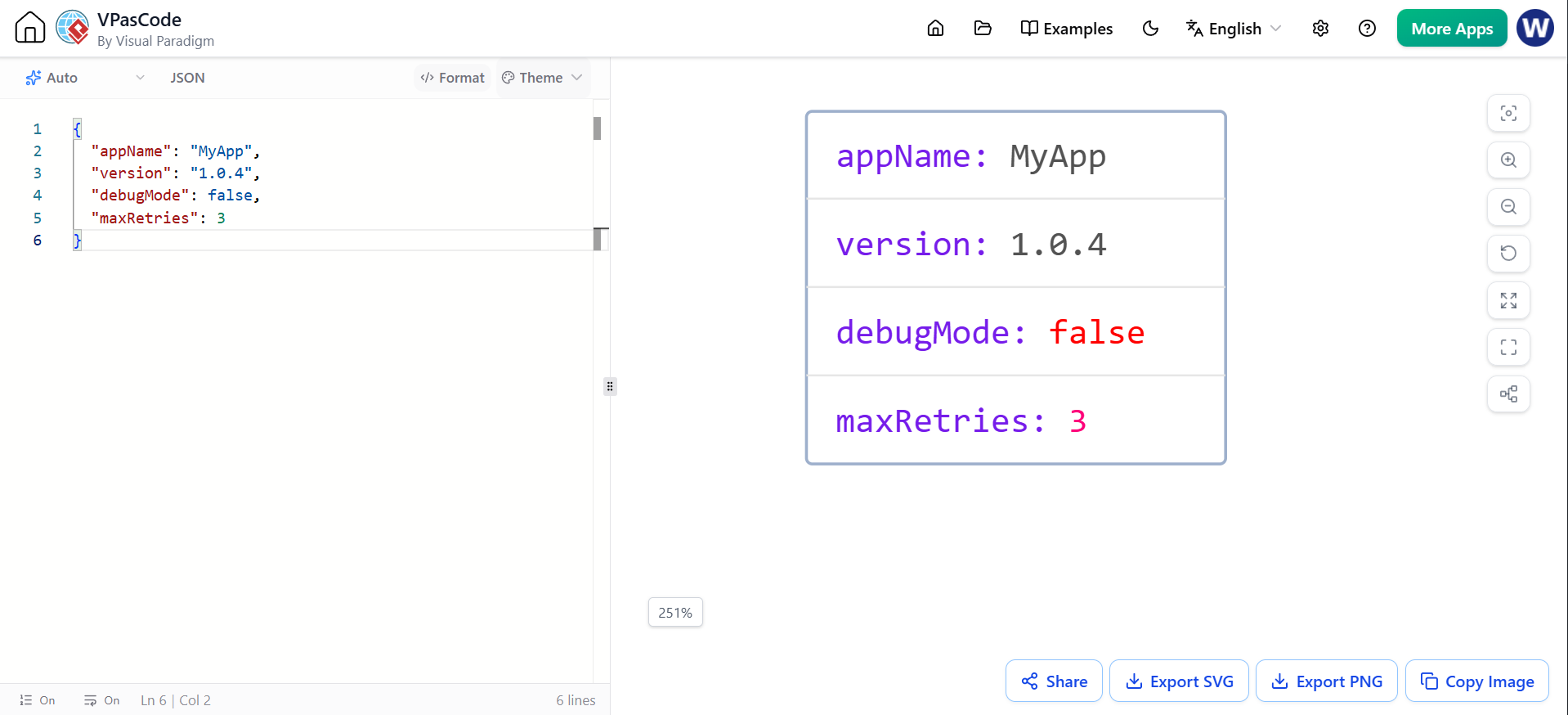
{
  "appName": "MyApp",
  "version": "1.0.4",
  "debugMode": false,
  "maxRetries": 3
}
This will create a long chain of nodes (Root -> Settings -> Database -> Credentials).

{
  "settings": {
    "theme": "dark",
    "database": {
      "host": "localhost",
      "credentials": {
        "user": "admin",
        "pass": "secret123"
      }
    }
  }
}
Notice how this differs from an array of objects.
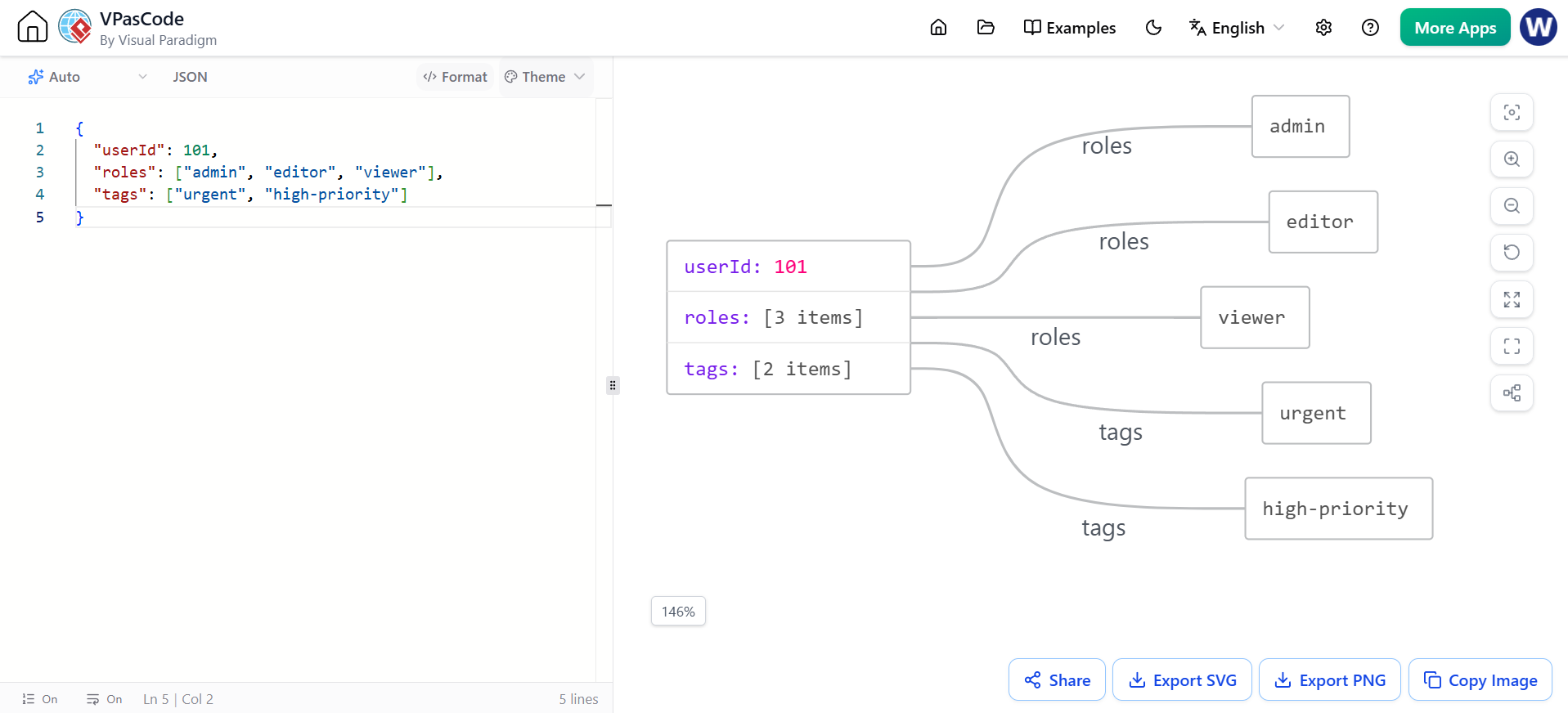
{
  "userId": 101,
  "roles": ["admin", "editor", "viewer"],
  "tags": ["urgent", "high-priority"]
}
roles key will likely fan out to three small nodes (or a list node depending on the specific VPasCode update), and tags will fan out to two nodes.Looking for a powerful, free diagram-as-code tool? Effortlessly render PlantUML, Mermaid, Graphviz, and 20+ programming languages in real time—powered by instant AI error fixing and automatic format detection.
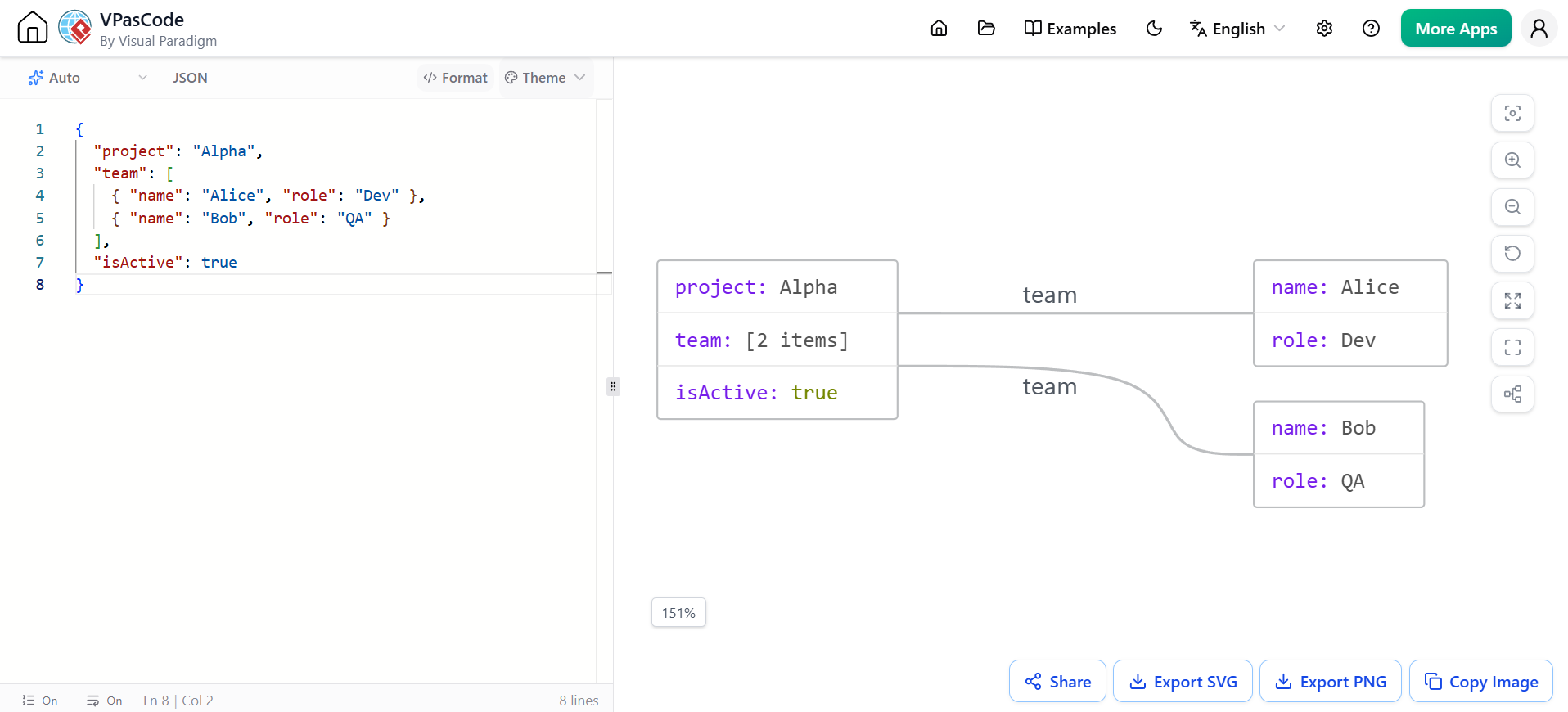
{
  "project": "Alpha",
  "team": [
    { "name": "Alice", "role": "Dev" },
    { "name": "Bob", "role": "QA" }
  ],
  "isActive": true
}
project and isActive inside the box. The team key will branch out into two separate nodes for Alice and Bob.Here's a realistic JSON example you can add to the article:
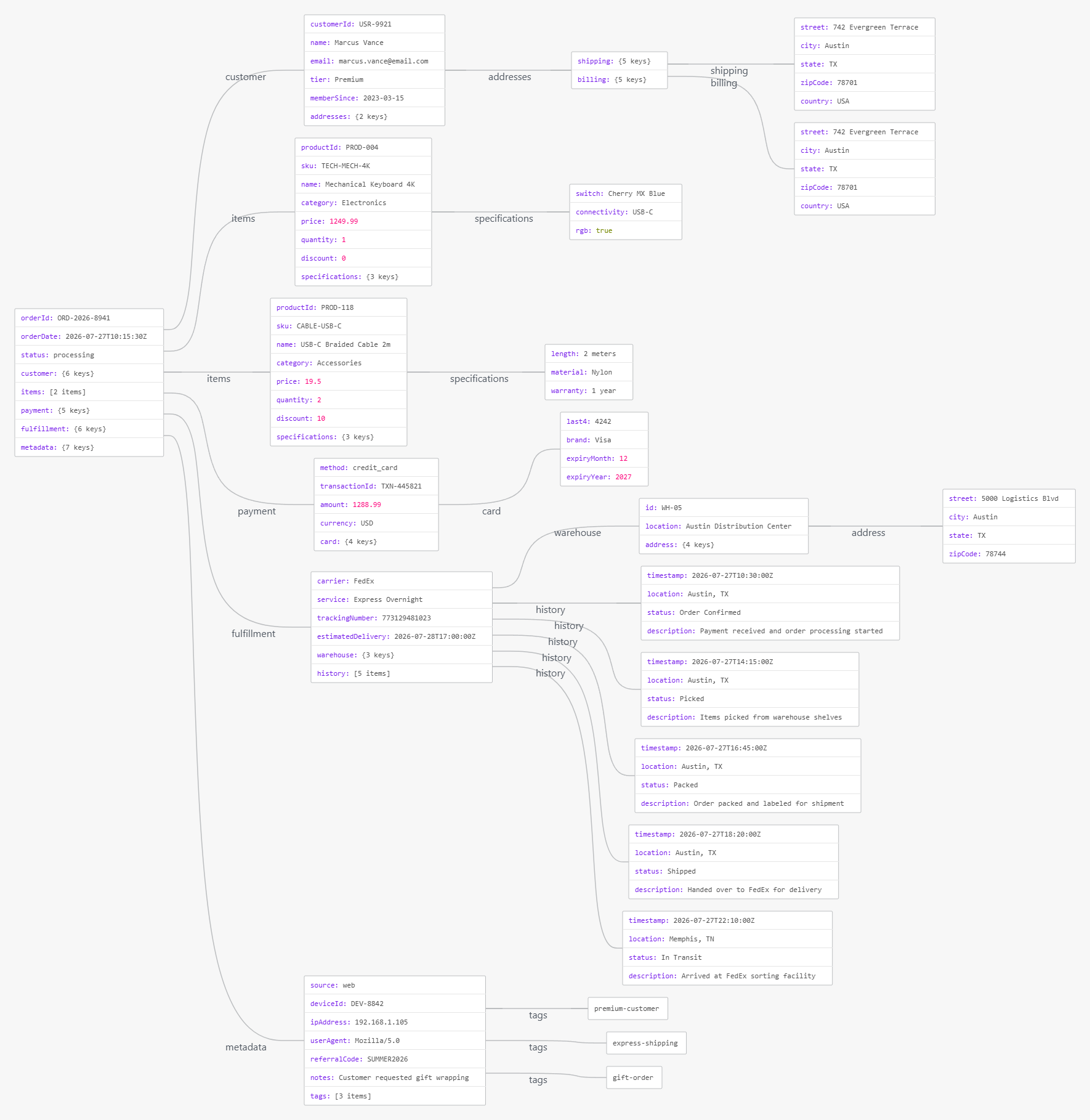
Here's a comprehensive, realistic JSON example from an e-commerce platform. This demonstrates nested objects, arrays, mixed data types, and complex hierarchies:
{
  "orderId": "ORD-2026-8941",
  "orderDate": "2026-07-27T10:15:30Z",
  "status": "processing",
  "customer": {
    "customerId": "USR-9921",
    "name": "Marcus Vance",
    "email": "[email protected]",
    "tier": "Premium",
    "memberSince": "2023-03-15",
    "addresses": {
      "shipping": {
        "street": "742 Evergreen Terrace",
        "city": "Austin",
        "state": "TX",
        "zipCode": "78701",
        "country": "USA"
      },
      "billing": {
        "street": "742 Evergreen Terrace",
        "city": "Austin",
        "state": "TX",
        "zipCode": "78701",
        "country": "USA"
      }
    }
  },
  "items": [
    {
      "productId": "PROD-004",
      "sku": "TECH-MECH-4K",
      "name": "Mechanical Keyboard 4K",
      "category": "Electronics",
      "price": 1249.99,
      "quantity": 1,
      "discount": 0,
      "specifications": {
        "switch": "Cherry MX Blue",
        "connectivity": "USB-C",
        "rgb": true
      }
    },
    {
      "productId": "PROD-118",
      "sku": "CABLE-USB-C",
      "name": "USB-C Braided Cable 2m",
      "category": "Accessories",
      "price": 19.50,
      "quantity": 2,
      "discount": 10,
      "specifications": {
        "length": "2 meters",
        "material": "Nylon",
        "warranty": "1 year"
      }
    }
  ],
  "payment": {
    "method": "credit_card",
    "transactionId": "TXN-445821",
    "amount": 1288.99,
    "currency": "USD",
    "card": {
      "last4": "4242",
      "brand": "Visa",
      "expiryMonth": 12,
      "expiryYear": 2027
    }
  },
  "fulfillment": {
    "carrier": "FedEx",
    "service": "Express Overnight",
    "trackingNumber": "773129481023",
    "estimatedDelivery": "2026-07-28T17:00:00Z",
    "warehouse": {
      "id": "WH-05",
      "location": "Austin Distribution Center",
      "address": {
        "street": "5000 Logistics Blvd",
        "city": "Austin",
        "state": "TX",
        "zipCode": "78744"
      }
    },
    "history": [
      {
        "timestamp": "2026-07-27T10:30:00Z",
        "location": "Austin, TX",
        "status": "Order Confirmed",
        "description": "Payment received and order processing started"
      },
      {
        "timestamp": "2026-07-27T14:15:00Z",
        "location": "Austin, TX",
        "status": "Picked",
        "description": "Items picked from warehouse shelves"
      },
      {
        "timestamp": "2026-07-27T16:45:00Z",
        "location": "Austin, TX",
        "status": "Packed",
        "description": "Order packed and labeled for shipment"
      },
      {
        "timestamp": "2026-07-27T18:20:00Z",
        "location": "Austin, TX",
        "status": "Shipped",
        "description": "Handed over to FedEx for delivery"
      },
      {
        "timestamp": "2026-07-27T22:10:00Z",
        "location": "Memphis, TN",
        "status": "In Transit",
        "description": "Arrived at FedEx sorting facility"
      }
    ]
  },
  "metadata": {
    "source": "web",
    "deviceId": "DEV-8842",
    "ipAddress": "192.168.1.105",
    "userAgent": "Mozilla/5.0",
    "referralCode": "SUMMER2026",
    "notes": "Customer requested gift wrapping",
    "tags": ["premium-customer", "express-shipping", "gift-order"]
  }
}
When you paste this into VPasCode, you'll see:
This example is perfect for testing how VPasCode handles production-level JSON complexity!
Understanding the structure of your data is just as critical as writing the code that processes it. VPasCode’s native JSON visualization feature bridges the gap between raw code and human comprehension. By automatically translating curly braces and square brackets into clean, logical node-link diagrams, it saves you valuable time and eliminates the cognitive load of parsing complex text.
As demonstrated in the e-commerce example, even highly nested, production-level JSON with multiple arrays, deep hierarchies, and mixed data types can be transformed into a clear, navigable map.
Key Takeaways:
Next time you are staring at a wall of JSON code, don't just read it—visualize it. Open VPasCode, paste your payload, and let the graph do the heavy lifting.

