
Powerful UML sequence diagram modeler that's like no other




Draw ANY of the UML2 diagrams

Re-usable elements, syntax checking, sub-diagrams, etc

We care about the difference between a click and a drag.

Modeling in ANY Java-enabled platforms - Windows, Mac OS X, Linux

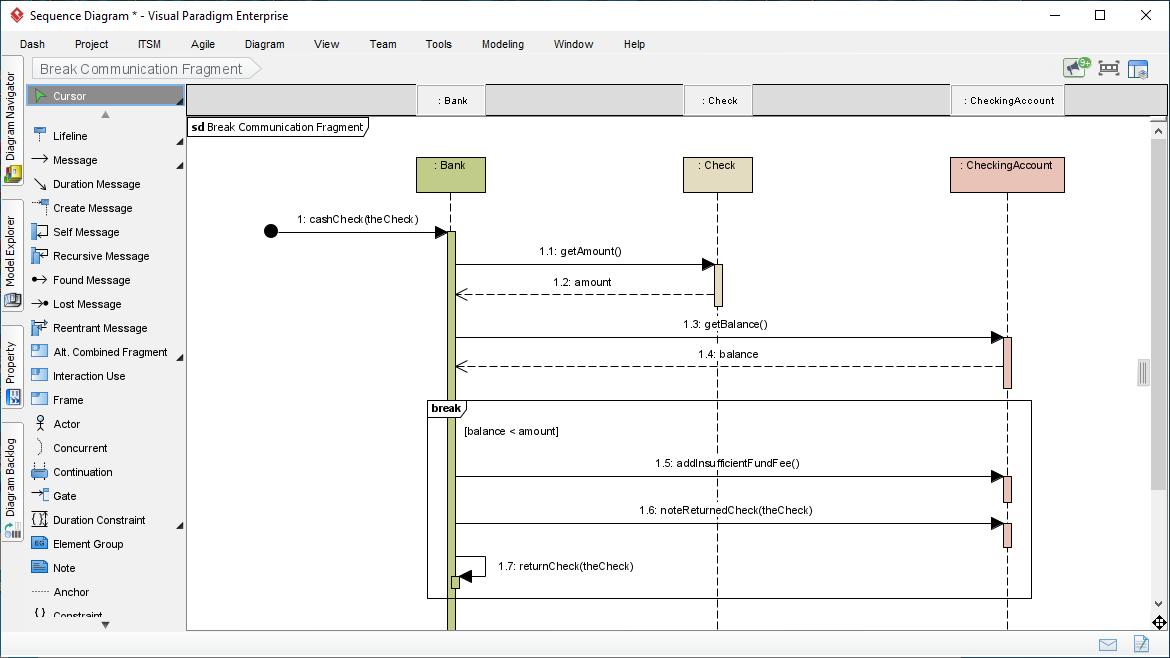
Visual Paradigm provides an intuitive Sequence Diagram editor that helps you create message flows in the fastest and accurate manner. Thanks to the Resource Catalog feature, you can easily connect lifelines with messages through drag and drop. It also helps you ensure the correctness of model syntax by listing only the shapes allowable to be created.
Reuse elements in different models, ensure the correctness of design with syntax checking, establish multiple levels of abstraction with sub-diagrams, add references to design artifacts, etc. Visual Paradigm is a UML modeler designed for a great outcome.
If you have ever used a real modeling software, you will appreciate how much it can help with your modeling work.


No matter you want to add supplementary reference to a model elements, or to establish a referencing relationship among elements, you can easily achieve thorugh the reference feature.
The reference feature allows you to add different kinds of reference to model elements: File, Folder, UML, model element, diagram, shape, etc. Best of all, the references are not just navigable within the editor but also from the documents generated / published.
| Community Edition
FREE for non-commercial use |
Modeler Edition
$6 / Month for ANY purposes |
|
|---|---|---|
| Use Case Diagram | ✔ | ✔ |
| Class Diagram | ✔ | ✔ |
| Sequence Diagram | ✔ | ✔ |
| Communication Diagram | ✔ | ✔ |
| State Machine Diagram | ✔ | ✔ |
| Activity Diagram | ✔ | ✔ |
| Component Diagram | ✔ | ✔ |
| Deployment Diagram | ✔ | ✔ |
| Package Diagram | ✔ | ✔ |
| Object Diagram | ✔ | ✔ |
| Composite Structure Diagram | ✔ | ✔ |
| Timing Diagram | ✔ | ✔ |
| Interaction Overview Diagram | ✔ | ✔ |
| Entity Relationship Diagram (ERD) | ✔ | ✔ |
| SysML Requirement Diagram | ✔ | ✔ |
| SysML Block Definition Diagram | ✔ | ✔ |
| SysML Internal Block Diagram | ✔ | ✔ |
| SysML Parametric Diagram | ✔ | ✔ |
| Business Concept Diagram | ✔ | ✔ |
| Printing | ✔ * | ✔ |
| Image exporting (PNG, JPG) | ✔ * | ✔ |
| Business Process Modeling (BPMN) | ✔ | |
| Data Flow Diagram (DFD) | ✔ | |
| Flowchart maker | ✔ | |
| Team collaboration (Cloud / On-Premises) | ✔ | |
| Diagram review and commenting | ✔ | |
| Task management | ✔ | |
| Project glossary management | ✔ | |
| Textual Analysis | ✔ | |
| EPC diagram | ✔ | |
| Process Overview | ✔ | |
| Organization chart | ✔ | |
| Network diagram | ✔ | |
| Rack diagram | ✔ | |
| Venn diagram | ✔ | |
| Floor plan maker | ✔ | |
| FREE Download | FREE Trial |
* A single-lined watermark will appear in printout and images produced by the Community Edition
Visual Paradigm is trusted by millions of users worldwide - from agile startups and consultants to Fortune 500 enterprises, universities, and government agencies.


