
In today's rapidly evolving digital landscape, organizations face unprecedented pressure to align business strategy with technology execution while managing complex transformation initiatives. Enterprise Architecture (EA) has emerged as a critical discipline for bridging this gap, yet many organizations struggle with fragmented modeling approaches, inconsistent documentation, and difficulty communicating architectural decisions across stakeholder groups.
This case study explores how ArchiMate—the Open Group's standard modeling language for enterprise architecture—combined with AI-powered tooling, enables organizations to create coherent, actionable, and stakeholder-aligned architectural blueprints. Through a structured examination of ArchiMate's core framework, its integration with TOGAF's Architecture Development Method (ADM), and practical implementation patterns enhanced by generative AI, we demonstrate how modern EA teams can accelerate decision-making, reduce modeling overhead, and drive measurable business outcomes. Whether you are embarking on your first architecture initiative or optimizing an established EA practice, this guide provides actionable insights for leveraging ArchiMate as a strategic enabler of organizational transformation.
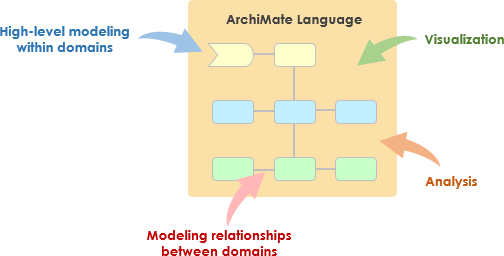
The ArchiMate Specification is a modeling language that enables Enterprise Architects to describe, analyze and visualize relationships among architecture domains using easy to understand visuals representations. It also helps enterprise architects to:
It provides a common language for describing how various parts of the enterprise are constructed and how they operate, including business processes, organizational structures, information flows, IT systems, and technical and physical infrastructures.
In a time when many enterprises are undergoing rapid change, ArchiMate models help stakeholders design, assess and communicate those changes within and between architecture domains, as well as examine the potential consequences and impact of decisions throughout an organization.
The ArchiMate language consists of the ArchiMate core language, which includes the Business, Application, and Technology Layers, along with elements to model the strategy and motivation underlying an architecture, as well as its implementation and migration. The Figure below shows a simplified mapping of how the ArchiMate language can be used in relation to the phases of the TOGAF Architecture Development Method (ADM).
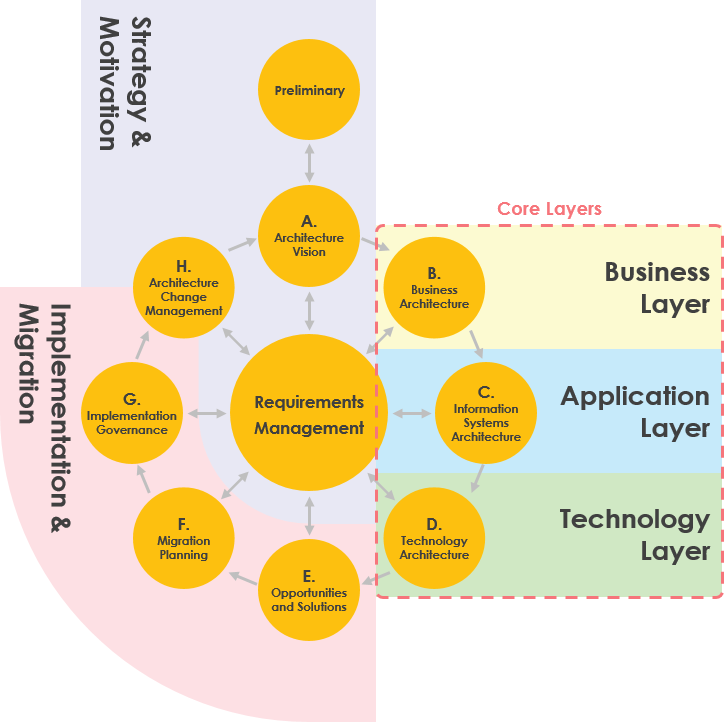
The Business, Application, and Technology Layers support the description of the Business, Information Systems, and Technology Architecture domains defined by the TOGAF framework, as well as their interrelationships.
The strategy and motivation elements in the ArchiMate language can be used to support the Requirements Management, Preliminary, and Architecture Vision phases of the TOGAF ADM, which establish the high level business goals, architecture principles, and initial business requirements. They are also relevant to the Architecture Change Management phase of the TOGAF ADM, since the phase deals with changing requirements.
The implementation and migration elements of the ArchiMate language support the implementation and migration of architectures through the Opportunities and Solutions, Migration Planning, and Implementation Governance phases of the TOGAF ADM.
The core layers have been there since the beginning of ArchiMate. It is what ArchiMate makes an Enterprise Architecture language in the first place, because you can model all these different aspects in a single coherent model. A layered view provides a natural way to look at service-oriented models. The higher layers use services that are provided by the lower layers. ArchiMate distinguishes three main layers:
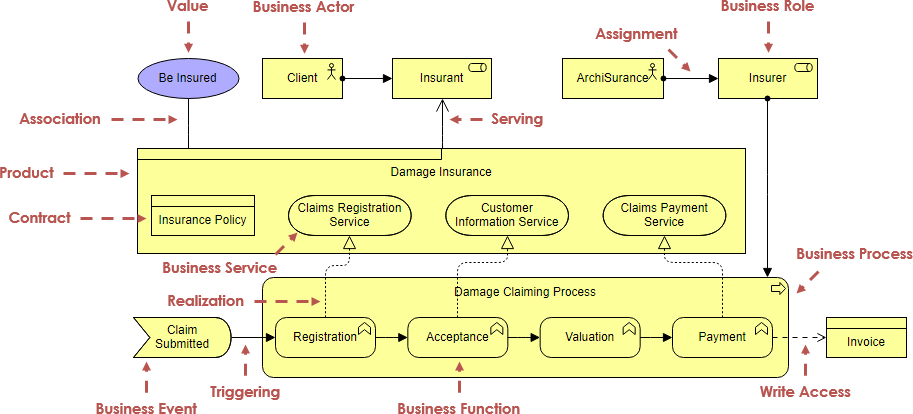
The Business layer offers products and services to external customers, which are realized in the organization by business processes performed by business actors and roles.
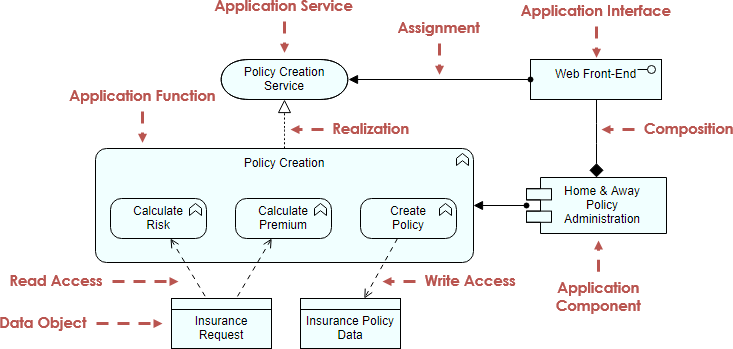
The Application layer supports the business layer with application services which are realized by (software) application components.
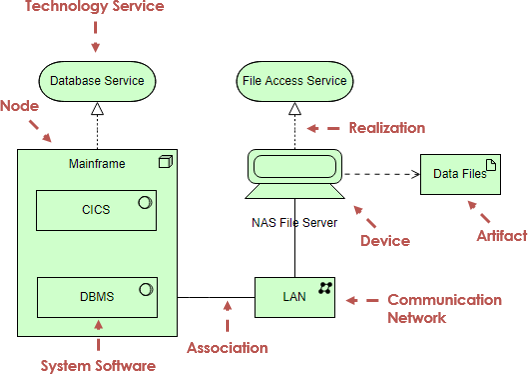
The Technology layer offers infrastructural services (e.g., processing, storage and communication services) needed to run applications, realized by computer and communication hardware and system software.

Layers
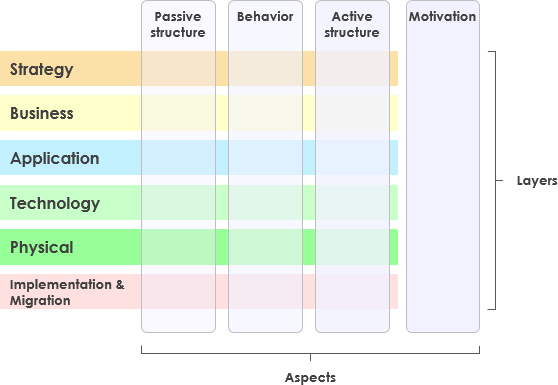
The first dimension core entities are assigned to are the different layers of an enterprise architecture model. In the new ArchiMate, the enterprise architecture model is split into six layers:
Strategy
Business
Application
Technology
Physical
Implementation & Migration.
With regards to the graphical representation of single entities, the layer an entity belongs to is indicated using different colors.
Higher layers use services provided by lower layers. The Business layer offers products and services to external customers which are realized by business processes performed by business actors. Application layer supports the business layer with application services which are realized by (software) applications. Technology layer offers infrastructural services (e.g., processing, storage and communication services) needed to run applications, realized by computer and communication hardware and system software.

Aspects
The second dimension is made up of three aspects, which the core entities are allocated to. In the graphical representation of elements, the assignment of an element to an aspect is visualized using different shapes.
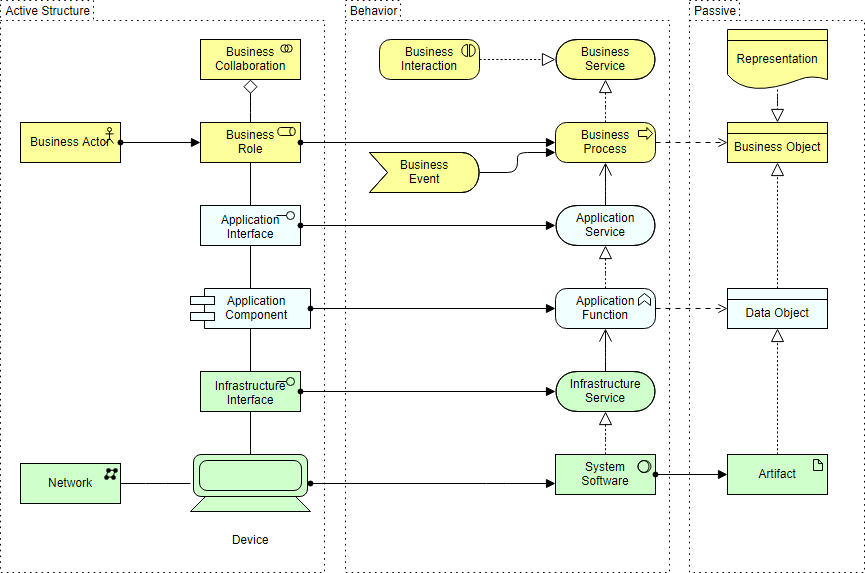
Active Structure
Active structures captures subjects that display actual behavior (who?). These active structures are represented using boxes with square corners and an icon in the upper-right corner.
Behavior Structure
Behavior aspects represents behaviors of active structures (how?) and are visualized using boxes with round corners and an icon in the upper-right corner.
Passive Structure
Passive structures are the objects behavior is performed on (what?). There is no global way to visualize them with regards to the shape.
Motivation Extension
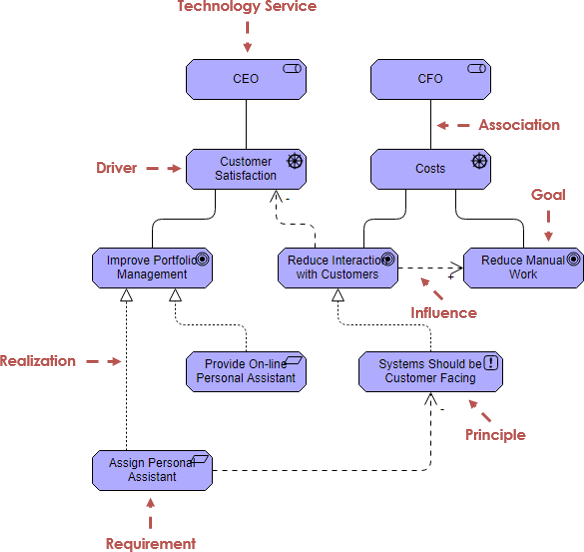
The Motivation Extension (Drivers, Goals, Requirements, Principles, etc.) has been introduced in ArchiMate 2. The Motivational concepts are used to model the motivations, or reasons, that underlie the design or change of some enterprise architecture. The motivation extension adds motivational concepts such as goal, principle, and requirement. It corresponds to the "Why" column of the Zachman framework
Motivation elements assigned to this aspect are depicted using boxes with diagonal corners but are also color coded, indicating that it also constitutes a layer.
As shown the Figure above, the main reasons for enterprise architect to adopt ArchiMate are as follows:
Capture stakeholder concerns
Address concerns by identifying and refining requirements
Create EA models
Create views of the model for stakeholders
show how concerns and requirements will be addressed
show trade-offs arising from conflicting concerns
A layered view provides a natural way to look at service-oriented models. The higher layers use services that are provided by the lower layers. ArchiMate distinguishes three main (Core) layers:
The Business layer offers products and services to external customers, which are realized in the organization by business processes performed by business actors and roles.
The Application layer supports the business layer with application services which are realized by (software) application components.
The Technology layer offers infrastructural services (e.g., processing, storage and communication services) needed to run applications, realized by computer and communication hardware and system software.
The ArchiMate Motivation elements enable the modeling of stakeholders, drivers for change, business goals, principles and requirements.
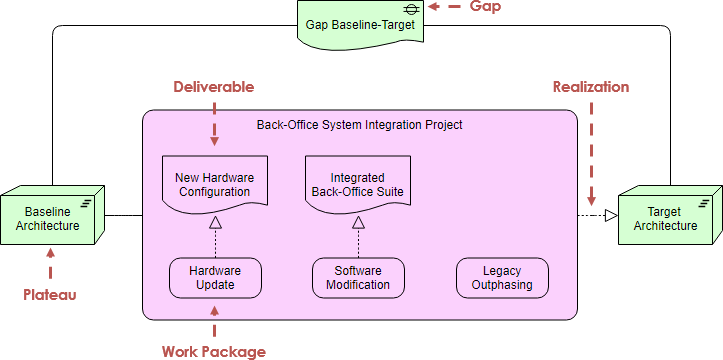
The ArchiMate Implementation and Migration elements enable the modeling of project portfolio management, gap analysis and transition and migration planning.
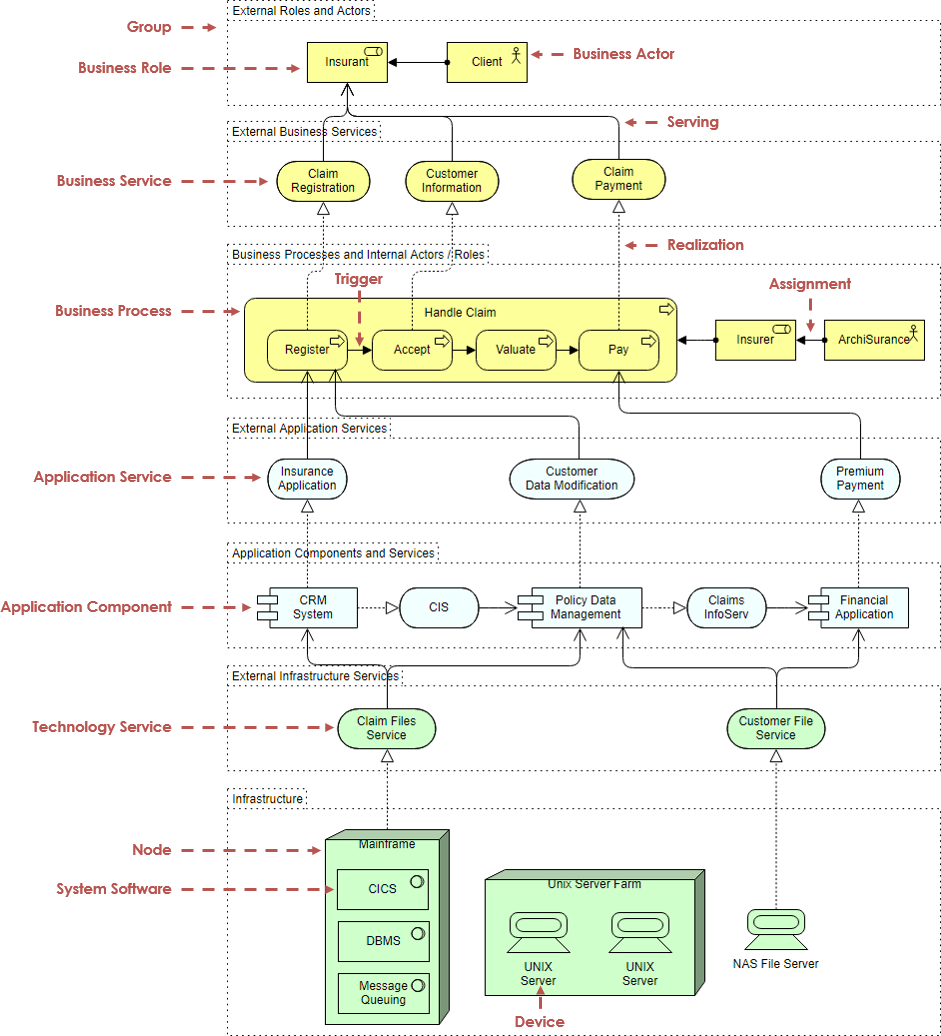
ArchiMate example – All layers
In the example ArchiMate model below, you can see the integration of the various ArchiMate layers.
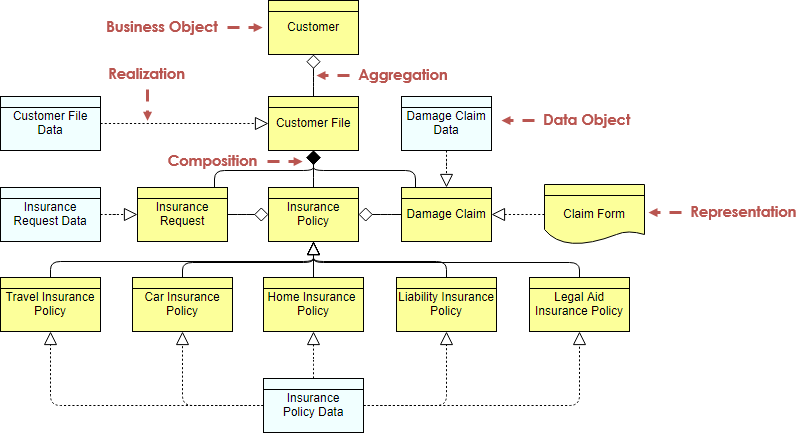
ArchiMate diagram example – Information Structure
This example is comparable to the traditional information models created in the development of almost any information system. It shows the structure of the information used in the enterprise or in a specific business process or application, in terms of data types or (object-oriented) class structures. Furthermore, it may show how the information at the business level is represented at the application level in the form of the data structures used there, and how these are then mapped onto the underlying infrastructure; e.g., by means of a database schema.
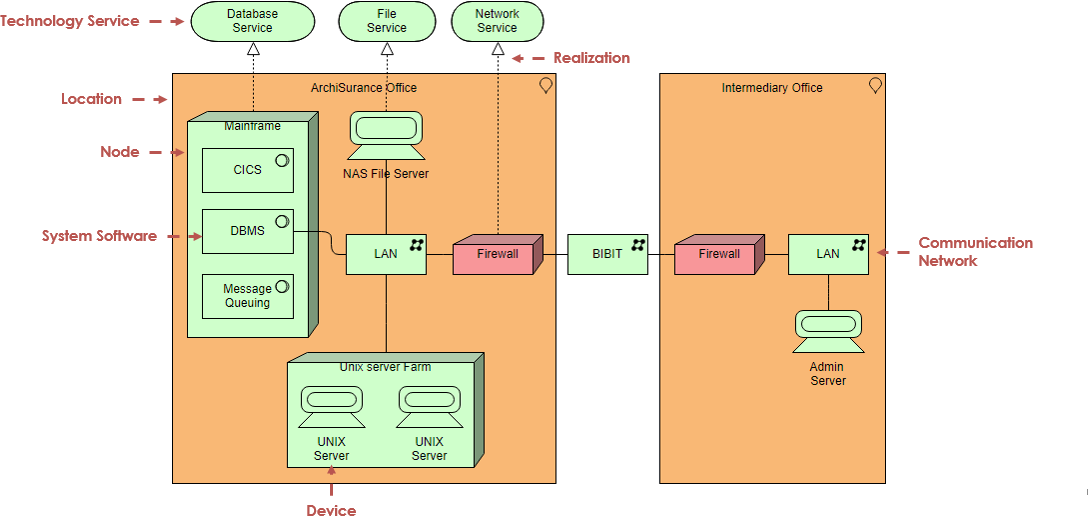
ArchiMate Diagram example: Infrastructure
This example contains the software and hardware infrastructure elements supporting the application layer, such as physical devices, networks, or system software (e.g., operating systems, databases, and middleware).
More ArchiMate Diagram examples:
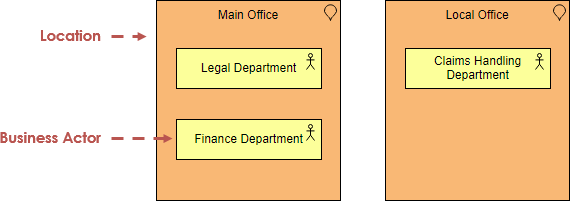
Example 1 – Location
The model below shows that the departments of an insurance company are distributed over different locations. The Legal and Finance departments are centralized at the main office, and there are claims handling departments at various local offices throughout the country.
Example 2 – Business Actor
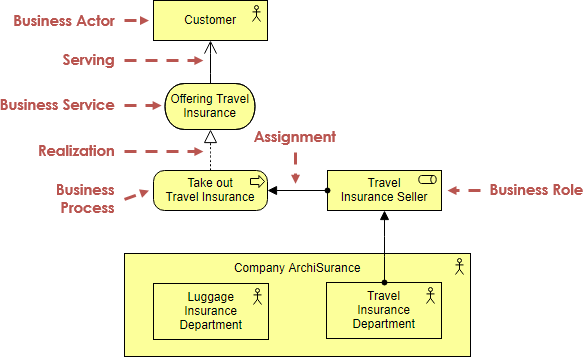
The model below illustrates the use of business actors. The company ArchiSurance is modeled as a business actor that is composed of two departments. The Travel insurance seller role is assigned to the travel department. In this role, the travel department performs the Take out insurance process, which offers a service that is accessible via the business interface assigned to this role.
Example 3 – Application Cooperation
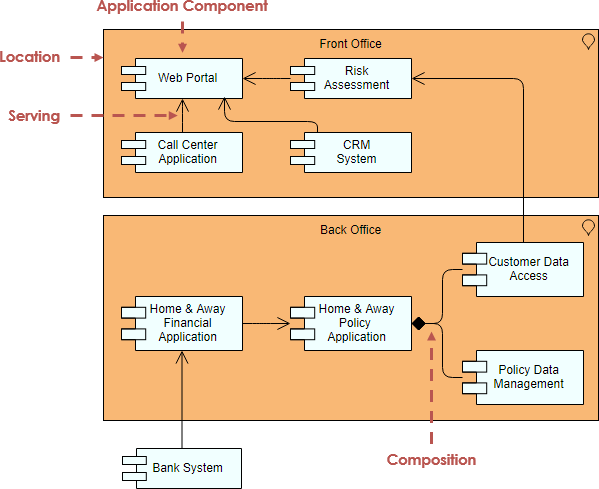
This example describes the relationships between applications components in terms of the information flows between them, or in terms of the services they offer and use. This example creates an overview of the application landscape of an organization and expresses the (internal) co-operation or orchestration of services that together support the execution of a business process.
Visual Paradigm provides a comprehensive workspace tailored specifically to the unique constraints of ArchiMate modeling:
Full Framework Coverage: Native support for every ArchiMate layer including Strategy, Motivation, Business, Application, Technology, Physical, and Implementation & Migration.
Official Viewpoint Mechanism: Includes direct support for all official viewpoints (such as Application Cooperation, Business Process, and Layered Viewpoints) to automatically filter and display relevant notation based on your audience.
Cross-Layer Modeling: Seamlessly maps dependencies across layers, allowing you to link high-level business goals down to actual technical infrastructure and software services.
Model Exchange File Format: Built-in support for the standard ArchiMate Model Exchange format to import and export work between other EA software tools smoothly.
Advanced Visual Controls: Features a "Color Legend" to easily categorize shapes, precise alignment guides, and symbol presentation options to match your organization's reporting styles.
Visual Paradigm integrates a generative AI Diagram Generator and AI Chatbot directly into its environment. This allows architects to completely skip manual drafting and transition straight to strategic optimization.
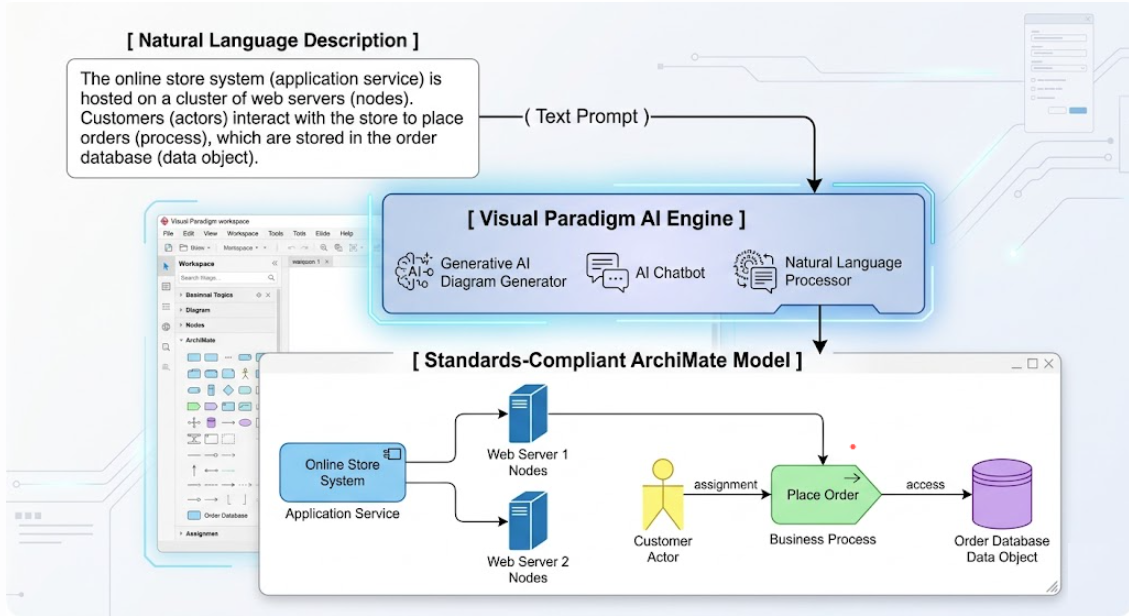
Architects can input plain-language descriptions—such as "Model a cloud migration strategy for a legacy retail billing system"—and the AI instantly translates it into a structured blueprint. The engine takes care of assigning the correct shapes, borders, and connectors automatically.
When utilizing the AI generator, you can pick a specific viewpoint (e.g., Capability Map or Technology Usage) from a dropdown menu. The AI will intentionally limit the scope of the generated elements to align strictly with the rules of that viewpoint.
The AI acts as an automated co-pilot. It checks relationship logic natively (such as knowing when to apply a realization versus an assignment arrow), entirely eliminating manual drawing mistakes and syntax breaks.
Because the AI can parse existing architectures, teams can perform rapid risk management queries. You can prompt the chatbot to model the cascading impacts across business and technology layers if a specific application layer is removed or upgraded.
Open Visual Paradigm Desktop.
Click on the Tools tab in the top menu and select AI Diagram Generation.

Select ArchiMate Diagram to be the diagram type, and then choose your desired ArchiMate Viewpoint from the dropdown menu.
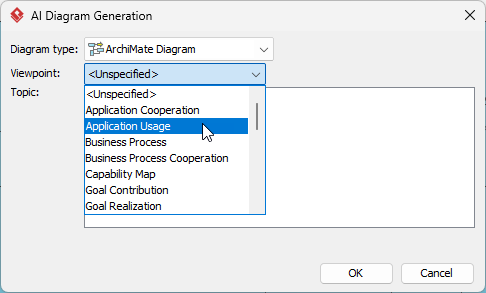
Enter a detailed prompt describing your business case or technical landscape.
Click OK to instantly populate the diagram canvas with a compliant model.
To illustrate the real-world value of ArchiMate combined with AI-powered tooling, consider the case of ArchiSurance, a mid-sized insurance provider undertaking a multi-year digital transformation initiative.
Challenge: ArchiSurance needed to modernize its legacy policy administration system while maintaining regulatory compliance, improving customer experience, and enabling new product lines. Stakeholders across business, IT, and compliance teams struggled to align on scope, dependencies, and migration sequencing.
Approach:
Architecture Vision (Preliminary Phase): Using ArchiMate's Motivation Extension, the EA team modeled key drivers (market competition, regulatory changes), goals (reduce time-to-market by 40%), and principles (cloud-first, API-enabled). These elements provided a shared rationale for the transformation.
Baseline Architecture Assessment: Leveraging the Core Layers (Business, Application, Technology), the team documented the existing landscape: manual underwriting processes (Business), monolithic policy system (Application), and on-premise infrastructure (Technology). Cross-layer relationships highlighted critical dependencies and single points of failure.
Target Architecture Design: Using AI-powered diagram generation, architects rapidly prototyped multiple target states. Prompts like "Design a microservices-based claims processing architecture with cloud infrastructure" produced compliant ArchiMate models showing service decomposition, data flows, and technology components—accelerating design iterations by an estimated 60%.
Migration Planning: The Implementation & Migration Extension enabled gap analysis and roadmap visualization. Work packages, plateaus, and deliverables were mapped to TOGAF ADM phases, providing executives with a clear, visual migration path.
Stakeholder Communication: Official ArchiMate viewpoints (e.g., Business Process View, Technology Usage View) allowed the team to tailor communications: simplified process flows for business leaders, detailed component diagrams for engineering teams, and risk/impact views for compliance officers.
Outcomes:
Reduced architecture documentation time by 50% through AI-assisted modeling
Improved stakeholder alignment with visual, layer-specific viewpoints
Enabled proactive risk identification through cross-layer dependency analysis
Accelerated migration planning with clear gap visualization and sequencing
ArchiMate has matured from a specialized modeling notation into a strategic enabler for enterprise-wide transformation. By providing a standardized, layered framework for representing business strategy, application landscapes, and technology infrastructure, ArchiMate empowers architects to create coherent, actionable blueprints that bridge the gap between vision and execution.
When combined with AI-powered tooling, the value proposition expands significantly: architects can generate standards-compliant models from natural language prompts, enforce syntactic correctness automatically, and rapidly explore "what-if" scenarios across architectural layers. This synergy between human expertise and machine assistance allows EA teams to focus less on diagram mechanics and more on strategic analysis, stakeholder engagement, and value delivery.
For organizations embarking on architecture initiatives, the path forward is clear: adopt ArchiMate as your common language, integrate it with your preferred framework (such as TOGAF ADM), and leverage AI capabilities to accelerate modeling without compromising rigor. Whether modernizing legacy systems, enabling digital products, or navigating regulatory change, a well-executed ArchiMate practice provides the clarity, alignment, and agility needed to turn architectural vision into business reality.

