
In the fast-paced world of software development, documentation has long been the neglected stepchild of the engineering process. Teams invest countless hours designing sophisticated system architectures, only to watch their documentation become obsolete within weeks of deployment. Static diagrams in wikis grow stale, architecture decision records drift from implementation reality, and onboarding new team members becomes an exercise in archaeological excavation rather than learning from current systems.
The root cause isn't laziness or lack of tools—it's the fundamental disconnect between how we write code and how we document it. Code lives in version-controlled repositories, while visual documentation often languishes in separate, manually drawn design tools. This guide presents a modern paradigm shift: treating architecture diagrams as text-based code using Visual Paradigm's VPasCode, and utilizing OpenDocs as a centralized, highly accessible visual knowledge base to share these diagrams with your team.
![[Visual Paradigm + AI] ➔ [VPasCode (.puml)] ➔ [OpenDocs Platform] [Living Document]](https://www.visual-paradigm.com/servlet/editor-content/guide/architecture-as-code-building-self-updating-documentation-with-visual-paradigm-ai-assisted-uml-and-opendocs-pipeline/sites/7/2026/07/img_6a56d99af12e2.png)
By combining Visual Paradigm's VPasCode (Diagram-as-Code platform), AI-powered assistants, and OpenDocs' publishing workspace, you can bridge the gap between technical diagrams and team collaboration. This approach eliminates the traditional graphic-maintenance burden while providing precise, professional visuals that evolve alongside your codebase. Whether you're a solo developer documenting a side project or part of an enterprise team managing complex microservices, this workflow will transform how you publish and share technical documentation.
The workflow streamlines documentation by turning textual UML specifications into high-fidelity diagrams that are easily published for non-technical stakeholders:
[Visual Paradigm + AI] ➔ [VPasCode] ➔ [OpenDocs Platform] ➔ [Living Document]
Visual Paradigm + AI Chatbot: You use an AI assistant or Visual Paradigm's built-in AI utilities to brainstorm and generate structural diagram code. The AI acts as an "Architect," transforming natural language descriptions into structured UML diagrams without requiring deep syntax knowledge.
VPasCode: A "Diagram as Code" platform utilizing standard PlantUML, Mermaid.js, or Graphviz text syntax within the Visual Paradigm ecosystem. VPasCode acts as the visual generator, allowing granular control over styling, layout, and logic from a unified browser-based workspace.
OpenDocs: A centralized, cloud-based knowledge management platform designed to organize and showcase the visual content you create. Rather than relying on complicated developer pipelines, APIs, or command-line scripts, OpenDocs lets you easily embed, update, and publish your visual documentation through a clear, intuitive web interface.
Living Document: A clean, always-accessible knowledge base where teammates can view up-to-date system maps. OpenDocs unifies rich-text authoring with professional visual modeling in a simple, shared library.
Instead of manually clicking and dragging shapes, prompt an AI chatbot to generate your system architecture. Ask the AI specifically for PlantUML syntax to ensure compatibility with the VPasCode workspace.
Example prompt: "Act as a software architect. Write PlantUML code for a microservices architecture that includes an API Gateway, an Auth Service, and a PostgreSQL database."
Visual Paradigm's AI Chatbot can instantly transform natural language prompts into structured UML diagrams, handling the heavy lifting of structuring relationships and component interactions without requiring hours of drag-and-drop adjustments.
VPasCode allows developers to manage diagrams directly through text formatting, bridging the gap between text-driven development and high-fidelity system modeling.
Save your AI-generated text structures into local files with a .puml extension. Because these are plain text files, you can track them in your own development version-control systems (like Git) alongside your application code.
VPasCode natively supports three industry-standard diagramming markup languages: PlantUML for comprehensive UML modeling, Mermaid for quick Markdown-style flowcharts, and Graphviz for relational logic and structural networks.
Once you have refined your diagram code within the VPasCode platform, render it to generate your high-fidelity graphic. Copy or export the rendered diagram and easily embed it directly into your corresponding OpenDocs document page.
Organize your pages, write supporting guides around the visuals, and share your OpenDocs workspace link with stakeholders, developers, and product owners.
OpenDocs functions as your collaborative visual wiki. When you update your text-based diagrams in VPasCode, simply refresh or republish the updated visuals in your OpenDocs library to ensure the entire team is aligned with the latest architecture decisions.
You can render these code blocks using the VPasCode workspace, standard PlantUML viewers, or your preferred local editor plugins.
This diagram shows how a user interacts with a microservice architecture via an API Gateway.
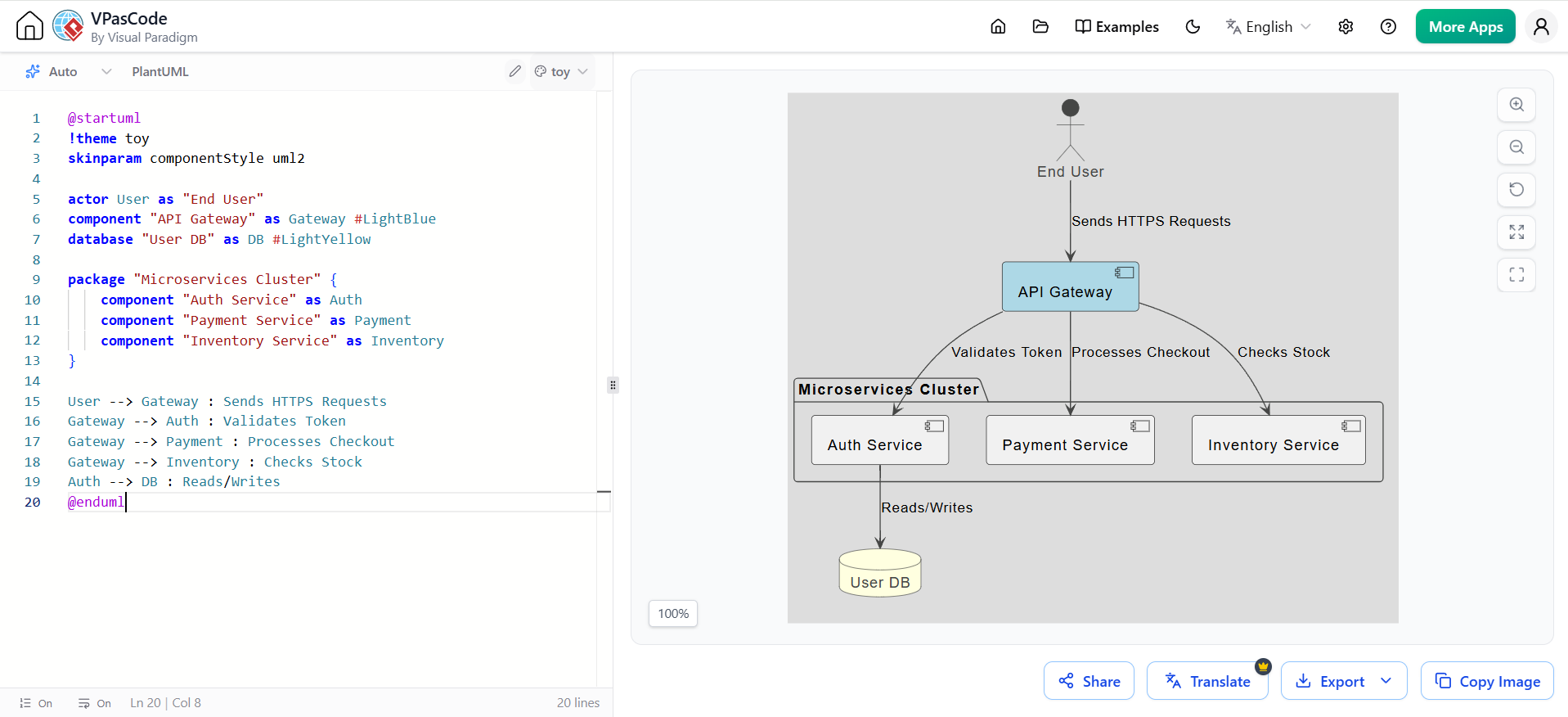
@startuml
!theme toy
skinparam componentStyle uml2

actor User as "End User"
component "API Gateway" as Gateway #LightBlue
database "User DB" as DB #LightYellow

package "Microservices Cluster" {
    component "Auth Service" as Auth
    component "Payment Service" as Payment
    component "Inventory Service" as Inventory
}

User --> Gateway : Sends HTTPS Requests
Gateway --> Auth : Validates Token
Gateway --> Payment : Processes Checkout
Gateway --> Inventory : Checks Stock
Auth --> DB : Reads/Writes
@enduml
This diagram demonstrates the step-by-step messaging process during a user login request.
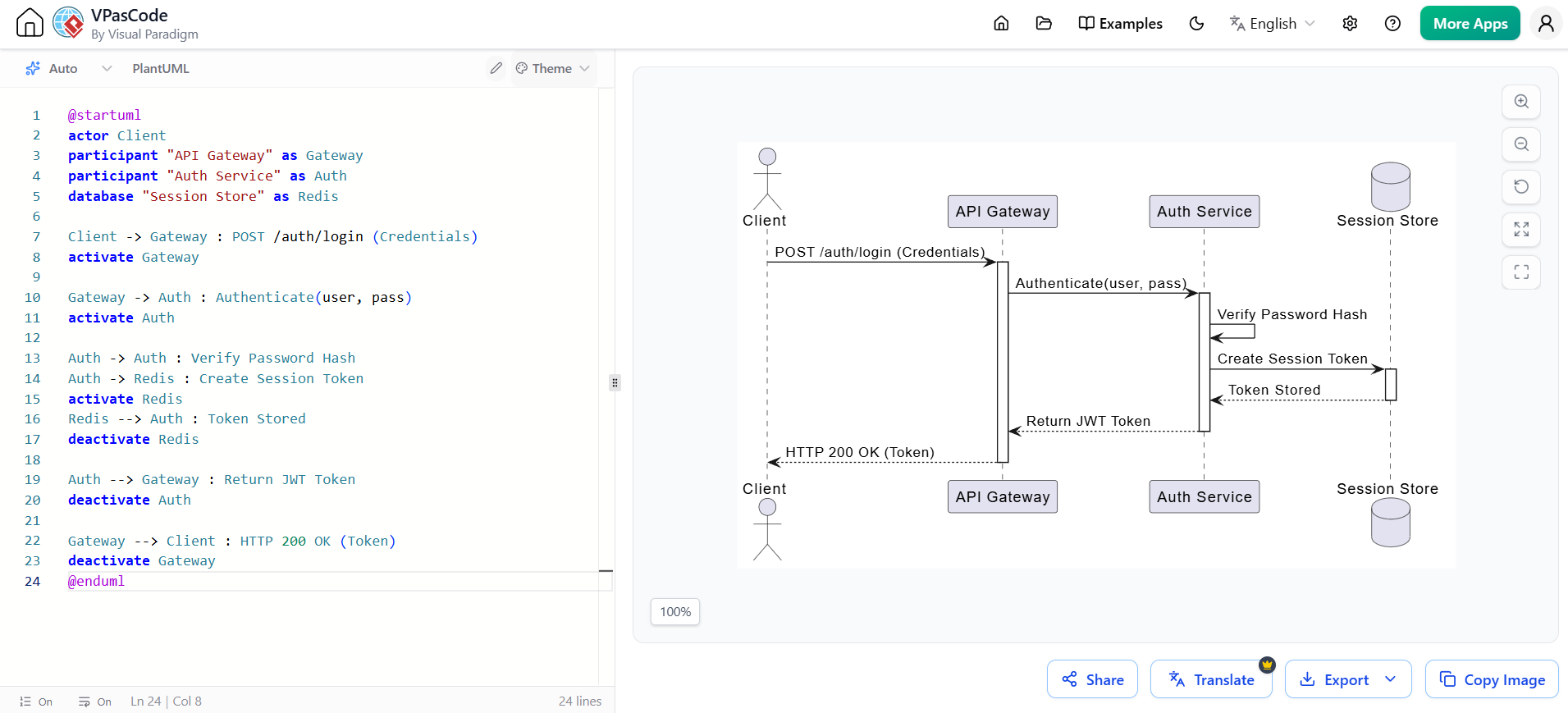
@startuml
actor Client
participant "API Gateway" as Gateway
participant "Auth Service" as Auth
database "Session Store" as Redis

Client -> Gateway : POST /auth/login (Credentials)
activate Gateway

Gateway -> Auth : Authenticate(user, pass)
activate Auth

Auth -> Auth : Verify Password Hash
Auth -> Redis : Create Session Token
activate Redis
Redis --> Auth : Token Stored
deactivate Redis

Auth --> Gateway : Return JWT Token
deactivate Auth

Gateway --> Client : HTTP 200 OK (Token)
deactivate Gateway
@endumlLooking for a powerful, free diagram-as-code tool? Effortlessly render PlantUML, Mermaid, Graphviz, and 20+ programming languages in real time—powered by instant AI error fixing and automatic format detection.
The integration of VPasCode's text-based design tools, AI assistants, and OpenDocs' clean publishing environment represents a practical, low-friction shift in how we approach technical documentation. By keeping your primary architectural sources as text-based diagram files, you eliminate the hassle of traditional canvas-drawing tools. When these models are published inside OpenDocs, they transform standard developer docs into structured visual landscapes that anyone in the organization can search, read, and understand.
The benefits extend beyond mere convenience. Treating diagram definitions as plain text means developers can easily review changes, compare histories, and check blueprints directly within their own local coding workflows. Meanwhile, your product managers, technical writers, and operations teams can rely on OpenDocs to find the final, published representations of those blueprints in a neat, accessible visual directory.
Visual Paradigm's ecosystem—pairing AI-powered diagram generation and VPasCode's multi-syntax editor with OpenDocs' web-based publishing—provides a comprehensive yet approachable toolkit for teams of all sizes. Start by drafting a single critical architecture diagram in PlantUML, render it in VPasCode, and embed it into your OpenDocs portal to give your team clean, central visual documentation they can actually use.

