
In the fast-paced world of modern agile software development, maintaining accurate, up-to-date architectural documentation is a persistent and costly challenge. Traditional manual diagramming tools inevitably lead to "documentation drift," a phenomenon where static images quickly become obsolete as the codebase evolves. This disconnect creates critical knowledge gaps, slows down developer onboarding, and introduces severe integration risks.
The Visual Paradigm (VP) AI Ecosystem represents a paradigm shift in how engineering teams approach system design. By bridging the gap between natural language, code, and published documentation, it streamlines agile architecture. The ecosystem converts plain text prompts into structured C4 model architecture diagrams via Visual Paradigm's VPasCode (Visual Paradigm as Code), renders them through an open document pipeline, and publishes them directly to living documentation platforms. This automated, AI-driven workflow eliminates manual drawing, ensures diagrams stay perfectly synchronized with source code, and establishes a single, trusted source of truth for both engineering teams and non-technical stakeholders.
The workflow operates across four distinct layers to transform abstract ideas into published, living engineering documents:
[User Text Input] ➔ 1. AI Chatbot ➔ 2. VpasCode (DSL) ➔ 3. Open Doc Pipeline ➔ 4. Living Docs (WordPress)
Agile teams start by describing their system architecture in plain English to the Visual Paradigm AI Chatbot. The AI interprets the requirements and automatically structures them into the four hierarchical levels of the C4 Model:
Instead of outputting a static, uneditable image file, the AI generates a VpasCode script.
Once the VpasCode script is pushed to the repository, a continuous integration (CI/CD) Open Doc Pipeline triggers automatically:
The final artifacts are pushed to a central knowledge portal, making system design visible and accessible to non-technical stakeholders:
To maximize efficiency, integrate these habits into your standard development cycles:
This view details how the end-user interacts with the physical gateway system and its external cloud services.
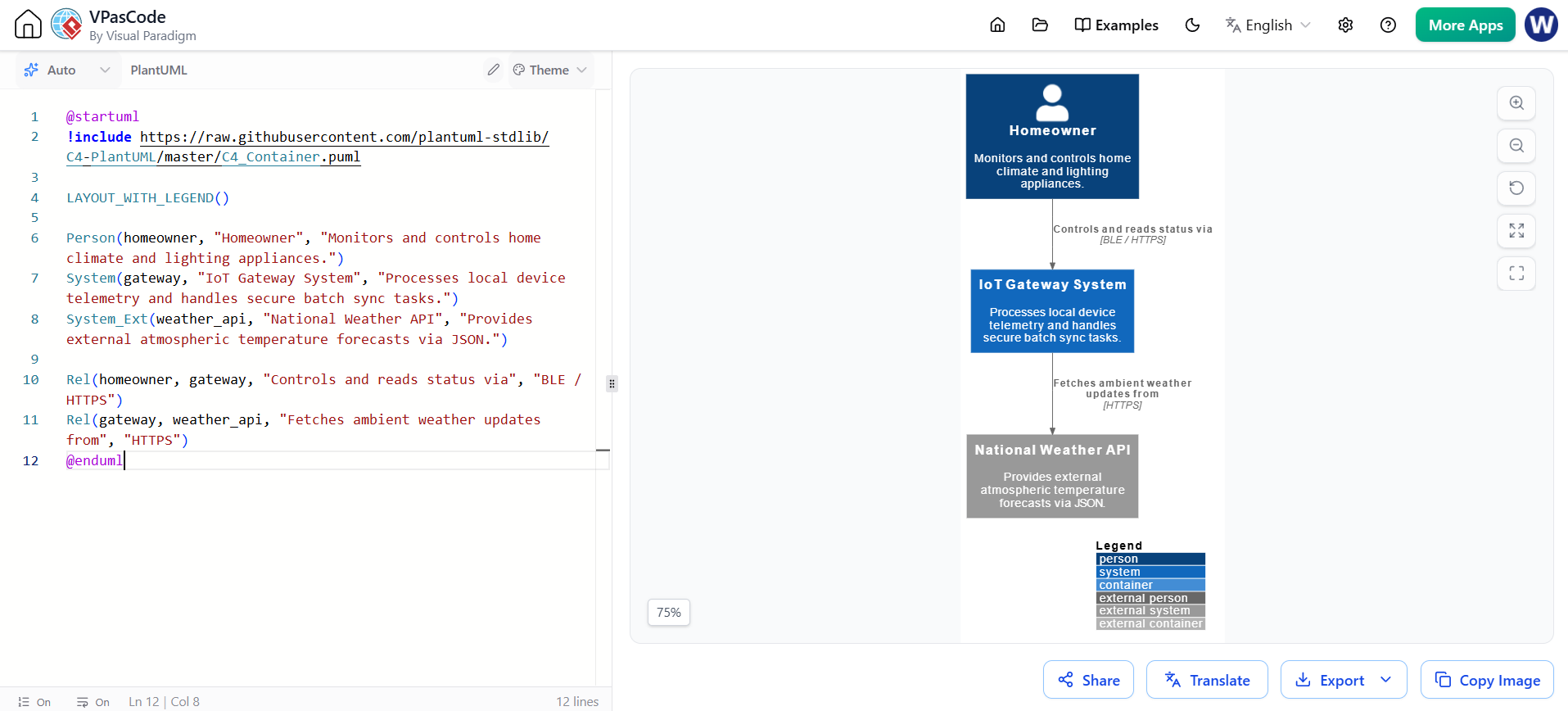
@startuml
!include https://raw.githubusercontent.com/plantuml-stdlib/C4-PlantUML/master/C4_Container.puml

LAYOUT_WITH_LEGEND()

Person(homeowner, "Homeowner", "Monitors and controls home climate and lighting appliances.")
System(gateway, "IoT Gateway System", "Processes local device telemetry and handles secure batch sync tasks.")
System_Ext(weather_api, "National Weather API", "Provides external atmospheric temperature forecasts via JSON.")

Rel(homeowner, gateway, "Controls and reads status via", "BLE / HTTPS")
Rel(gateway, weather_api, "Fetches ambient weather updates from", "HTTPS")
@enduml
This view isolates the runtime environments, process boundaries, and database engines running directly within the physical hardware appliance.
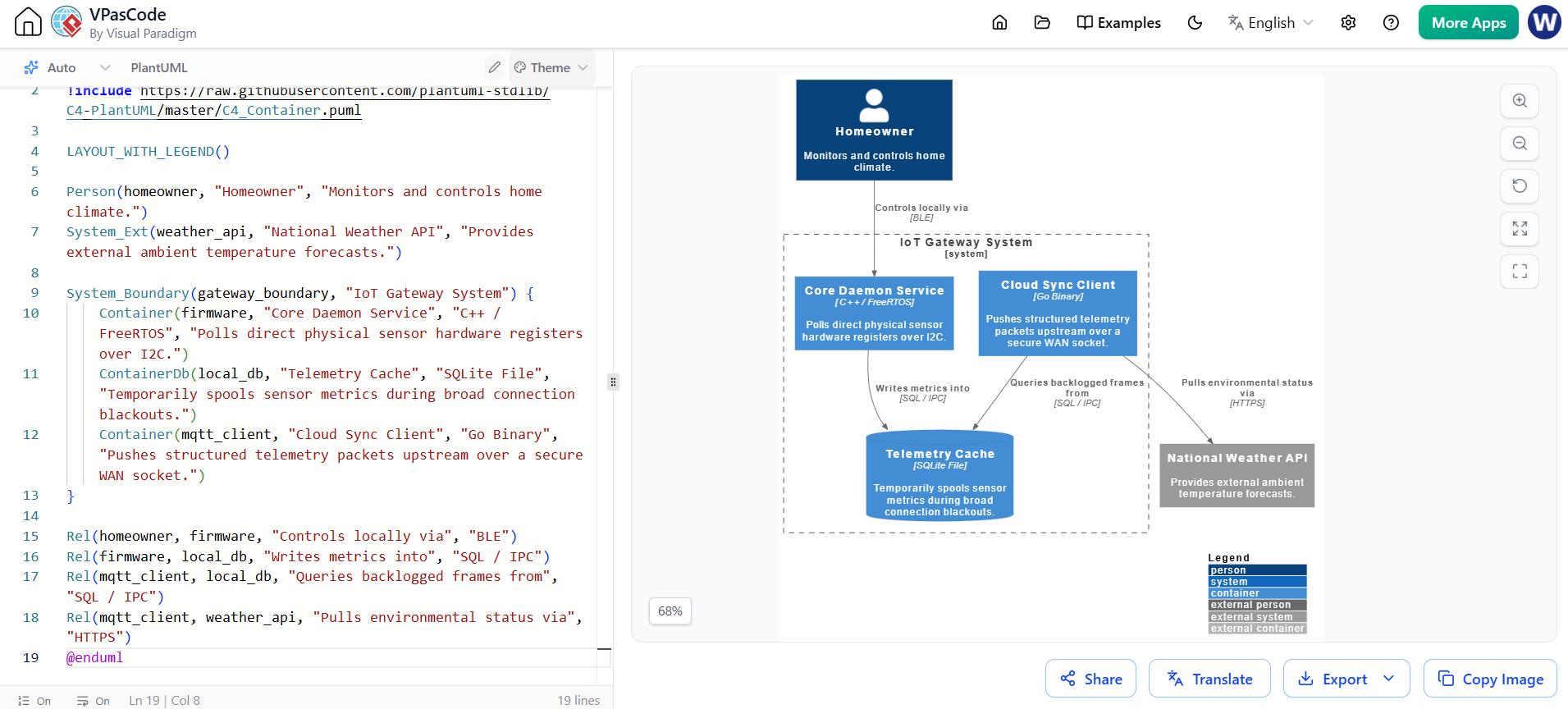
@startuml
!include https://raw.githubusercontent.com/plantuml-stdlib/C4-PlantUML/master/C4_Container.puml

LAYOUT_WITH_LEGEND()

Person(homeowner, "Homeowner", "Monitors and controls home climate.")
System_Ext(weather_api, "National Weather API", "Provides external ambient temperature forecasts.")

System_Boundary(gateway_boundary, "IoT Gateway System") {
    Container(firmware, "Core Daemon Service", "C++ / FreeRTOS", "Polls direct physical sensor hardware registers over I2C.")
    ContainerDb(local_db, "Telemetry Cache", "SQLite File", "Temporarily spools sensor metrics during broad connection blackouts.")
    Container(mqtt_client, "Cloud Sync Client", "Go Binary", "Pushes structured telemetry packets upstream over a secure WAN socket.")
}

Rel(homeowner, firmware, "Controls locally via", "BLE")
Rel(firmware, local_db, "Writes metrics into", "SQL / IPC")
Rel(mqtt_client, local_db, "Queries backlogged frames from", "SQL / IPC")
Rel(mqtt_client, weather_api, "Pulls environmental status via", "HTTPS")
@enduml
This view details the structural software design patterns, concurrent goroutines, and buffers running inside the Cloud Sync Client container.
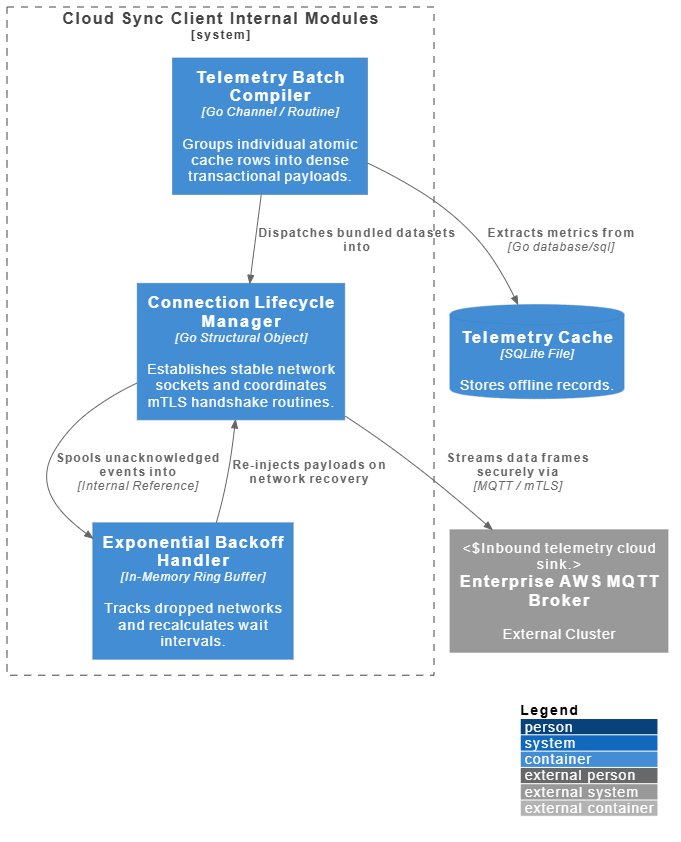
@startuml
!include https://raw.githubusercontent.com/plantuml-stdlib/C4-PlantUML/master/C4_Container.puml

LAYOUT_WITH_LEGEND()

ContainerDb(local_db, "Telemetry Cache", "SQLite File", "Stores offline records.")
System_Ext(cloud_broker, "Enterprise AWS MQTT Broker", "External Cluster", "Inbound telemetry cloud sink.")

System_Boundary(sync_client_boundary, "Cloud Sync Client Internal Modules") {
    Container(conn_mgr, "Connection Lifecycle Manager", "Go Structural Object", "Establishes stable network sockets and coordinates mTLS handshake routines.")
    Container(batcher, "Telemetry Batch Compiler", "Go Channel / Routine", "Groups individual atomic cache rows into dense transactional payloads.")
    Container(retry_queue, "Exponential Backoff Handler", "In-Memory Ring Buffer", "Tracks dropped networks and recalculates wait intervals.")
}

Rel(batcher, local_db, "Extracts metrics from", "Go database/sql")
Rel(batcher, conn_mgr, "Dispatches bundled datasets into")
Rel(conn_mgr, cloud_broker, "Streams data frames securely via", "MQTT / mTLS")
Rel(conn_mgr, retry_queue, "Spools unacknowledged events into", "Internal Reference")
Rel(retry_queue, conn_mgr, "Re-injects payloads on network recovery")
@enduml
At this layer, architectural components break down into programming classes. Because code changes continuously, Visual Paradigm desktop tools reverse-engineer this layer automatically from the engineering repository.
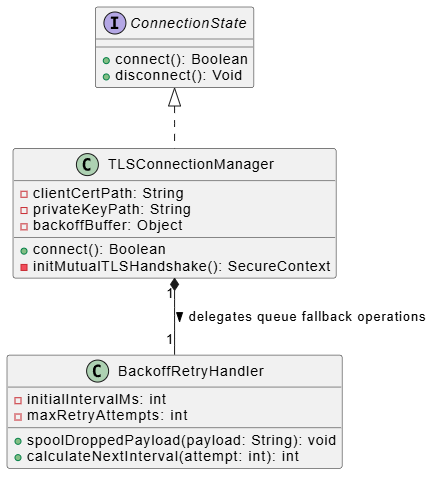
@startuml
interface ConnectionState {
    + connect(): Boolean
    + disconnect(): Void
}

class TLSConnectionManager {
    - clientCertPath: String
    - privateKeyPath: String
    - backoffBuffer: Object
    + connect(): Boolean
    - initMutualTLSHandshake(): SecureContext
}

class BackoffRetryHandler {
    - initialIntervalMs: int
    - maxRetryAttempts: int
    + spoolDroppedPayload(payload: String): void
    + calculateNextInterval(attempt: int): int
}

ConnectionState <|.. TLSConnectionManager
TLSConnectionManager "1" *-- "1" BackoffRetryHandler : delegates queue fallback operations >
@enduml
Looking for a powerful, free diagram-as-code tool? Effortlessly render PlantUML, Mermaid, Graphviz, and 20+ programming languages in real time—powered by instant AI error fixing and automatic format detection.
When integrating this code into an automated Agile CI/CD process:
!include https://raw.githubusercontent.com/plantuml-stdlib/C4-PlantUML/master/C4_Container.puml at the top of all diagram source files (.puml / .vp).vpascode-cli or a GitHub Actions runner step to compile the source code straight into static vector images.The transition from static, manually maintained diagrams to an AI-driven, code-based living documentation ecosystem is no longer a luxury—it is a necessity for modern agile teams. By leveraging Visual Paradigm’s AI capabilities alongside the VpasCode and Open Doc Pipeline, organizations can completely eliminate documentation drift. This approach ensures that architectural diagrams remain a true, real-time reflection of the codebase, fostering better collaboration, faster onboarding, and higher system reliability.
Embracing the "Docs-as-Code" philosophy empowers teams to treat architecture with the same rigor as application logic: versioned, reviewed, and automatically deployed. Start integrating these AI-powered workflows into your CI/CD pipelines today, and transform your architectural documentation from a burdensome afterthought into a dynamic, living asset.

