
In modern product development and systems engineering, a persistent gap exists between the creation of visual models and their integration into living documentation. Teams often find themselves trapped in a cycle of manual exports, static image uploads, and version control nightmares. A diagram created in a sophisticated modeling tool frequently becomes a stale screenshot the moment it is pasted into a wiki or document, leading to "documentation debt" where technical records no longer reflect the current state of the system.
The Visual Paradigm Pipeline addresses this critical friction point. Serving as the high-speed connective tissue of the Visual Paradigm AI Visual Modeling Ecosystem, the Pipeline transforms fragmented workflows into a unified, “Concept-to-Docs” powerhouse. By acting as a secure, cloud-based centralized repository, it ensures that valuable visual assets—whether generated by AI, crafted in desktop software, or designed online—flow instantly to where they are needed most: your professional documentation hub. This case study explores how the Pipeline serves as the essential bridge for modern teams, turning complex modeling efforts into synchronized, editable, and authoritative knowledge bases.
The Pipeline is more than just a file transfer mechanism; it is a secure, cloud-based centralized repository designed to store, manage, and transfer artifacts—the valuable visual assets you create across various platforms. In the context of Visual Paradigm’s AI Visual Modeling Ecosystem, the Pipeline acts as the vital bridge between four core pillars: Visual Paradigm Desktop AI Diagram Generation, AI Chatbot, OpenDocs Knowledge Management Platform, and Step-by-Step AI-Powered Web Apps.
It ensures that a diagram created in one “pillar” doesn’t stay trapped there. Instead, it flows instantly to where it’s needed most: your documentation and publication hub.
A Single Source of Truth: The Pipeline eliminates the friction of manual downloads and uploads. It preserves the editability of your models and ensures that every stakeholder is looking at the most recent revision of a design.
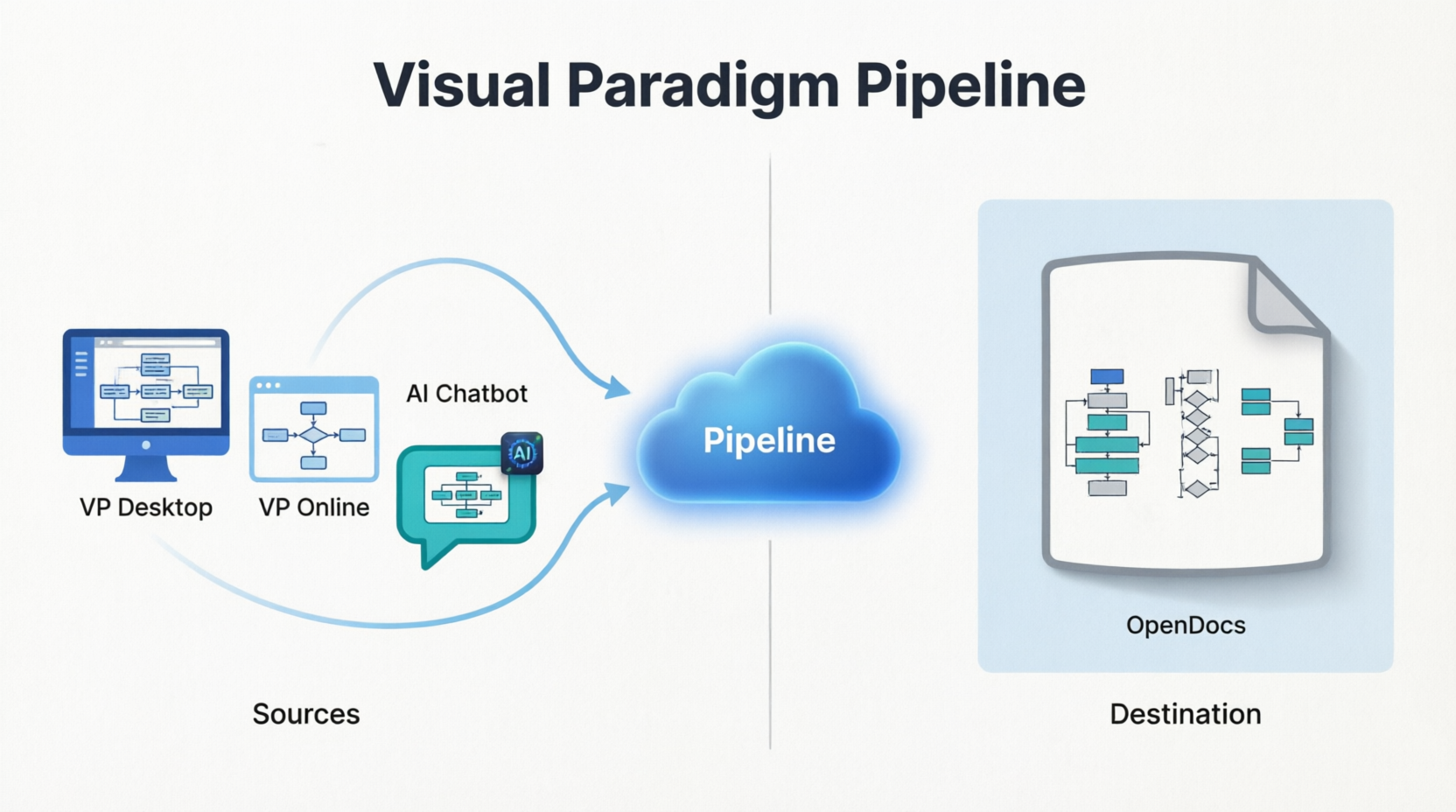
While the Pipeline is the vehicle, Visual Paradigm OpenDocs is the destination. OpenDocs is a premier knowledge management platform specifically engineered to be “diagram-aware.” By utilizing the Pipeline, users can move work from any Visual Paradigm feature directly into a professional document, technical manual, or knowledge base.
This “Work-to-Publish” workflow allows teams to:
Model with Precision: Use high-end desktop or online tools to create complex system architectures.
Generate with Speed: Use AI to brainstorm and visualize ideas instantly.
Publish with Authority: Seamlessly embed those visuals into OpenDocs to create living documentation that evolves alongside the project.
Visual Paradigm is constantly encircling its apps with deeper connectivity. Below are the five critical ways teams can currently leverage the Pipeline to streamline their workflow.
Designed for the power user, this connection allows for the creation of intricate UML, BPMN, or SysML models in professional desktop modeling software, which are then exported to OpenDocs via the pipeline. This moves local modeling expertise into a global, accessible knowledge base.
In Visual Paradigm Desktop, open the diagram you wish to send.
Right-click on the diagram and select Export > Send to OpenDocs Pipeline.
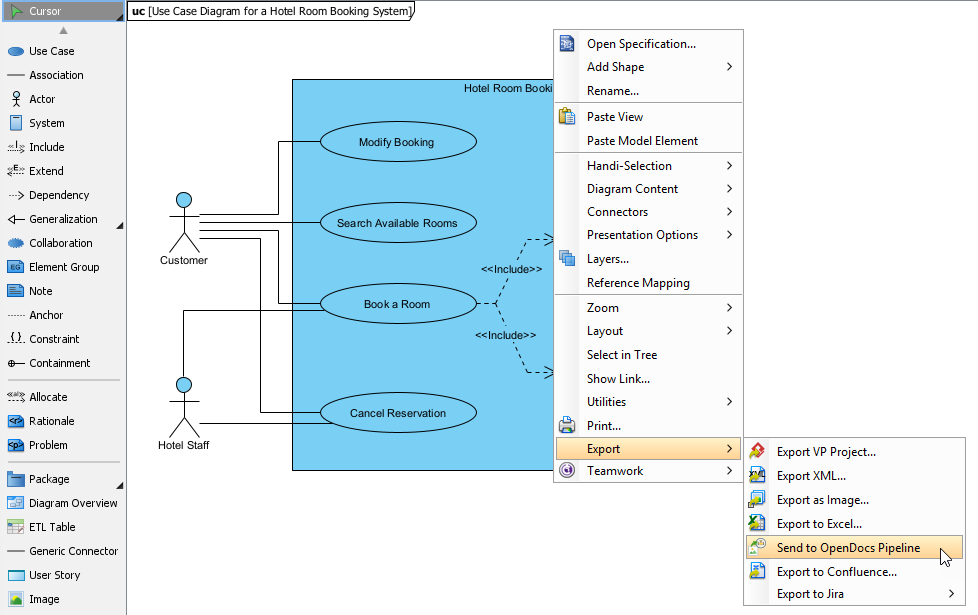
When prompted, save your project by clicking OK.
(Optional) Enter a comment. This will be visible in the Pipeline pane within OpenDocs to help you identify the version or purpose of the artifact.
Confirm the export to output your diagram to the cloud.
Once your diagram is in the Pipeline, you can place it anywhere in your knowledge base: Open any document page in OpenDocs and click Edit. Click on the page where you want to insert the diagram. On the toolbar, click Insert. In the Insert window, select Pipeline from the left-hand sidebar. Your sent diagrams will appear here.
This connection supports a 100% cloud workflow. Whether designing a technical flowchart or a high-impact marketing graphic in a browser, the Pipeline passes work directly to documentation in OpenDocs without a single local download.
Open your diagram or graphic in Visual Paradigm Online.
In the top menu, select Export > Send to OpenDocs Pipeline.
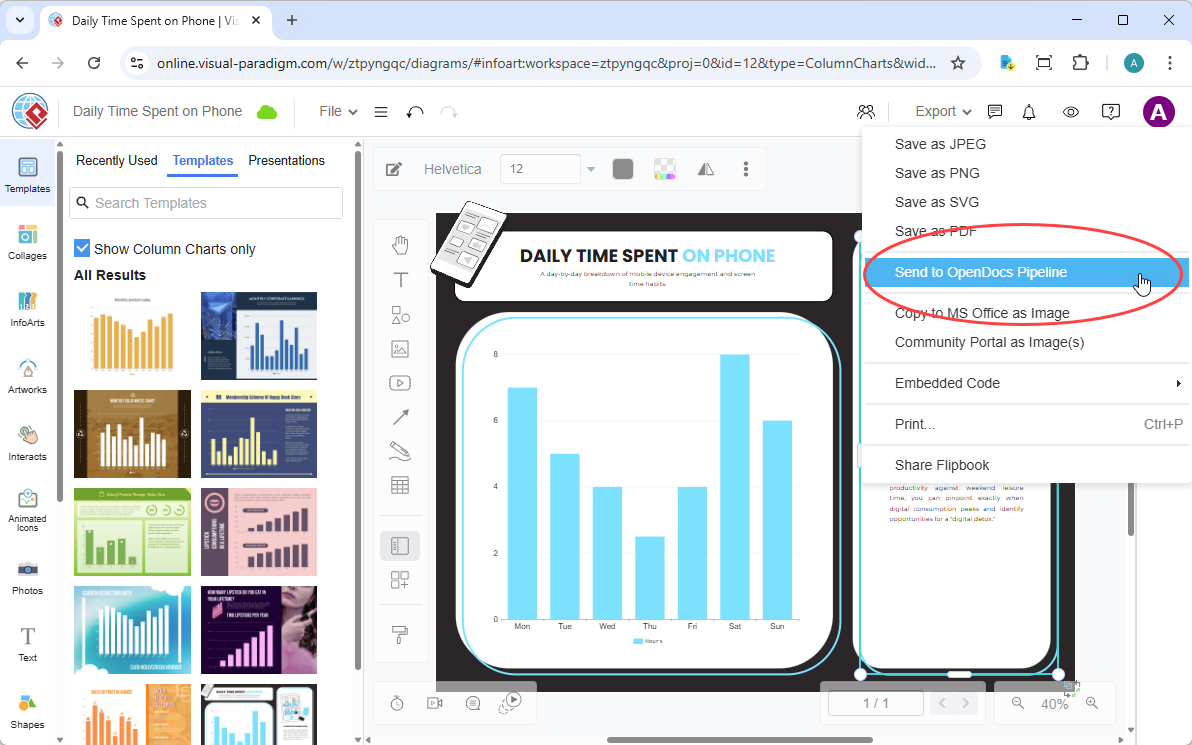
(Optional) Add a comment to describe the artifact. This makes it easier to find later in the Pipeline pane.
Confirm the export. Your visual is now securely stored in the Pipeline.
Once your diagram is in the Pipeline, you can place it anywhere in your knowledge base: Open any document page in OpenDocs and click Edit. Click on the page where you want to insert the diagram. On the toolbar, click Insert. In the Insert window, select Pipeline from the left-hand sidebar. Your sent diagrams will appear here.
This feature enables conversational documentation. Users can ask the AI Chatbot to generate a system architecture or a business process diagram. With one click, that AI-generated artifact is ready to be inserted into OpenDocs pages.
Generate Your Diagram: Create or refine your diagram (UML, flowchart, architecture, BPMN, etc.) in the AI Chatbot.
Once the AI has produced the visual you need, click Export and select Send to OpenDocs Pipeline.
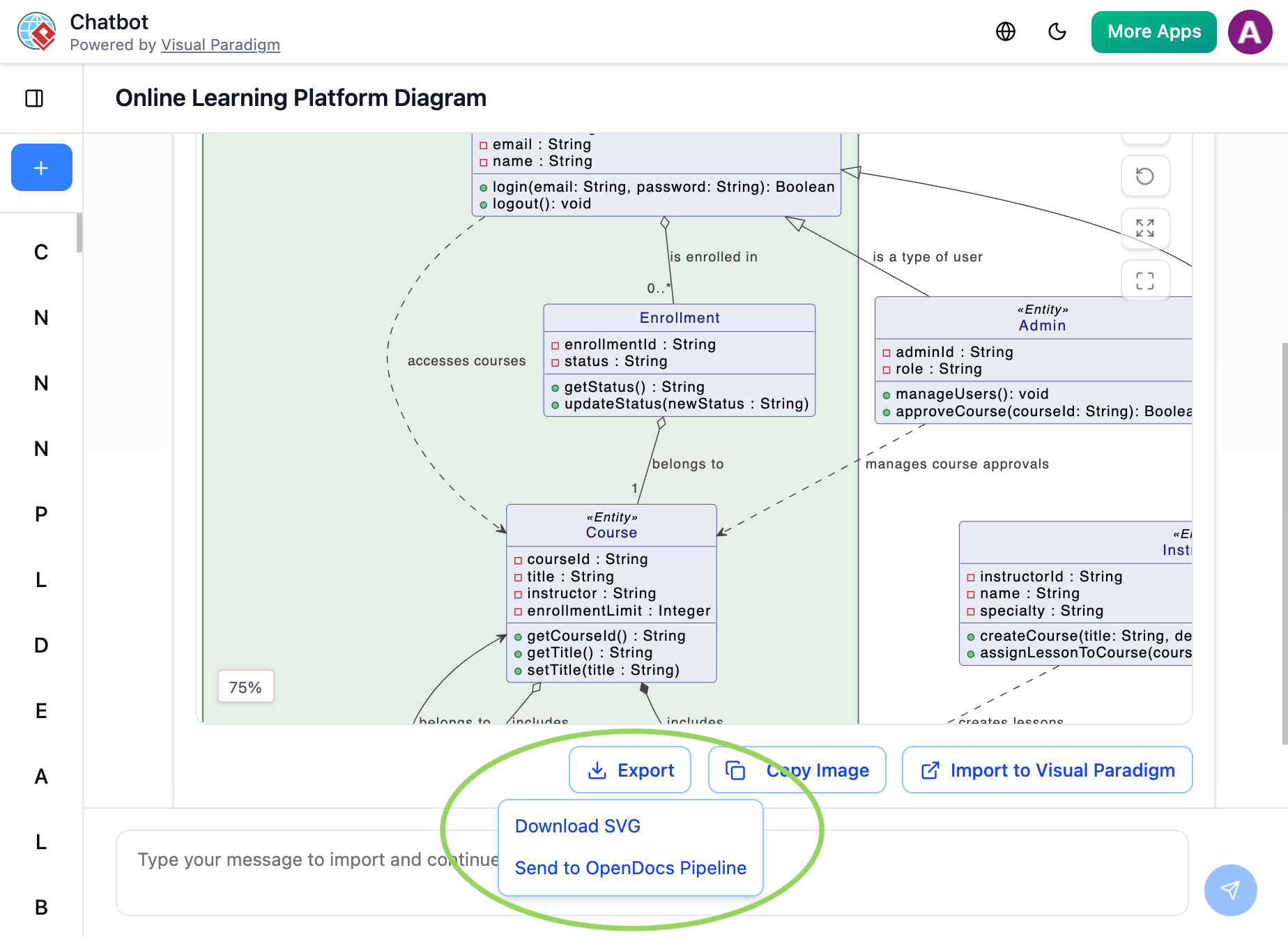
Go to your desired document page in OpenDocs and enter the editor. Click Insert on the toolbar and select Pipeline. Your AI-generated diagram will be waiting for you in the asset list.
Teams can now bring interactive media into their knowledge management. Digital Flipbooks can be sent through the Pipeline, allowing users to embed rich, flippable catalogs or brochures directly within OpenDocs pages.
For organizing and publishing at scale, entire Bookshelves can be sent to OpenDocs. This creates a centralized library of resources within the documentation workspace, making it easier than ever to manage large volumes of information.
The shift from traditional workflows to the Pipeline workflow represents a significant leap in efficiency and accuracy.
| Traditional Workflow | The Pipeline Workflow |
|---|---|
| Manual Export (PNG/JPG) | Instant “Send to Pipeline” |
| Manual Re-uploading on changes | “Update to Latest Revision” in one click |
| Disconnected, static images | Deep-linked, editable artifacts |
| Scattered files on local drives | Centralized cloud repository |
The core purpose of the Visual Paradigm Pipeline is to serve as a secure, cloud-based asset transit hub and "connective tissue" that bridges the gap between dynamic visual modeling and living documentation. It eliminates the friction of traditional documentation workflows—such as manually downloading images, taking screenshots, or handling fragmented file versions—by establishing a unified, automated pipeline that turns complex diagrams into synchronized documentation assets.
Single Source of Truth: Centralizes visual assets (called artifacts) so that all engineering, architecture, and business teams work from identical data.
Eliminates Documentation Debt: Replaces static, quickly outdated manual copy-pasting with a live, continuous link between design tools and knowledge bases.
Preserves Editability: Embedded graphics remain vector-quality and fully editable at their source rather than turning into flat, unalterable images.
The Pipeline acts as a bidirectional bridge that connects separate environments across the Visual Paradigm Ecosystem:
[ VP Desktop / VP Online / AI Chatbot ] ──(Send/Commit)──> [ OpenDocs Pipeline Hub ] ──(Insert/Sync)──> [ Live OpenDocs Pages ]
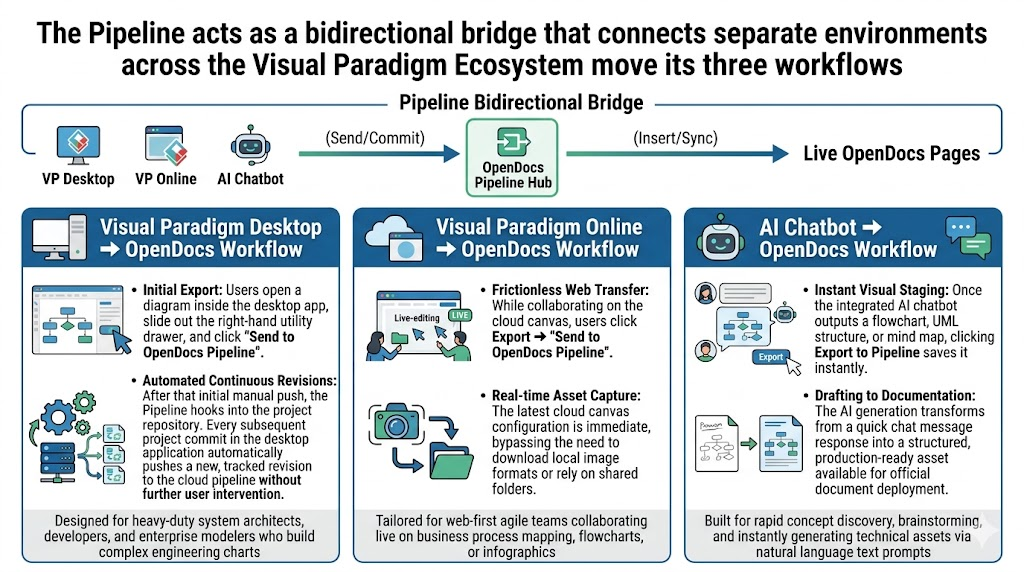
Designed for heavy-duty system architects, developers, and enterprise modelers who build complex engineering charts.
Initial Export: Users open a diagram inside the desktop app, slide out the right-hand utility drawer, and click "Send to OpenDocs Pipeline".
Automated Continuous Revisions: After that initial manual push, the Pipeline hooks into the project repository. Every subsequent project commit in the desktop application automatically pushes a new, tracked revision to the cloud pipeline without further user intervention.
Tailored for web-first agile teams collaborating live on business process mapping, flowcharts, or infographics.
Frictionless Web Transfer: While collaborating on the cloud canvas, users click Export ➔ "Send to OpenDocs Pipeline".
Real-time Asset Capture: The latest cloud canvas configuration is immediate, bypassing the need to download local image formats or rely on shared folders.
Built for rapid concept discovery, brainstorming, and instantly generating technical assets via natural language text prompts.
Instant Visual Staging: Once the integrated AI chatbot outputs a flowchart, UML structure, or mind map, clicking Export to Pipeline saves it instantly.
Drafting to Documentation: The AI generation transforms from a quick chat message response into a structured, production-ready asset available for official document deployment.
Once assets arrive in the central hub, users manage and display them using built-in document controls:
Inline Insertion: Technical writers open a page in Visual Paradigm OpenDocs, enter edit mode, click Insert, select Pipeline, and instantly place the visual artifact wherever their cursor sits.
Change Synchronization Alerts: If an architect edits an underlying model in the desktop application, a clear Update Indicator flags the change inside the OpenDocs panel. Document managers can review the fresh design changes and sync the text page to the live schema with a single click.
Granular Version Control: Every artifact transmission tracks contextual notes (e.g., "v2.1 – Updated authentication flow"). Teams can view chronological change logs, compare revisions side-by-side, or explicitly choose to stick to an older historical revision if a project document requires it.
The Visual Paradigm Pipeline represents a fundamental shift in how technical teams approach documentation. By treating visual models not as static endpoints but as living, synchronized assets, organizations can eliminate the costly disconnect between design and documentation. Whether leveraging the deep modeling capabilities of the Desktop suite, the agility of VP Online, or the speed of AI-generated diagrams, the Pipeline ensures that every visual artifact contributes to a single, authoritative source of truth.
As the Visual Paradigm ecosystem continues to expand, the Pipeline will only grow stronger, encircling more apps and providing even more ways to bridge the gap between creative modeling and professional publication. For teams looking to future-proof their knowledge management and reduce administrative overhead, adopting the Pipeline is not just an improvement—it is a necessity for maintaining clarity in an increasingly complex digital landscape.

