
In software engineering, the gap between capturing requirements and designing system interactions is often where projects lose momentum. Business analysts and product owners write detailed use cases, but translating those textual requirements into precise, technical sequence diagrams has traditionally been a manual, time-consuming, and error-prone process.
Enter the Visual Paradigm ecosystem. By combining the conversational power of its AI Diagramming Chatbot with robust, platform-wide automated workflows, Visual Paradigm is redefining how teams bridge the gap between requirements and dynamic system design.
At the forefront of this transformation is Visual Paradigm’s AI Diagramming Chatbot. Designed to act as an intelligent modeling assistant, the chatbot can analyze a textual use case and instantly draft a comprehensive sequence diagram. It identifies the actors, lifelines, and message exchanges required to fulfill the use case, saving developers and architects hours of manual drafting.
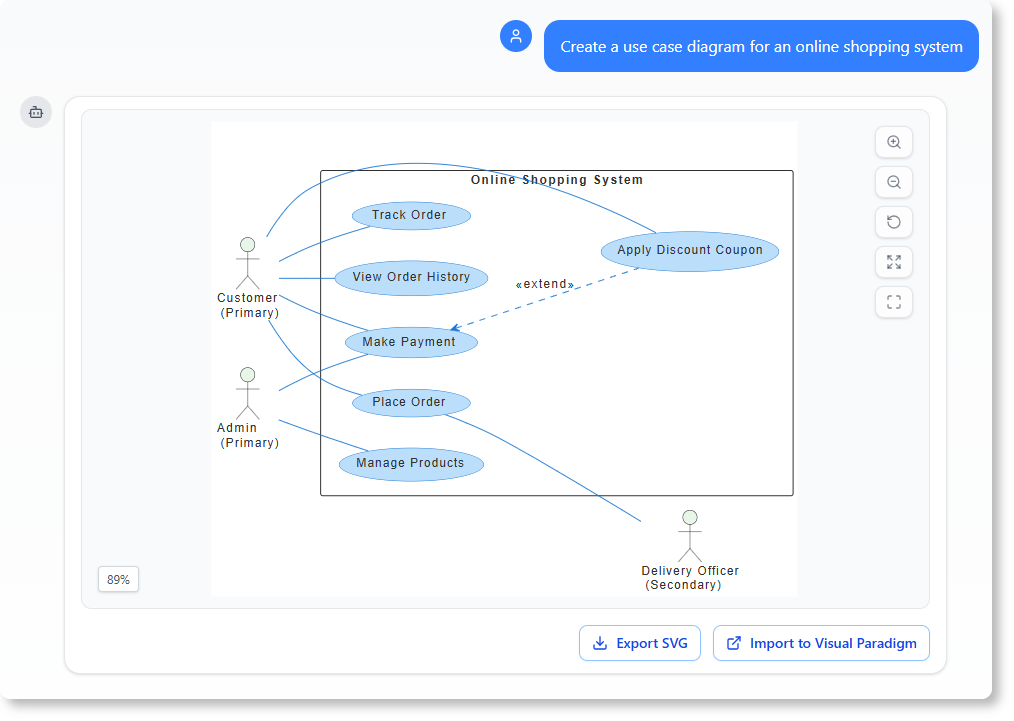
However, the true power of the chatbot lies in its Iterative Model Derivation capability. Software design is rarely a "one-and-done" process; it requires refinement.
Through Iterative Model Derivation, the chatbot maintains the context of your initial prompt within the same conversation. If you need to adjust the flow, you don't start from scratch. You can simply ask follow-up questions or provide new constraints—such as, "Add a step for database rollback if the payment fails," or "Include an authentication service interaction." The AI instantly updates the sequence diagram. This iterative approach ensures that the content between all generated models remains strictly coherent, logically consistent, and perfectly aligned with your evolving requirements.
While the AI Diagramming Chatbot offers a highly intuitive, conversational approach to model generation, the broader Visual Paradigm platform supports similar automated workflows directly within its modeling environment. These features empower teams to generate dynamic behavior models directly from structured text.
Every detailed use case contains a "Flow of Events"—a step-by-step textual description of the interaction between the actor and the system. Visual Paradigm can parse this specific flow of events and instantly generate a corresponding sequence diagram. This eliminates the need to manually map text steps to UML lifelines and messages, ensuring the diagram is a 1:1 visual representation of the documented flow.
Use cases often contain multiple scenarios, including the "happy path," alternate flows, and exception handling. Visual Paradigm’s ecosystem allows you to generate both sequence and activity diagrams directly from these use case scenarios. While sequence diagrams are perfect for detailing the chronological message passing between objects, the auto-generated activity diagrams provide a complementary view of the control and data flow. This dual-diagram generation offers a complete visualization of the system's dynamic behavior.
Generating diagrams quickly is only half the battle; maintaining them as the project evolves is the real challenge. This is where Visual Paradigm’s commitment to traceability shines.
Because the AI Diagramming Chatbot and the platform's automated workflows generate models from a centralized source of truth (the use case), the ecosystem maintains strict traceability across your project. You can easily link use cases to their underlying sequence diagrams, and subsequently to the underlying classes and interaction patterns that implement them.
This end-to-end traceability offers massive benefits:
Impact Analysis: If a use case changes, you can instantly trace which sequence diagrams, classes, and interaction patterns need to be updated.
Consistency: It ensures that the high-level business requirements (use cases) are perfectly synchronized with the low-level technical design (sequence diagrams and classes).
Onboarding: New team members can trace the lineage of a feature from a simple text description down to the exact class interactions, drastically reducing the learning curve.
To illustrate how Visual Paradigm's AI Diagramming Chatbot and its broader ecosystem work in practice, let's walk through a concrete example: placing an online order. We'll trace the journey from a textual use case all the way to sequence diagrams, class models, and activity diagrams.
Use Case Name: Place an Online Order
Actor: Customer
Preconditions: The customer is logged in and has at least one item in the shopping cart.
Flow of Events (Main Success Scenario):
Customer selects items and initiates checkout.
System validates the shopping cart contents.
System checks inventory availability for all items.
System prompts the customer to enter payment details.
Customer submits payment details.
System authorizes payment via the Payment Gateway.
System reserves the items in inventory.
System creates the order record.
System sends an order confirmation notification.
System displays the order confirmation to the customer.
Alternate Flow — Payment Declined:
6a. Payment Gateway declines the transaction.
6b. System notifies the customer of the failure.
6c. Customer resubmits with updated payment details.
6d. Return to step 6.
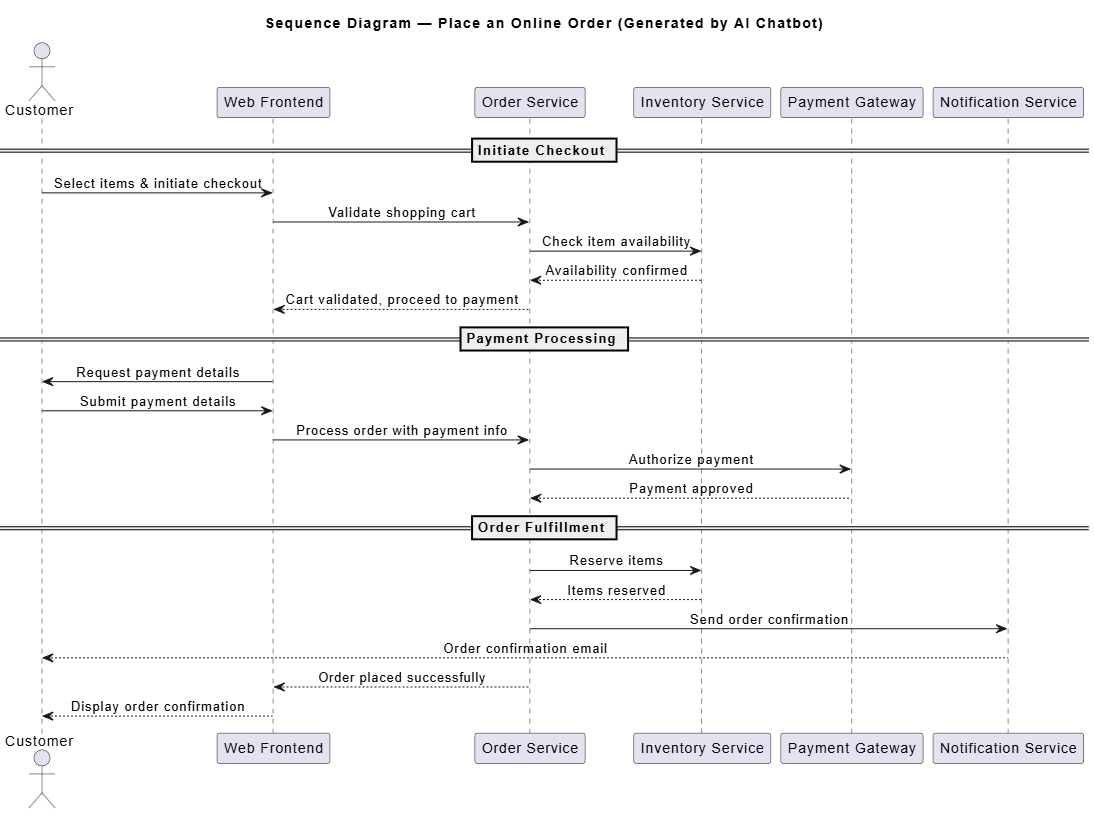
The user provides the use case above to the AI Diagramming Chatbot. The chatbot parses the flow of events, identifies the actors and system components (lifelines), and generates an initial sequence diagram:
@startuml
title Sequence Diagram — Place an Online Order (Generated by AI Chatbot)

skinparam sequenceMessageAlign center
skinparam responseMessageBelowArrow true

actor Customer
participant "Web Frontend" as Frontend
participant "Order Service" as Order
participant "Inventory Service" as Inventory
participant "Payment Gateway" as Payment
participant "Notification Service" as Notify

== Initiate Checkout ==
Customer -> Frontend: Select items & initiate checkout
Frontend -> Order: Validate shopping cart
Order -> Inventory: Check item availability
Inventory --> Order: Availability confirmed
Order --> Frontend: Cart validated, proceed to payment

== Payment Processing ==
Frontend -> Customer: Request payment details
Customer -> Frontend: Submit payment details
Frontend -> Order: Process order with payment info
Order -> Payment: Authorize payment
Payment --> Order: Payment approved

== Order Fulfillment ==
Order -> Inventory: Reserve items
Inventory --> Order: Items reserved
Order -> Notify: Send order confirmation
Notify --> Customer: Order confirmation email
Order --> Frontend: Order placed successfully
Frontend --> Customer: Display order confirmation

@enduml
Key Concept — Model Coherence: Notice how every message in the sequence diagram maps directly to a step in the flow of events. The AI ensures that the lifelines (Web Frontend, Order Service, Inventory Service, etc.) are consistent, and no step in the use case is omitted.
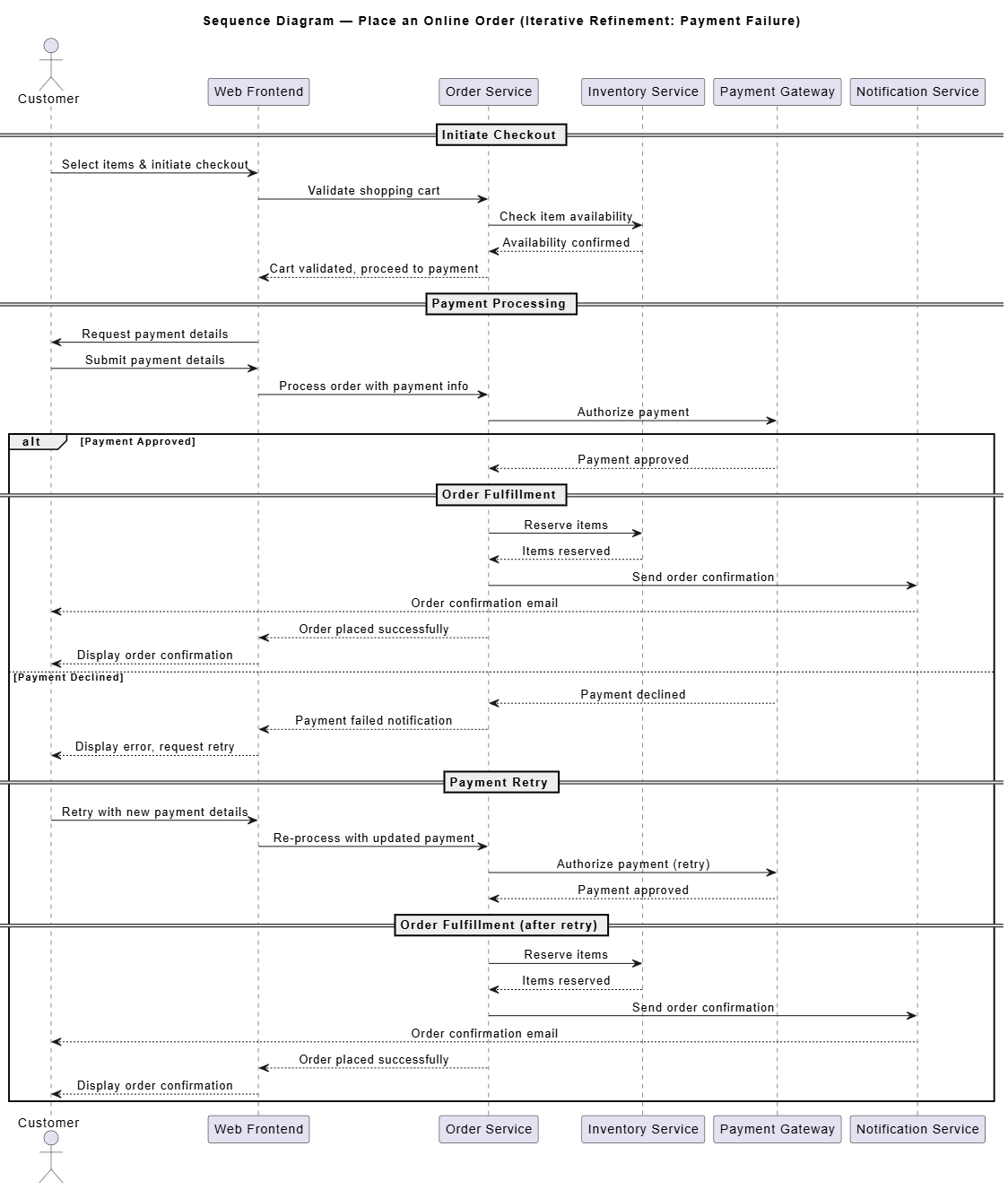
The initial diagram only covers the happy path. Using the Iterative Model Derivation capability, the user asks a follow-up question within the same conversation:
"What happens if the payment is declined? Add an alternate flow where the customer can retry with new payment details."
The chatbot retains full context of the original diagram and generates a refined version:
@startuml
title Sequence Diagram — Place an Online Order (Iterative Refinement: Payment Failure)

skinparam sequenceMessageAlign center
skinparam responseMessageBelowArrow true

actor Customer
participant "Web Frontend" as Frontend
participant "Order Service" as Order
participant "Inventory Service" as Inventory
participant "Payment Gateway" as Payment
participant "Notification Service" as Notify

== Initiate Checkout ==
Customer -> Frontend: Select items & initiate checkout
Frontend -> Order: Validate shopping cart
Order -> Inventory: Check item availability
Inventory --> Order: Availability confirmed
Order --> Frontend: Cart validated, proceed to payment

== Payment Processing ==
Frontend -> Customer: Request payment details
Customer -> Frontend: Submit payment details
Frontend -> Order: Process order with payment info
Order -> Payment: Authorize payment

alt Payment Approved
    Payment --> Order: Payment approved

    == Order Fulfillment ==
    Order -> Inventory: Reserve items
    Inventory --> Order: Items reserved
    Order -> Notify: Send order confirmation
    Notify --> Customer: Order confirmation email
    Order --> Frontend: Order placed successfully
    Frontend --> Customer: Display order confirmation

else Payment Declined
    Payment --> Order: Payment declined
    Order --> Frontend: Payment failed notification
    Frontend --> Customer: Display error, request retry

    == Payment Retry ==
    Customer -> Frontend: Retry with new payment details
    Frontend -> Order: Re-process with updated payment
    Order -> Payment: Authorize payment (retry)
    Payment --> Order: Payment approved

    == Order Fulfillment (after retry) ==
    Order -> Inventory: Reserve items
    Inventory --> Order: Items reserved
    Order -> Notify: Send order confirmation
    Notify --> Customer: Order confirmation email
    Order --> Frontend: Order placed successfully
    Frontend --> Customer: Display order confirmation
end

@enduml
Key Concept — Iterative Derivation: The chatbot did not discard the original model. It extended it by introducing a PlantUML alt/else combined fragment, preserving every element from the happy path while weaving in the exception scenario. The coherence between the original and refined models is maintained automatically.
One of the most powerful aspects of Visual Paradigm's ecosystem is traceability. The lifelines in the sequence diagram above map directly to classes in the system design. The platform can generate or link to a class diagram that underpins these interactions:

@startuml
title Class Diagram — Order System (Traced from Sequence Diagram)

class OrderService {
    +validateCart(cartId: String): boolean
    +createOrder(cartId: String, paymentInfo: PaymentInfo): Order
    +processPayment(order: Order): PaymentResult
    +reserveAndConfirm(order: Order): void
}

class PaymentGateway {
    +authorizePayment(amount: Decimal, cardInfo: CardInfo): PaymentResult
    +refundPayment(transactionId: String): boolean
}

class InventoryService {
    +checkAvailability(itemId: String, qty: int): boolean
    +reserveItems(itemId: String, qty: int): boolean
    +releaseItems(itemId: String, qty: int): void
}

class NotificationService {
    +sendOrderConfirmation(order: Order, email: String): void
    +sendPaymentFailure(order: Order, email: String): void
}

class Order {
    -orderId: String
    -items: List<OrderItem>
    -status: OrderStatus
    -totalAmount: Decimal
    +calculateTotal(): Decimal
}

class PaymentInfo {
    -cardNumber: String
    -expiryDate: String
    -cvv: String
}

class PaymentResult {
    -transactionId: String
    -approved: boolean
    -errorCode: String
}

OrderService --> PaymentGateway : «uses»\nauthorizePayment()
OrderService --> InventoryService : «uses»\ncheckAvailability()\nreserveItems()
OrderService --> NotificationService : «uses»\nsendOrderConfirmation()
OrderService --> Order : «creates»
OrderService ..> PaymentInfo : «depends»
OrderService ..> PaymentResult : «depends»

@enduml
Key Concept — Traceability in Action: Every method call in the sequence diagrams (e.g., Authorize payment, Check item availability, Send order confirmation) can be traced back to a specific method on a specific class. If the PaymentGateway.authorizePayment() signature changes, the impact analysis tool flags the sequence diagram messages and any related test cases automatically.
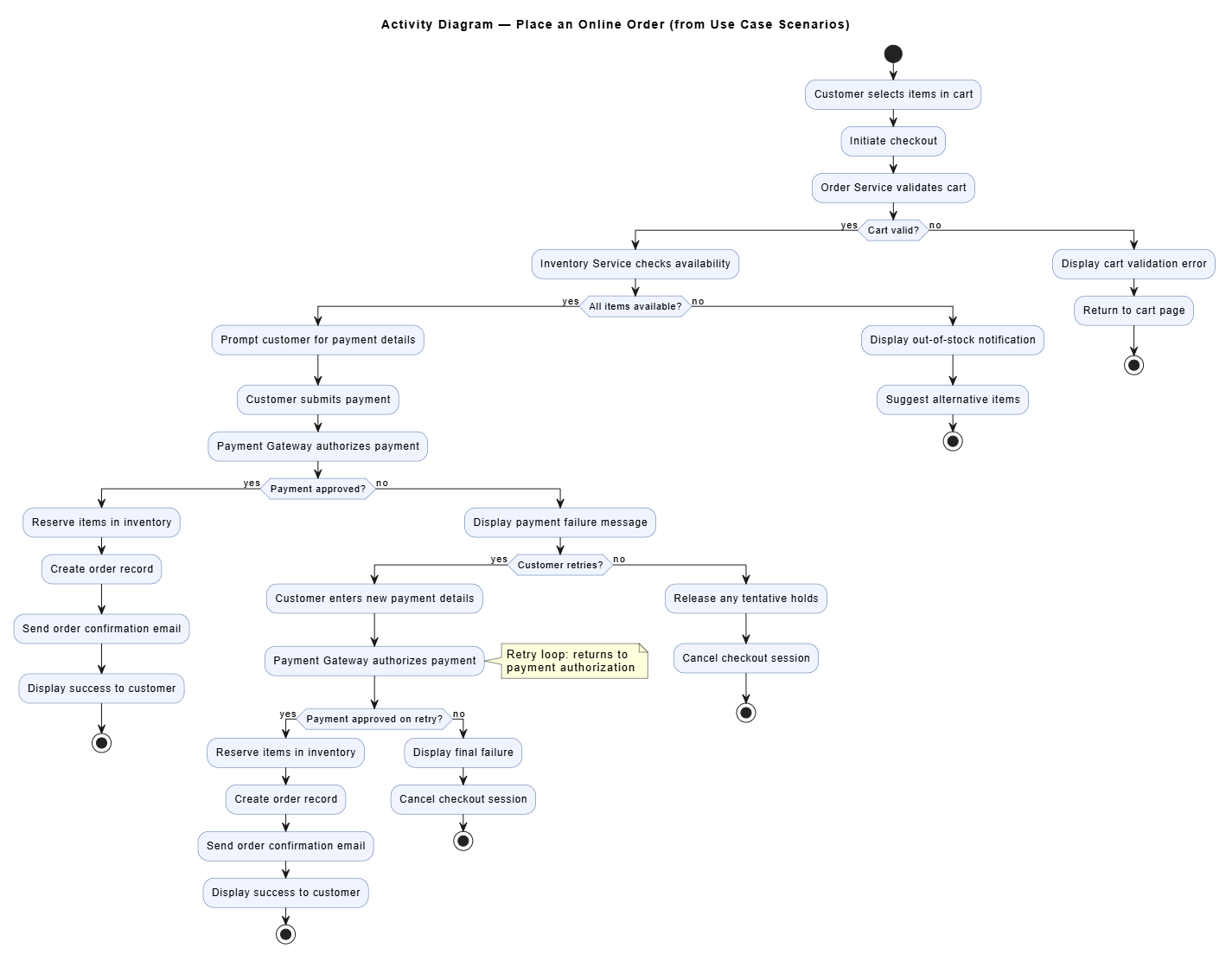
Finally, Visual Paradigm can generate an activity diagram directly from the use case scenarios, providing a complementary, flow-oriented view of the same process:
@startuml
title Activity Diagram — Place an Online Order (from Use Case Scenarios)

skinparam ActivityBackgroundColor #f0f4ff
skinparam ActivityBorderColor #4a6fa5

start

:Customer selects items in cart;
:Initiate checkout;

:Order Service validates cart;

if (Cart valid?) then (yes)
    :Inventory Service checks availability;

    if (All items available?) then (yes)
        :Prompt customer for payment details;
        :Customer submits payment;
        :Payment Gateway authorizes payment;

        if (Payment approved?) then (yes)
            :Reserve items in inventory;
            :Create order record;
            :Send order confirmation email;
            :Display success to customer;
            stop
        else (no)
            :Display payment failure message;

            if (Customer retries?) then (yes)
                :Customer enters new payment details;
                :Payment Gateway authorizes payment;
                note right
                    Retry loop: returns to
                    payment authorization
                end note
                if (Payment approved on retry?) then (yes)
                    :Reserve items in inventory;
                    :Create order record;
                    :Send order confirmation email;
                    :Display success to customer;
                    stop
                else (no)
                    :Display final failure;
                    :Cancel checkout session;
                    stop
                endif
            else (no)
                :Release any tentative holds;
                :Cancel checkout session;
                stop
            endif
        endif

    else (no)
        :Display out-of-stock notification;
        :Suggest alternative items;
        stop
    endif
else (no)
    :Display cart validation error;
    :Return to cart page;
    stop
endif

@enduml
Key Concept — Dual Diagram Generation: The activity diagram and the sequence diagram are generated from the same source of truth (the use case). The activity diagram emphasizes decision points and control flow (if/else branches, loops), while the sequence diagram emphasizes message passing and temporal ordering between objects. Together, they provide a complete picture of the system's dynamic behavior.
| Concept | What It Means | Where It Appears Above |
|---|---|---|
| Flow of Events Parsing | Textual use case steps are automatically converted into diagram elements | Step 1: Initial Sequence Diagram |
| Iterative Model Derivation | Follow-up prompts refine diagrams in-context without losing prior structure | Step 2: Adding Payment Failure |
| Coherence | All generated models remain logically consistent with each other | Steps 1 → 2 → 3 → 4 |
| Traceability | Lifelines map to classes; messages map to methods; changes propagate | Step 3: Class Diagram |
| Scenario-Based Generation | Multiple scenarios (happy path, exceptions) drive both sequence and activity diagrams | Steps 2 & 4 |
| Combined Fragments | UML constructs like alt/else model conditional behavior cleanly |
Step 2: alt Payment Approved / Payment Declined |
This end-to-end example demonstrates how Visual Paradigm's AI Chatbot and platform ecosystem transform a simple textual use case into a web of coherent, traceable, and iteratively refined models — bridging the gap between business requirements and technical design with unprecedented speed and accuracy.
The transition from requirements to technical design no longer has to be a bottleneck. By leveraging the AI Diagramming Chatbot and its Iterative Model Derivation capabilities, teams can generate and refine sequence diagrams through natural conversation, ensuring absolute coherence across their models.
Coupled with Visual Paradigm’s automated workflows for Flow of Events and Use Case Scenarios, and backed by rigorous traceability linking requirements to classes and interaction patterns, Visual Paradigm provides a holistic, intelligent ecosystem. It allows software teams to spend less time drawing boxes and arrows, and more time engineering exceptional software.

