
When our enterprise architecture consulting team first heard about combining ArchiMate modeling with AI-powered tooling, we were cautiously optimistic. Like many EA practitioners, we've seen promising frameworks struggle in practice—burdened by steep learning curves, inconsistent adoption, and the eternal challenge of keeping models aligned with rapidly evolving business needs.
Over the past six months, we put this integrated approach to the test across three client engagements: a financial services modernization, a healthcare digital transformation, and a retail cloud migration. What follows is our candid, experience-based guide to leveraging ArchiMate with AI assistance—not as theoretical best practices, but as lessons learned from the trenches. We'll share what worked, what surprised us, and how you can adapt these patterns to your own context, complete with the visual examples that helped our stakeholders finally "see" the architecture.
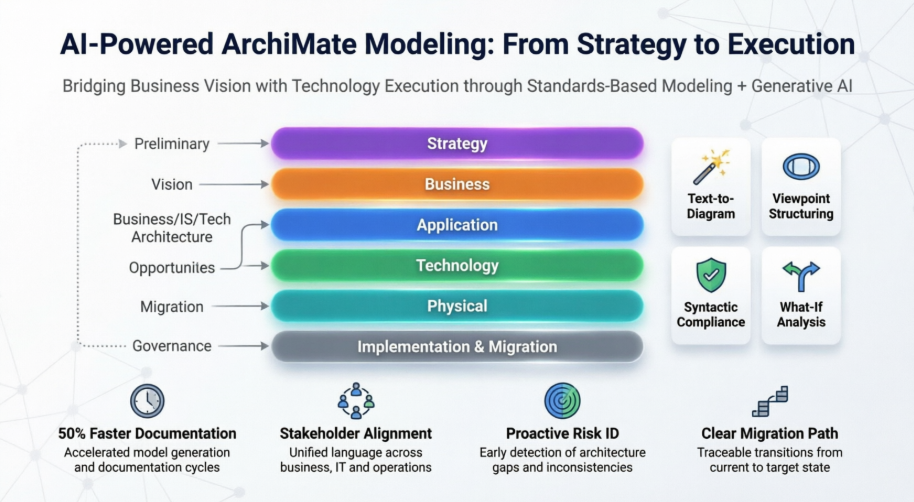
In our work, ArchiMate has proven to be far more than just another modeling notation. It's a shared vocabulary that helps diverse stakeholders—business leaders, solution architects, infrastructure teams—finally speak the same language. What resonated most with our clients was how ArchiMate makes abstract architectural concepts tangible through visual representations.
We found ArchiMate particularly valuable because it:
Provides a common language for describing how various parts of the enterprise are constructed and how they operate, including business processes, organizational structures, information flows, IT systems, and technical and physical infrastructures.
Helps stakeholders design, assess and communicate changes within and between architecture domains, as well as examine the potential consequences and impact of decisions throughout an organization.
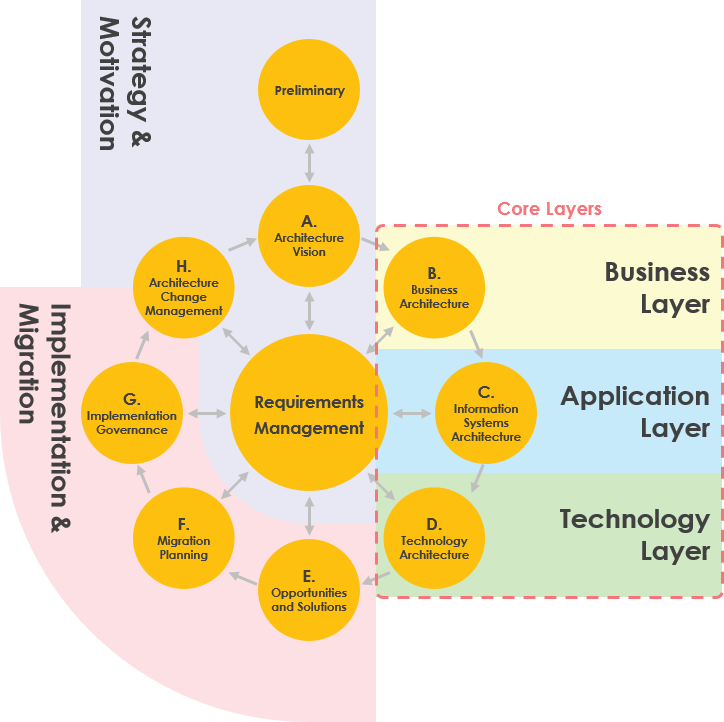
One of our initial concerns was whether ArchiMate would add overhead to our existing TOGAF-based delivery process. The opposite proved true. The visual mapping between ArchiMate layers and TOGAF ADM phases gave our teams a practical "cheat sheet" for knowing which elements to model at each stage.
Core Layers in Action
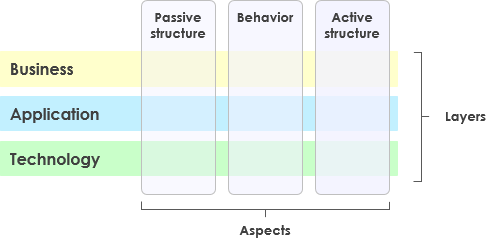
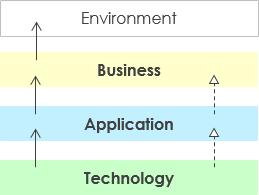
The Business, Application, and Technology Layers became our foundation for documenting the "what" and "how" of architecture. We appreciated how the layered view naturally supports service-oriented thinking—higher layers consuming services from lower layers creates an intuitive dependency model that resonated with both technical and non-technical stakeholders.
The Full Framework: ArchiMate 3 Expansion
When we adopted ArchiMate 3, the addition of Strategy and Physical layers filled critical gaps we'd previously worked around with custom extensions.
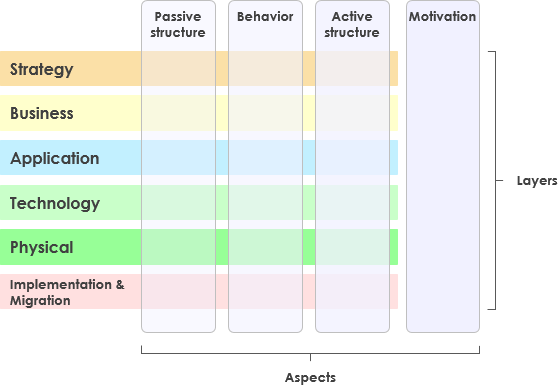
The six-layer structure (Strategy, Business, Application, Technology, Physical, Implementation & Migration) gave us end-to-end traceability from business intent to physical deployment. Color-coding by layer made complex diagrams instantly more readable during stakeholder reviews.
Understanding Aspects: The "Who, How, What" Framework
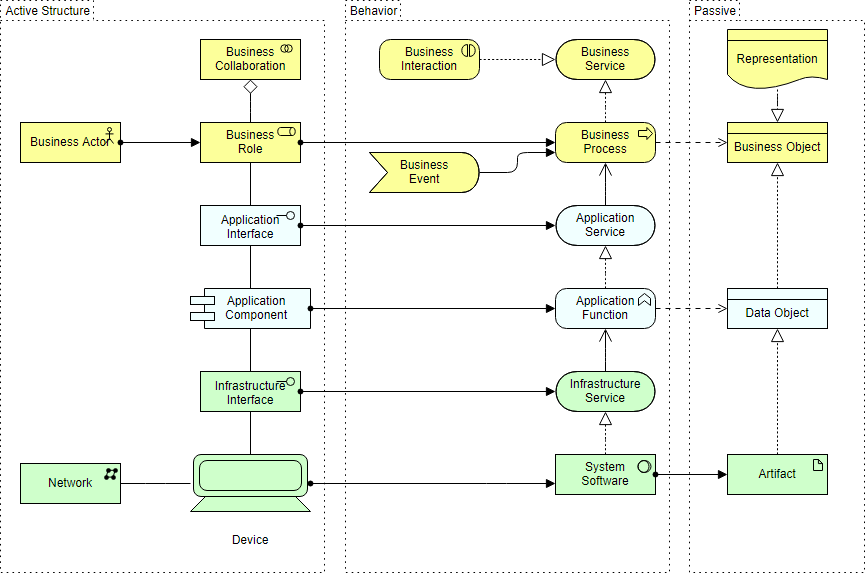
The three-aspect model (Active Structure, Behavior, Passive Structure) became a powerful mental model for our team. We started every modeling session by asking: "Are we modeling who does it, how it's done, or what it acts upon?" This simple discipline dramatically reduced modeling errors and improved consistency.
Motivation Extension: Connecting the "Why"
Before using the Motivation Extension, we struggled to keep business rationale connected to technical designs. Modeling drivers, goals, and principles as first-class ArchiMate elements changed that. During one engagement, tracing a regulatory compliance requirement through motivation elements to specific technology controls became our most compelling artifact for audit discussions.
Our biggest win with ArchiMate hasn't been technical precision—it's been stakeholder alignment. The framework's built-in support for viewpoints lets us tailor the same underlying model for different audiences without maintaining separate documents.
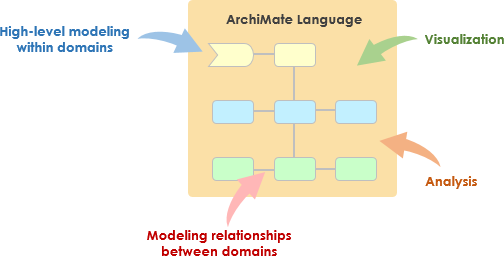
In practice, this meant:
Capturing stakeholder concerns early in motivation elements
Addressing concerns by refining requirements within the model
Creating views that show how concerns will be addressed
Visualizing trade-offs when requirements conflict
One CIO told us: "For the first time, I can see how my infrastructure investment decisions impact customer-facing processes." That's the value ArchiMate delivered.
Based on our engagements, here's how we now approach the integration:
The Business layer became our starting point for every engagement. Modeling products, services, processes, and actors helped business stakeholders recognize their operations in the architecture.
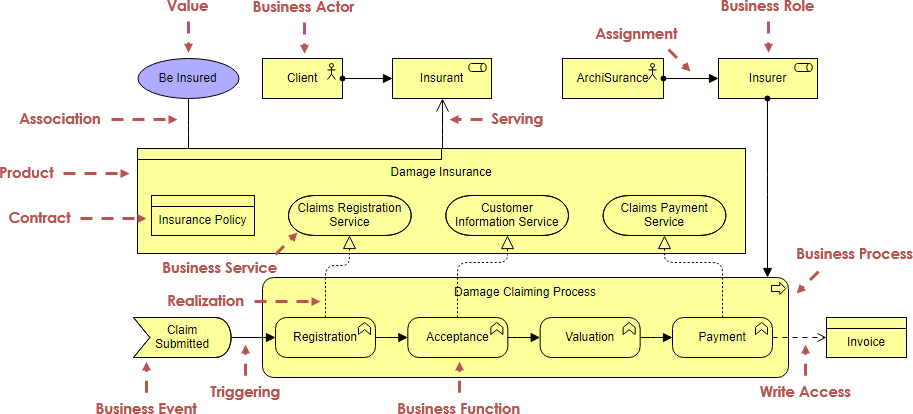
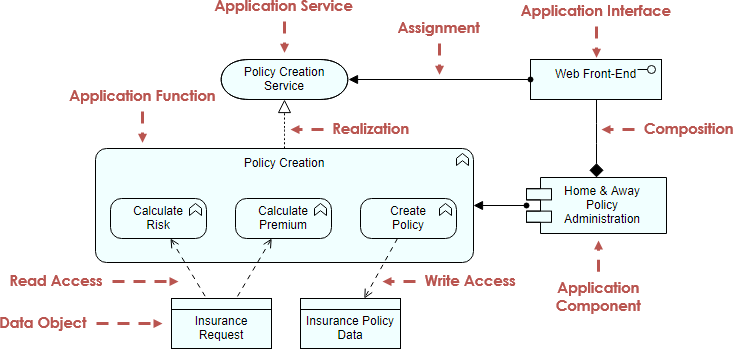
We used the Application layer to cut through the "application sprawl" many clients face. Showing which applications provide which services—and which business processes consume them—revealed duplication and integration gaps we hadn't fully appreciated.
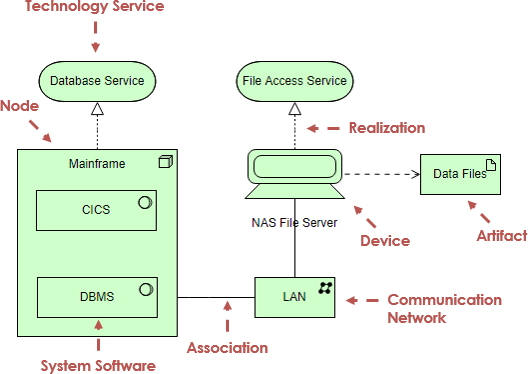
The Technology layer kept our designs honest. By explicitly modeling infrastructure services, we avoided the common pitfall of designing "cloud-native" architectures that still depended on on-premise constraints.
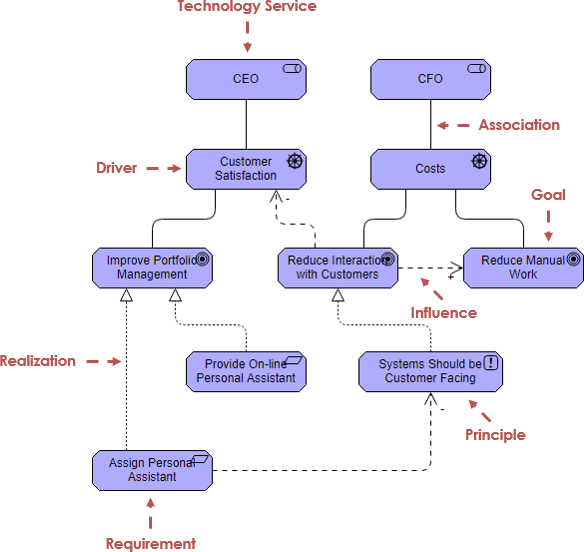
Modeling stakeholders, drivers, goals, and principles wasn't just documentation—it was strategy communication. When we could visually connect "reduce customer onboarding time by 50%" (goal) to "implement API gateway" (application component) to "deploy Kubernetes cluster" (technology node), executive sponsorship became much easier to secure.
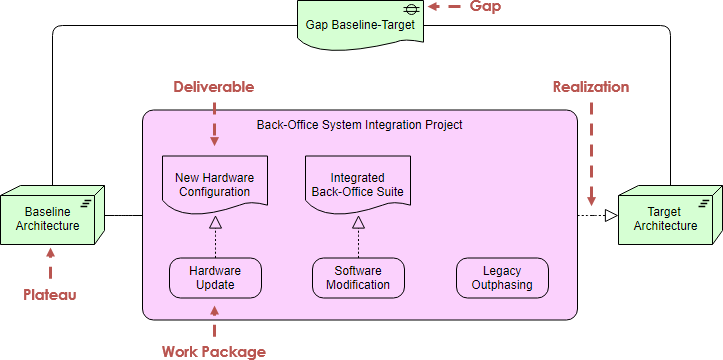
This extension transformed our migration planning. Instead of static Gantt charts, we modeled work packages, plateaus, and deliverables as ArchiMate elements. Stakeholders could see not just when changes would happen, but what architectural state each phase would achieve.
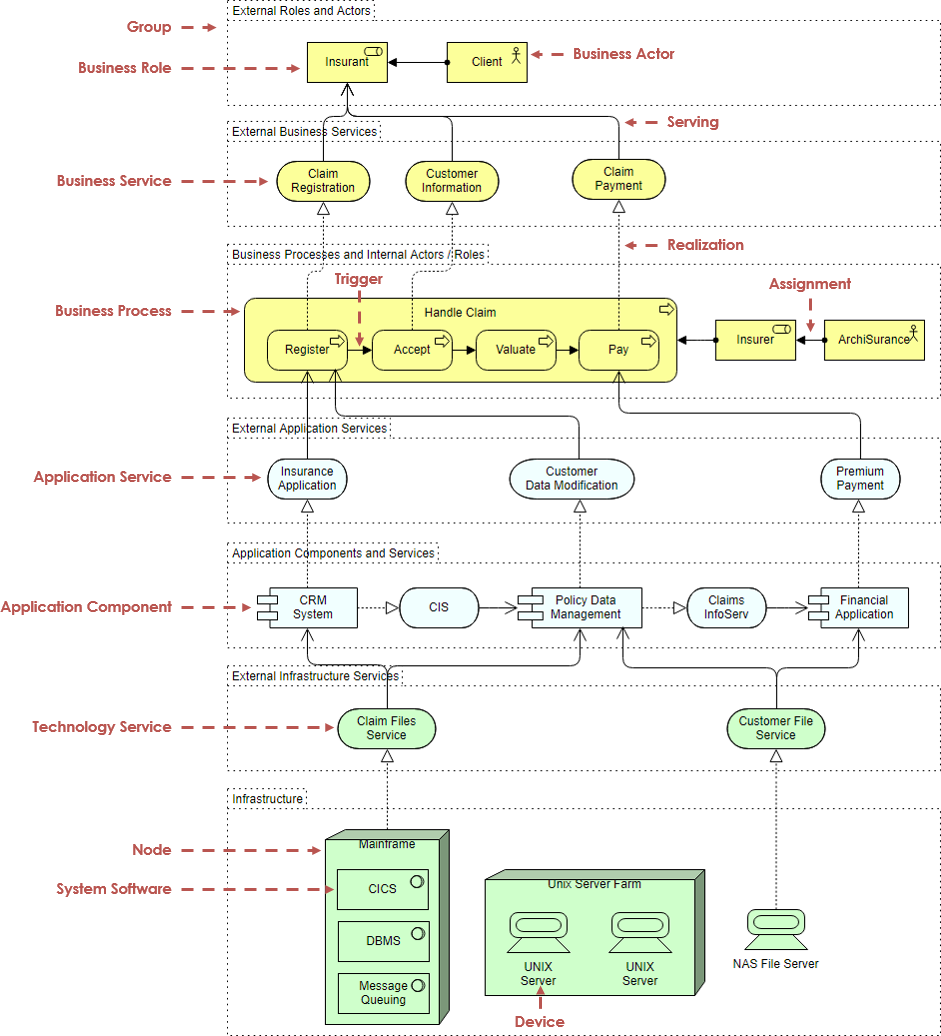
This comprehensive view helped one client understand how a new digital product would flow from strategy through to infrastructure.
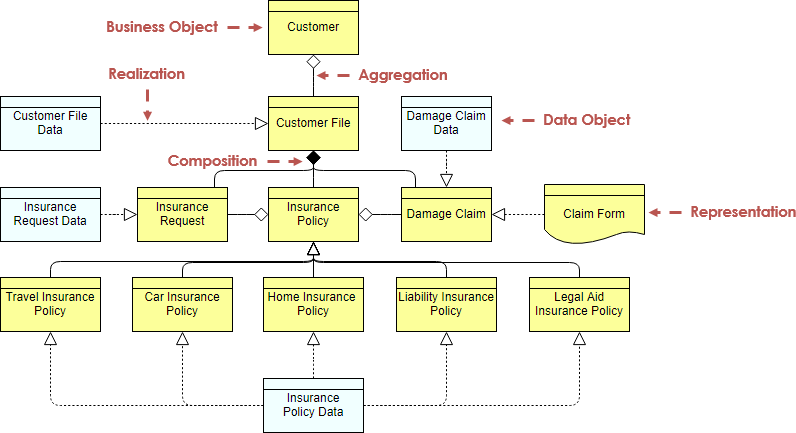
We used this pattern to align business data definitions with application data models and database schemas—critical for data governance initiatives.
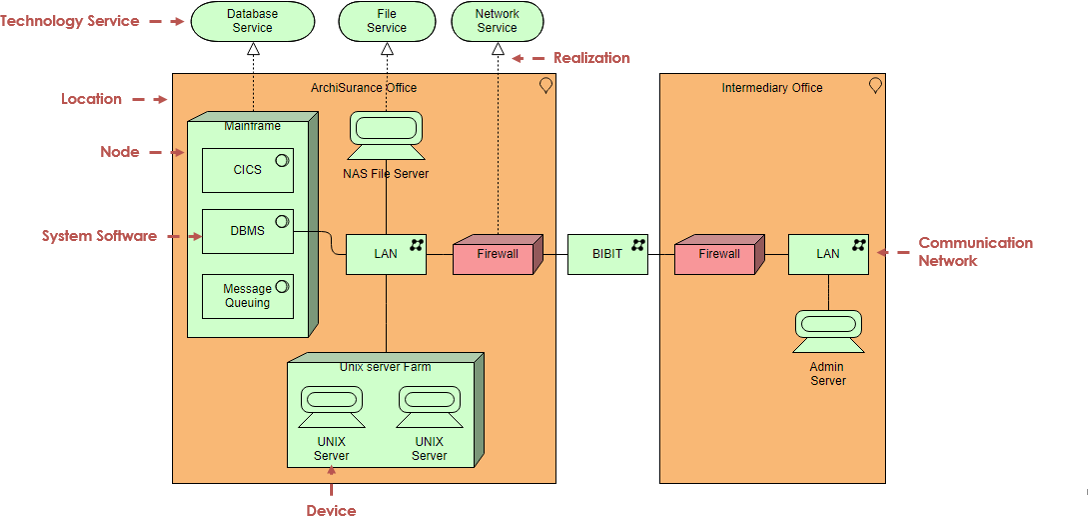
For cloud migration planning, this infrastructure view helped infrastructure teams understand exactly which components needed re-architecting versus lift-and-shift.
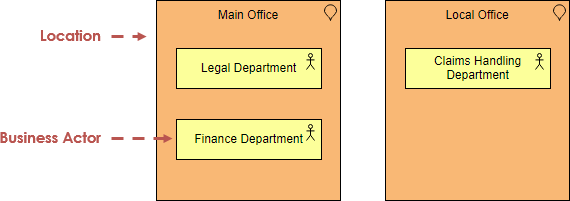
Location Modeling
Showing how departments distribute across physical locations helped a client optimize their hybrid work infrastructure strategy.
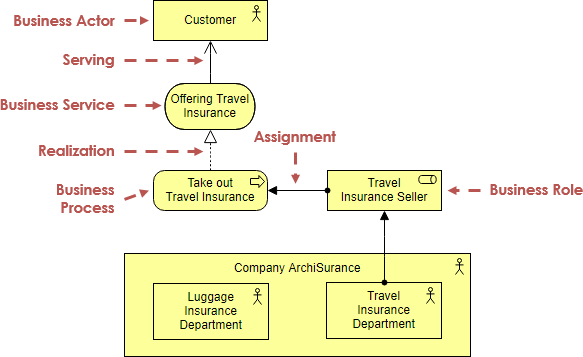
Business Actor Clarity
Modeling actors and roles clarified ownership and accountability during a post-merger integration.
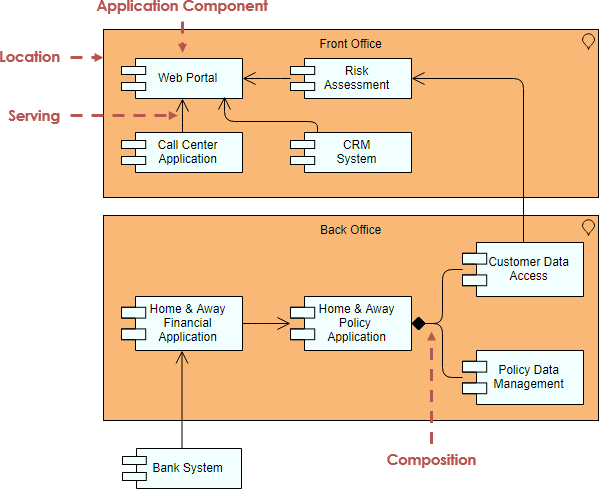
Application Cooperation
This view revealed hidden dependencies between applications that were causing production incidents.
We evaluated several ArchiMate tools and selected Visual Paradigm Enterprise for our engagements. Here's what mattered most in practice:
We standardized on this workflow for new ArchiMate diagrams:
Start with a new project in Visual Paradigm
Create a new ArchiMate Diagram via Diagram > New
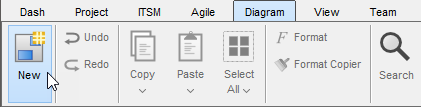
Select ArchiMate Diagram and proceed
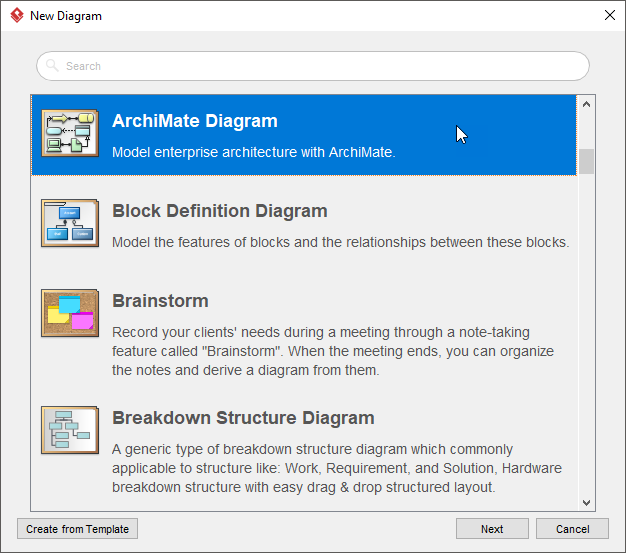
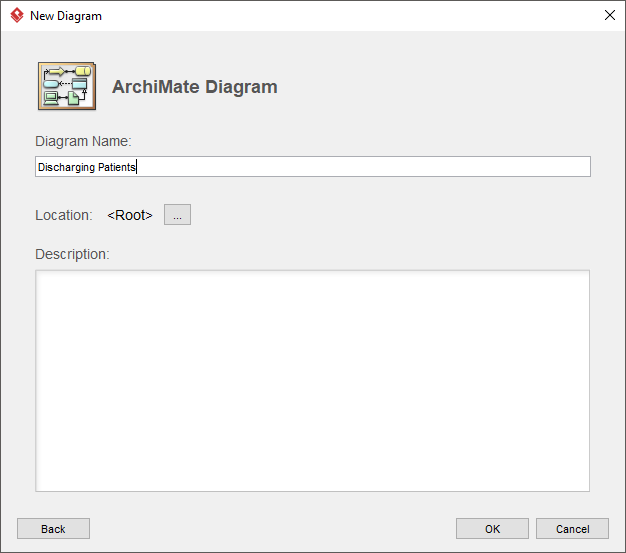
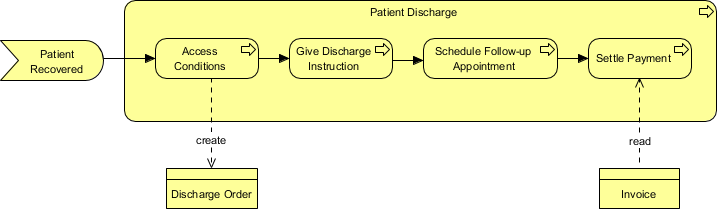
Name your diagram meaningfully (e.g., Discharging Patients)
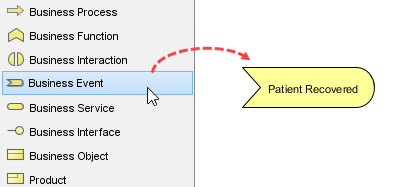
Begin modeling with business events, using the Resource Catalog to maintain syntactic correctness
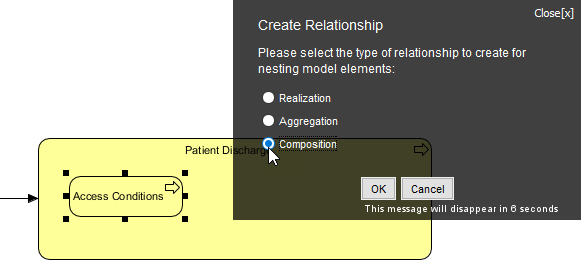
Use composition relationships to structure complex processes
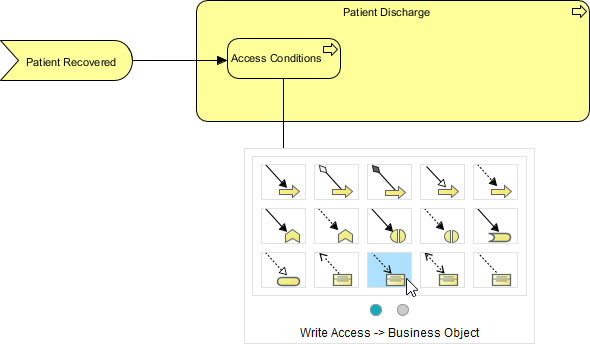
Model data objects with appropriate access types (read/write)
Iterate and refine, resizing elements for clarity
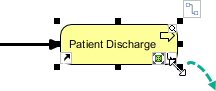
Finalize with clear naming and connector labels
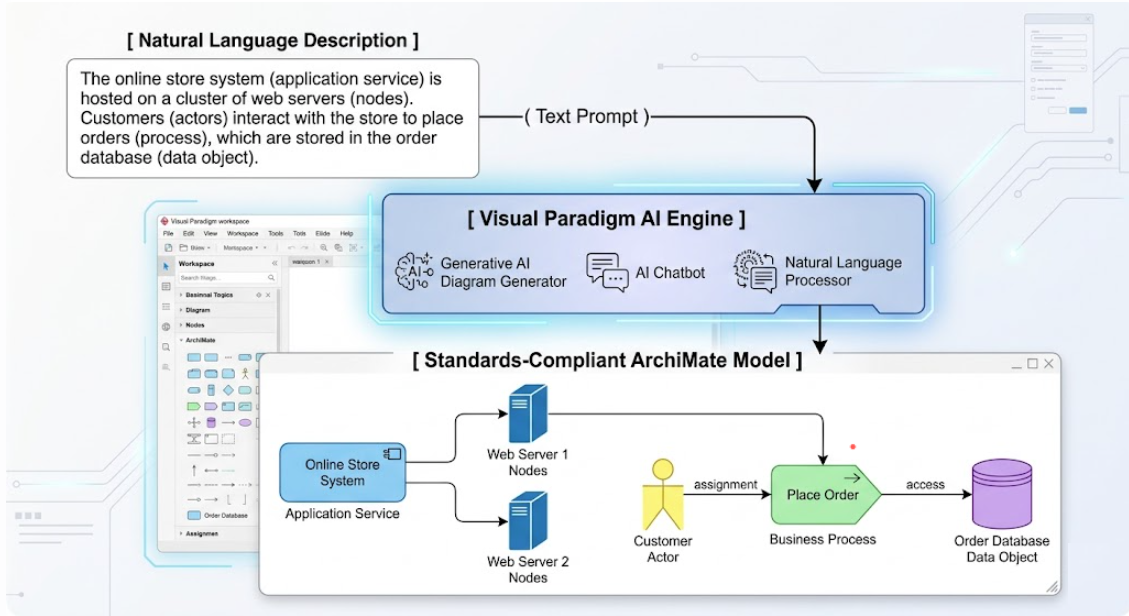
The integration of generative AI into ArchiMate modeling was the surprise breakthrough of our evaluation. Here's how we actually used it:
What Worked Well
Instant Text-to-Diagram
We'd start sessions with prompts like: "Model a cloud migration strategy for a legacy retail billing system with phased decommissioning." The AI generated a structurally sound baseline in seconds, which we then refined. This cut initial modeling time by ~60%.
Automated Viewpoint Structuring
Selecting a viewpoint (e.g., "Technology Usage") before generation ensured the AI only included relevant elements. No more manually filtering complex models for executive reviews.
Syntactic Compliance as a Safety Net
The AI's built-in validation caught relationship errors we'd have missed—like using assignment where realization was required. This reduced rework during peer reviews.
Rapid "What-If" Exploration
We'd ask: "Show the impact of retiring the legacy claims application on business processes and technology components." The AI-generated impact analysis became a powerful risk discussion tool.
Open Visual Paradigm Desktop
Navigate to Tools > AI Diagram
Select the appropriate ArchiMate Viewpoint
Enter a detailed, context-rich prompt
Review and refine the generated model
Pro tip: The more specific your prompt about layers, relationships, and constraints, the better the output.
After testing this approach across multiple engagements, our conclusion is clear: ArchiMate, especially when enhanced with AI-powered tooling, has matured from a specialized notation into a practical enabler for enterprise transformation.
What makes this combination powerful isn't just technical capability—it's the human impact. When stakeholders can see how strategy connects to execution, when architects can explore alternatives without manual redrawing, when migration plans show dependencies rather than just listing tasks, architecture becomes a catalyst for action rather than a documentation exercise.
Our advice for teams considering this approach:
Start with the problem, not the tool: Use ArchiMate to solve specific alignment or communication challenges you're facing today
Invest in viewpoint discipline: The real value emerges when you consistently tailor models for different audiences
Embrace AI as a co-pilot, not a replacement: Let automation handle syntax and structure; focus your expertise on strategy and trade-offs
Iterate visibly: Share evolving models early and often—Archimate's visual nature makes feedback cycles faster and more productive
Measure what matters: Track stakeholder comprehension, decision velocity, and risk identification—not just model completeness
The organizations that will thrive in today's complex landscape aren't those with the most detailed architectures, but those that can align strategy, execution, and adaptation most effectively. ArchiMate with AI assistance gives you a practical path to get there.

