
When I first started working with Business Process Model and Notation (BPMN), I felt overwhelmed by the sheer number of symbols, rules, and variations. Like many newcomers, I tried to learn everything at once—and quickly hit a wall. It wasn’t until I discovered the Descriptive Modeling Subclass that things finally clicked.
This subclass is essentially the “core vocabulary” of BPMN. Think of it as the set of elements you’ll use in roughly 80% of real-world process diagrams. After spending months experimenting with these specific components across dozens of projects, I can confidently say that mastering this subset is the single most impactful step any aspiring process modeler can take. In this guide, I’m sharing my hands-on experience with each element—what works, what trips people up, and how to apply them effectively in practice. Whether you’re documenting an onboarding workflow, mapping a customer service process, or designing an approval chain, these are the building blocks you need to get right.
According to the BPMN, a proficient process modeler should be familiar with the following elements. Below, I break down each one based on my own modeling experience, including practical tips and common pitfalls I’ve encountered along the way.
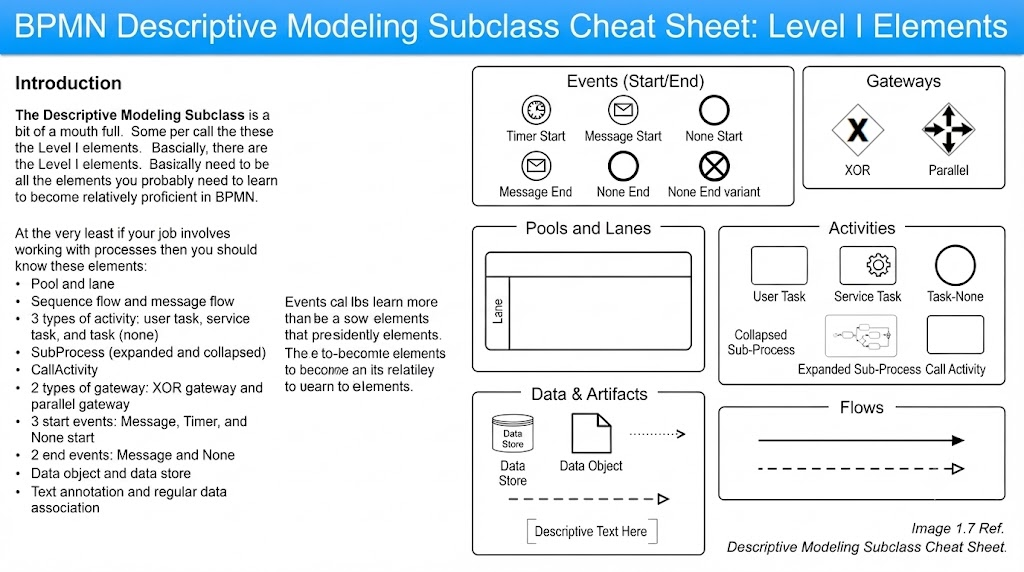
Events are the heartbeat of any BPMN diagram—they define when a process begins and when it concludes. Getting these right sets the tone for the entire model.
Start events trigger a process. The three types in this subclass are:
Message Start Event: Activates when a message is received from an external participant. My tip: Use this when your process depends on an external trigger, like receiving a purchase order via email or an API call. Avoid using it for internal triggers—that’s what None start events are for.
Timer Start Event: Fires at a specific time or on a recurring schedule. Real-world use case: I used this for a monthly compliance reporting process that automatically kicks off on the 1st of every month. Be precise with your timer expression; ambiguous timing is a top source of stakeholder confusion during reviews.
None Start Event: The default start event with no explicit trigger. When to use it: When the trigger is implicit or not relevant to the diagram’s audience. I default to this for internal processes where the “why” of initiation is well-understood by all stakeholders.
End events signify process completion:
Message End Event: Sends a message upon process completion. Pro tip: Always pair this with a corresponding Message Start Event in the receiving pool. I once spent hours debugging a process because the end event sent a message that no one was listening for—a classic mismatch.
None End Event: Simply marks the end of a flow with no additional action. This is your go-to for most terminal points in a process.
Practitioner Note: I always label my start and end events clearly in the diagram legend. Stakeholders unfamiliar with BPMN often confuse event types, and clear labeling prevents endless clarification meetings.
Activities represent work being performed. They are the “meat” of your process diagram, and choosing the right type communicates critical information about who or what is doing the work.
There are three primary task types in this subclass:
User Task: Work performed by a human actor. Best practice: Always assign a role or specific user group to user tasks. I’ve seen diagrams with unlabeled user tasks that led to three different departments claiming ownership—or worse, no one claiming ownership. Specify the actor directly on the task or via lane assignment.
Service Task: Automated work performed by a system or application. Key distinction: If a human is clicking buttons in a system, it’s a User Task. If the system performs the work autonomously (e.g., generating a report, updating a database), it’s a Service Task. This distinction matters for identifying automation opportunities later.
Task (None): A generic task with no specified type. When I use it: Only when the nature of the work is intentionally abstracted or when the audience doesn’t need to know whether it’s manual or automated. Otherwise, be specific—specificity drives clarity.
SubProcesses allow you to encapsulate complexity:
Expanded SubProcess: Shows all internal steps within the parent process. Use case: When the internal logic is critical to understanding the overall flow. I use expanded subprocesses during detailed design phases when developers need to see every step.
Collapsed SubProcess: Displays only the name, hiding internal details. My favorite feature: This keeps high-level diagrams clean while allowing stakeholders to drill down when needed. I always provide a separate detailed diagram linked to collapsed subprocesses so nothing is truly hidden.
CallActivities reference a global process or reusable task defined elsewhere. Why this matters: It eliminates duplication and ensures consistency. I once inherited a process library where the same “Approve Request” logic was modeled differently in 12 different diagrams. Refactoring those into a single CallActivity saved countless hours of maintenance. Caveat: Make sure your global processes are well-documented; a poorly documented CallActivity is worse than duplicated logic because the error propagates everywhere.
Gateways control the flow of execution—they are the decision points and synchronization mechanisms of your process. Misusing gateways is the #1 cause of logically flawed BPMN diagrams in my experience.
Used for exclusive decision-making: exactly one path is taken based on a condition.
Critical rule: Every outgoing sequence flow from an XOR gateway must have a condition label, except for exactly one default flow. I cannot stress this enough. Unlabeled XOR branches are the most common review comment I receive from auditors and business analysts.
Common mistake: Using XOR when multiple paths could legitimately be taken simultaneously. If two conditions can both be true, you need a Parallel Gateway, not XOR.
My checklist: Before finalizing any XOR gateway, I verify that (a) all conditions are mutually exclusive, (b) one default path exists, and (c) the conditions cover all possible scenarios.
Used to create or synchronize concurrent flows:
Diverging (Fork): Splits one flow into multiple parallel paths. All paths execute simultaneously.
Converging (Join): Waits for all incoming parallel paths to complete before proceeding.
Pitfall I’ve learned the hard way: Never use a Parallel Gateway as a decision point. I once modeled a process where a Parallel Gateway was used to split based on conditions—this created phantom parallel executions that didn’t match reality. Parallel Gateways have no conditions; they simply split or join.
Synchronization warning: Ensure every diverging Parallel Gateway has a matching converging Parallel Gateway. Missing joins create “orphaned” tokens that never resolve—a subtle bug that can cause processes to hang indefinitely in execution engines.
These elements provide the organizational scaffolding that makes complex processes readable and accountable.
Pool: Represents a major participant (typically an organization or external entity). Rule of thumb: One pool per organizational boundary. Messages flow between pools; sequence flows do not cross pool boundaries.
Lane: Subdivides a pool to show roles, departments, or systems within that participant. My approach: I organize lanes by role rather than by individual person. Roles are stable; people change. A lane labeled “Accounts Payable Clerk” will outlast any specific employee.
Layout tip: Place the initiating participant’s pool on the left or top. Readers naturally follow left-to-right, top-to-bottom flow. Violating this convention forces cognitive effort that compounds in complex diagrams.
Sequence Flow (solid line): Connects elements within the same pool. Defines the order of execution.
Message Flow (dashed line): Connects elements between pools. Represents communication, not control flow.
The cardinal sin: Drawing a sequence flow across pool boundaries. This violates BPMN semantics and will be flagged in any formal review. If two pools need to interact, use a Message Flow with appropriate Message Start/End Events.
Labeling advice: Always label message flows with the content being exchanged (“Purchase Order,” “Approval Notification”). Unlabeled message flows tell stakeholders nothing about what information is actually moving between participants.
Data elements and annotations transform a skeletal process diagram into a rich, informative artifact that serves multiple audiences.
Data Object: Represents information consumed or produced by an activity. Association rule: Connect data objects to activities using Data Association arrows (dotted lines). I place data objects near the activities that use them and label them with the actual data name (“Customer Application Form,” “Credit Score Report”) rather than generic terms like “Data” or “Information.”
Data Store: Represents persistent storage (database, file system, repository). Distinction from Data Object: Data Objects are transient; Data Stores persist beyond a single process instance. If the data survives after the process ends, it belongs in a Data Store.
Stakeholder value: Adding data objects was the single change that made my process diagrams useful to IT teams. Without them, developers had to reverse-engineer data requirements from task descriptions. With them, data mapping became straightforward.
Text Annotation: Free-form notes attached to any element via an Association connector. Best practice: Use annotations sparingly and purposefully. Good annotations explain why, not what. The diagram should show what; annotations should clarify exceptions, business rules, or regulatory references that don’t fit neatly into standard BPMN elements.
What I avoid: Annotations that restate what the diagram already shows (“This task approves the request” next to an “Approve Request” task). These add visual noise without value.
Data Association: The dotted-line connector linking data objects/stores to activities. Direction matters: input associations point toward the activity; output associations point away. Bidirectional associations indicate both read and write operations.
After years of creating, reviewing, and refining BPMN diagrams, my strongest recommendation to anyone entering the field is this: master the Descriptive Modeling Subclass before anything else. The advanced elements—complex gateways, compensation handlers, escalation events—have their place, but they are built on top of this foundation. If your descriptive modeling is shaky, your advanced models will be too.
What makes this subclass particularly powerful is its balance: it’s comprehensive enough to model the vast majority of real-world business processes accurately, yet constrained enough to learn thoroughly in a reasonable timeframe. Every element described in this guide has earned its place through repeated practical use. None of them are academic curiosities; each solves a genuine modeling problem I’ve faced in actual projects.
My journey from confused beginner to confident practitioner wasn’t about memorizing every BPMN symbol—it was about deeply understanding these core elements until using them became second nature. When you reach that point, you’ll find that reading others’ diagrams becomes intuitive, communicating process designs to stakeholders becomes effortless, and identifying improvement opportunities becomes almost automatic.
Start here. Practice deliberately. Build real diagrams for real processes. And when you’re ready to expand beyond this subclass, you’ll do so from a position of strength rather than uncertainty. The Descriptive Modeling Subclass isn’t just a starting point—it’s the foundation upon which all meaningful process modeling expertise is built.

