
In today's fast-paced business environment, organizations need effective tools to visualize, analyze, and optimize their workflows. Business Process Model and Notation (BPMN) has emerged as the global standard for business process modeling, bridging the gap between business strategy and technical implementation.
Developed by the BPMI Notation Working Group in May 2004 and later standardized as BPMN 2.0 by the Object Management Group in 2010, this notation system provides a universal language that speaks to technical experts, business analysts, and managers alike. Whether you're designing a simple customer onboarding process or orchestrating complex enterprise workflows, BPMN offers an intuitive yet powerful framework for mapping out your processes.
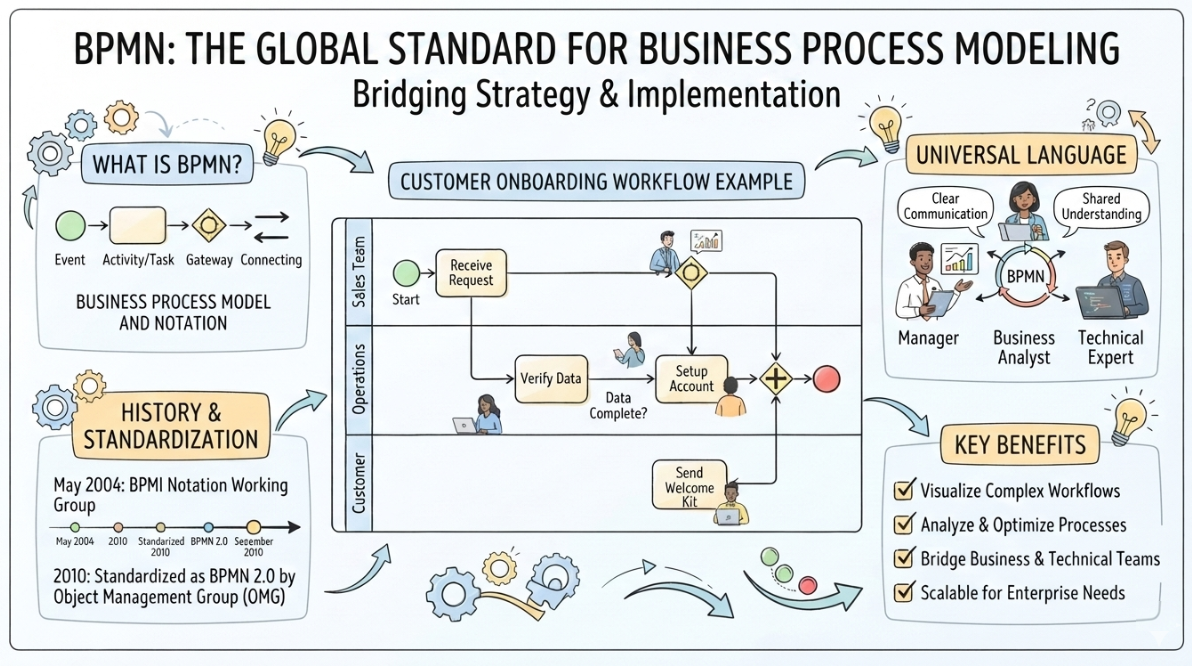
This comprehensive guide introduces you to the fundamental concepts of BPMN 2.0, equipping you with the knowledge to read, understand, and create business process diagrams that drive organizational efficiency.
BPMN serves three primary stakeholder groups:
Technical Experts – Professionals responsible for implementing and deploying processes in BPM systems
Business Analysts – Specialists who design, document, and continuously improve business processes
Managers – Leaders who monitor, control, and optimize operational workflows
BPMN functions as a critical link between business processes and their technical implementation. Its key advantages include:
✓ Visual Clarity – Simple graphical notations make complex processes easy to understand
✓ Universal Language – Standardized symbols ensure consistent communication across teams
✓ Executable Models – Diagrams aren't just documentation; they can be directly implemented in BPM systems
✓ Scalability – Equally effective for simple workflows and complex enterprise processes
In BPMN, processes are represented as diagrams composed of graphical elements that illustrate the logical flow of activities. These elements are categorized for easy recognition, allowing users to quickly interpret both simple and complex process models.
Every BPMN process consists of steps (activities) performed sequentially or concurrently according to defined business rules.
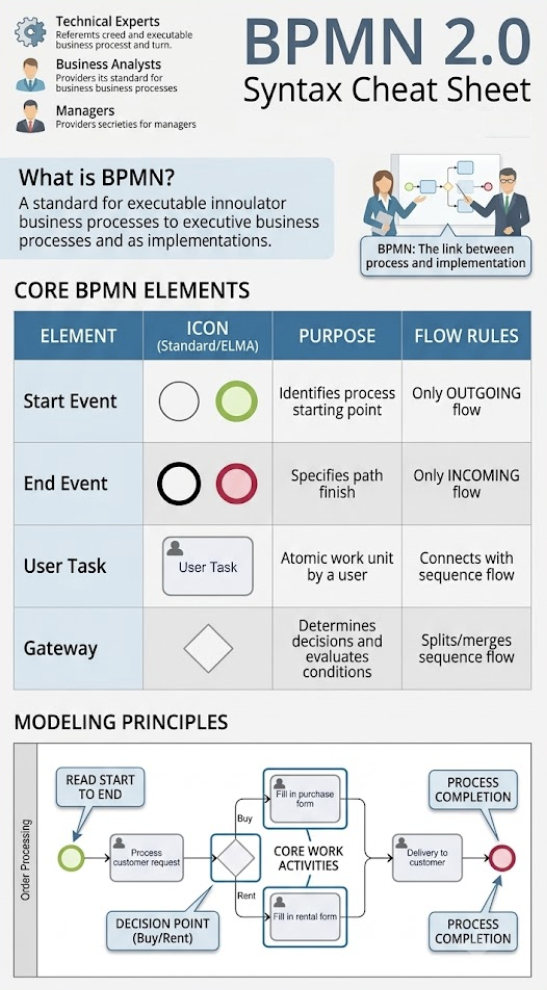
Purpose: Marks the beginning of a process
Characteristics:
Represented by a circle with an open center and thin-lined boundary
Can only have outgoing sequence flow (arrows pointing away)
In ELMA software: Displayed as a green circle
Real-World Example:
In an online bicycle store, a Start Event could be triggered by:
A phone call from a customer
An online message submitted through the website
An email inquiry
Key Rule: Always read a BPMN process from the Start Event.
Purpose: Marks the completion of a process path
Characteristics:
Represented by a circle with a thick-lined boundary
Can only have incoming sequence flow (arrows pointing toward it)
In ELMA software: Displayed as a red circle
A process can have multiple End Events
Real-World Example:
In the bicycle store scenario, the End Event represents the delivery of merchandise to the customer.
Purpose: Represent the actual work performed during a process
Characteristics:
Shown as rounded rectangles
Placed between Start and End Events
Executable elements that drive the process forward
A. Task (Atomic Activity)
The simplest form of activity
Cannot be broken down further
Represents a single unit of work
B. User Task
The most common type of Task
Represents work performed by a human user
Example: "Fill in rental form" or "Fill in purchase form"
Real-World Example:
In the order processing workflow, Tasks include:
"Process customer request"
"Fill in purchase form"
"Fill in rental form"
Purpose: Control process flow through decision-making and branching
Characteristics:
Represented by a diamond shape
Act as branching points in the process
Evaluate conditions and determine which path the process should follow
Can split or merge sequence flows
How Gateways Work:
Gateways evaluate business rules and direct the sequence flow accordingly. They answer questions like:
"Should this order be processed as a purchase or rental?"
"Is the application approved or rejected?"
"Which department should handle this request?"
Real-World Example:
In the bicycle store process, a Gateway determines whether the customer wants to:
Buy a bicycle → Routes to "Fill in purchase form"
Rent a bicycle → Routes to "Fill in rental form"
Both paths eventually converge at the final delivery step.
Let's examine a complete BPMN process for an online bicycle store:
Start Event → Customer submits a request (phone call or website message)
Task: Process Customer Request → Store staff reviews the inquiry
Gateway: Decision Point → Determine customer intent:
Buy a bicycle?
Rent a bicycle?
Branch A (Purchase):
Task: Fill in purchase form
Proceed to delivery
Branch B (Rental):
Task: Fill in rental form
Proceed to delivery
End Event → Delivery to customer
✓ Clear visual representation of decision points
✓ Parallel paths for different scenarios
✓ Single outcome (delivery) from multiple routes
✓ Easy to understand for both business and technical stakeholders
One of BPMN's most powerful features is that process models are not just documentation—they are executable specifications.
How It Works:
Business analysts create process diagrams using BPMN notation
BPM software (like ELMA) interprets the diagram
The system converts the visual model into executable code
The process runs in real-time, following the designed workflow
Benefits:
Eliminates gaps between design and implementation
Reduces development time
Ensures the implemented process matches the designed process
Enables rapid process modification and deployment
Start at the Beginning
Always begin with the Start Event (green circle)
Follow the Arrows
Sequence flows (arrows) show the direction of process movement
Identify Decision Points
Look for diamond-shaped Gateways that indicate branching logic
Track Activities
Note the rounded rectangles representing tasks to be completed
Find All End Points
Remember that processes can have multiple End Events (red circles)
Understand the Context
Consider the business rules that govern each decision and activity
Visual Paradigm provides comprehensive, professional-grade tools for modeling processes using the Business Process Model and Notation (BPMN) 2.0 standard. It bridges the gap between initial high-level business planning and deep technical implementation.
Here is a comprehensive breakdown of the core BPMN features available in the Visual Paradigm modeling suite:
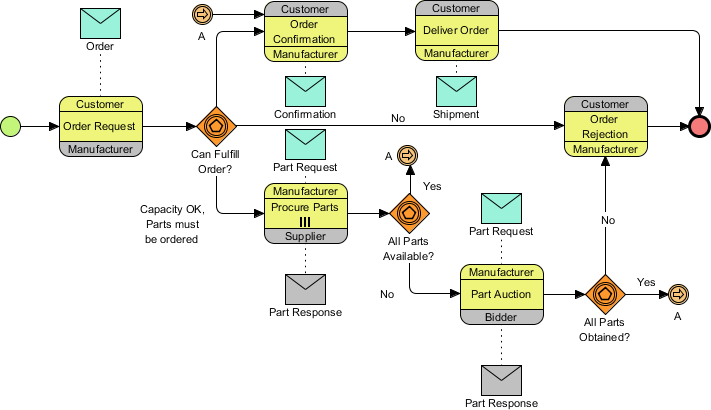
Full BPMN 2.0 Support: Implements the global standard (ISO/IEC 19510) for designing clear and readable Business Process Diagrams (BPD).
Resource Catalog: Offers a drag-and-drop editor allowing users to seamlessly build paths and connect flow objects via a context-aware popup menu.
Smart Connection Rules: Validates connecting lines dynamically to prevent invalid sequence paths or message flows before errors break your logic.
Complete BPMN Vocabulary: Full access to all foundational elements including tasks, pools, lanes, connections, artifacts, and gateways.
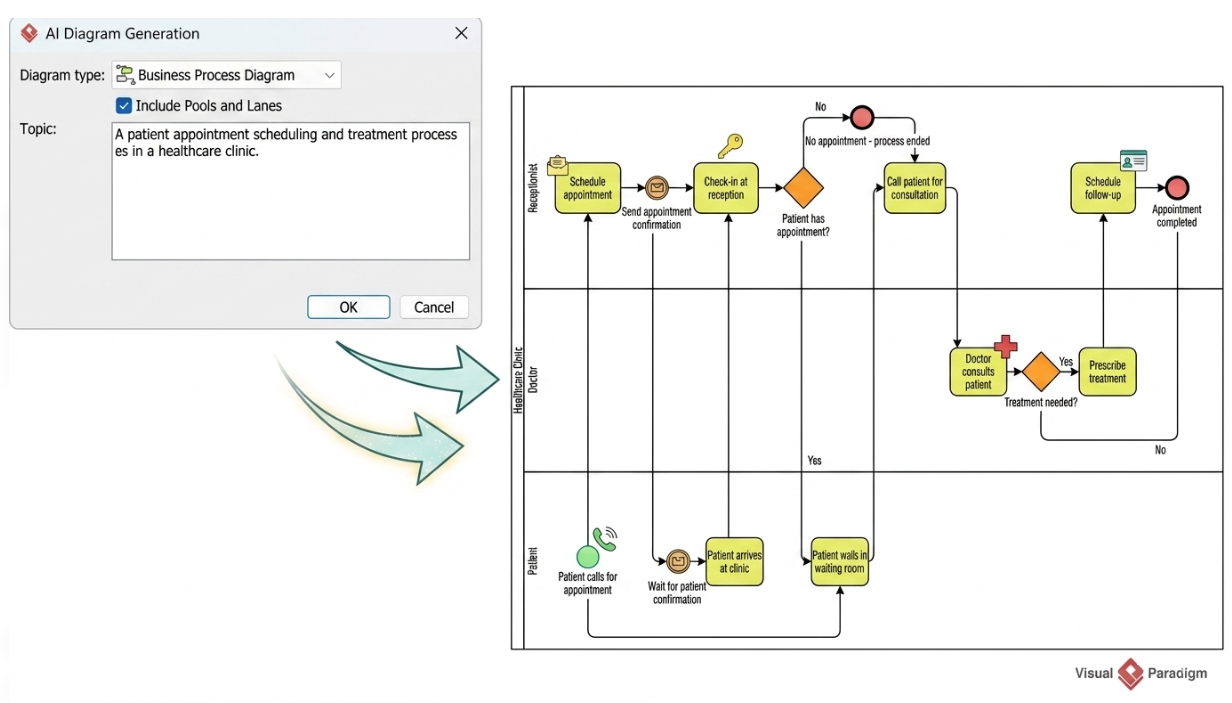
AI BPMN Diagram Generator: Transforms natural language process narratives instantly into fully editable Business Process Diagrams.
Automated Layout Structuring: Recognizes specific business roles, creates the necessary swimlanes, sequences tasks, and embeds required gateway split-logic automatically.
Business Process Simulation: Evaluates workflow behavior over customizable scales (minutes, hours, or days) to assess efficiency.
Bottleneck Detection: Pinpoints execution delays through integrated tools like Queue Time Charts to see exactly where tasks sit waiting.
Cost Evaluation Tools: Calculates operational expenses based on specific task configurations and automatically tracks financial totals using your preferred currency.
Resource Optimization Matrix: Allocates and maps precise human or hardware dependencies to separate activities, backed by Resource Usage Charts.
As-Is and To-Be Gap Analysis: Tracks process adjustments side-by-side using a specialized Visual Diff tracking engine.
Sub-Process Drill-Down: Supports collapsing complex nested procedures into compact views or expanding them to isolate deep operational steps.
Model Component Reusability: Treats shapes as shared objects instead of generic imagery, making updates reflect universally across broad team projects.
Downstream Agile Transformation: Converts tasks directly into actionable Agile process backlogs, matrixed RACI models, or CRUD tables.
BPMN 2.0 provides a powerful yet accessible framework for modeling business processes. By mastering the fundamental elements—Start Events, End Events, Tasks, and Gateways—you gain the ability to read, understand, and create process diagrams that drive organizational efficiency.
What You've Learned:
BPMN serves as a universal language connecting business strategy to technical implementation
Process diagrams are visual, intuitive, and executable
Four core elements form the foundation of any BPMN diagram
Real-world processes can be mapped clearly using standardized notation
Next Steps:
As you continue your BPMN journey, you'll explore:
Advanced gateway types (parallel, inclusive, event-based)
Intermediate events and message flows
Pools and lanes for organizational modeling
Complex event handling and exception management
Sub-processes and call activities
With practice, you'll be able to decode even the most complex process diagrams and design efficient workflows that transform how your organization operates. Remember: every expert process modeler started with understanding these basic elements—master them well, and you'll build a solid foundation for advanced BPMN mastery.

