Align Business Goal and Business Logic with Decision Table
Thriving in today's dynamic world demands a business model flexible enough to adapt to evolving challenges. The Decision Table, an indispensable tool for business modeling, operates with agility, providing business analysts with straightforward and rapid methods to refine existing business logic.
What is a Decision Table?
A decision table is a visual representation of a set of rules that can be used to make decisions. It's a grid that shows all the possible combinations of input conditions and the corresponding actions or outcomes. Decision tables are easy to read and understand, which makes them an ideal tool for aligning business goals and business logic.
Case Study - Loan Company
With the property market in recovery, HPYLoan, a loan company, aims to attract more customers interested in home purchases. To achieve this, they need to develop an effective loan policy that aligns with their overarching business goals.

HPYLoan has developed a decision table to illustrate their current loan approval policy and identify areas for enhancement. Examining the fourth business rule revealed that a manual review process for home purchasing loans could potentially deter applicants.

Upon studying the fourth business rule in the decision table, it became evident that loan applicants seeking home purchasing loans faced a manual review process, which could discourage applications.
To resolve this, HPYLoan revised its business rules. They now approve home purchasing loan requests from existing homeowners immediately, eliminating the need for further manual review. This adjustment is anticipated to accelerate the loan approval process and make it more appealing to homeowners looking to purchase a new property.
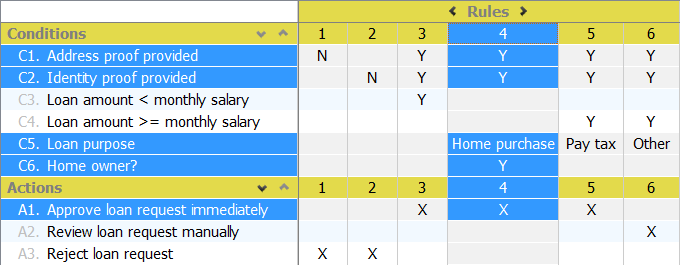
HPYLoan's final step involves announcing and promoting the revised policy. By aligning their business goals with their loan policy and leveraging decision tables, they have taken a significant step toward attracting more customers and fostering business growth.
Try it out
- Download the decision table sample project.
- Start Visual Paradigm and open the downloaded project file.
- Open the decision table.

- Click the column header for rule 4.
 Observe the Actions compartment, which indicates that a manual review process is required for home purchasing loan applicants.
- To streamline the process, we will modify the rule: if the loan purpose is for home purchasing and the applicant is a current homeowner, the request can be approved directly without further review. First, we need to add a condition to determine if the applicant is a homeowner. Move the mouse pointer over the compartment caption Conditions. Click the add button near the caption.

- Enter Home Owner? as the new condition. Enter 'Y' under the fourth rule.

- Update the actions accordingly: set 'Y' for the condition Approve loan request immediately and remove the 'X' from Review loan request manually. The updated decision table should then appear as follows:

Conclusion
Formulating policies that reconcile market needs with business goals can be a protracted and arduous process without the aid of decision tables. Fortunately, decision tables offer a straightforward and efficient method for analyzing and modifying business logic.
The tabular layout of a decision table enables a quick understanding of current rules and facilitates the easy incorporation of new ideas. This enables confident modifications to your business logic, mitigating the risk of unintentionally altering other rules or conditions. With decision tables, you can streamline the process of aligning your business goals with your policies and make adjustments quickly and accurately.