BPMN Tutorial with Example - The Leave Application Process
BPMN (Business Process Model and Notation) is a visual representation that enables companies to better understand their internal business procedures. It utilizes different symbols to represent the activities involved in a business process. With Visual Paradigm's BPMN tools, you can easily draw a Business Process Diagram (BPD). In this tutorial, we will use the leave application process as an example to demonstrate how a Business Process diagram can effectively showcase the process.
Components of BPMN
In addition to flow elements like events, gateways, and activities, a complete BPMN diagram also includes other essential components, such as swimlanes, pools, and lanes. Swimlanes are used to organize activities within a process diagram and are made up of two other elements: pools and lanes. A pool represents a major participant in a process, while a lane is a sub-partition within a pool.

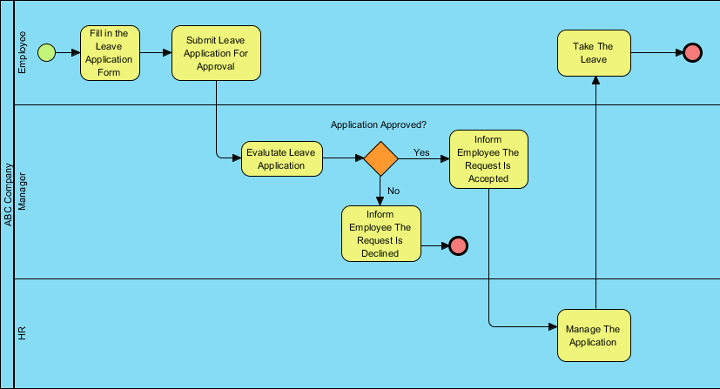
In this example, the BPMN includes a pool that represents the participant, ABC Company. Within this pool, there are multiple lanes, each representing a different role within the company. In total, there are three participants in this process: the employee, the manager, and the HR department.

The Leave Application Process Example
To begin the process, an employee needs to request leave. A start event symbol is placed in the Employee lane to indicate the beginning of the process. A solid arrow connects the start event to a task symbol, indicating the process flow and showing that the employee must fill out a leave application form. The completed form is then submitted to the manager for approval.

Once the application is submitted, the manager takes over the process. The Submit Leave Application For Approval task is linked to another task, Evaluate Leave Application, in the Manager lane. The manager evaluates the application to decide whether to approve or decline the request. Since there are two possible outcomes, a gateway symbol is used to split the process into two paths. If the application is declined, the manager informs the employee, and the process ends. The Inform Employee The Request Is Declined task is linked to an end event symbol. However, if the application is approved, the manager informs the employee, and the process continues in the HR lane, where the application is managed.

Finally, the last step is for the employee to take their leave. An end event symbol is connected to the final task, Take the Leave, to indicate that the entire process is complete.